Testing an AI Agent's Change with TestSprite CLI: A CoderCup Case Study
 Rui Li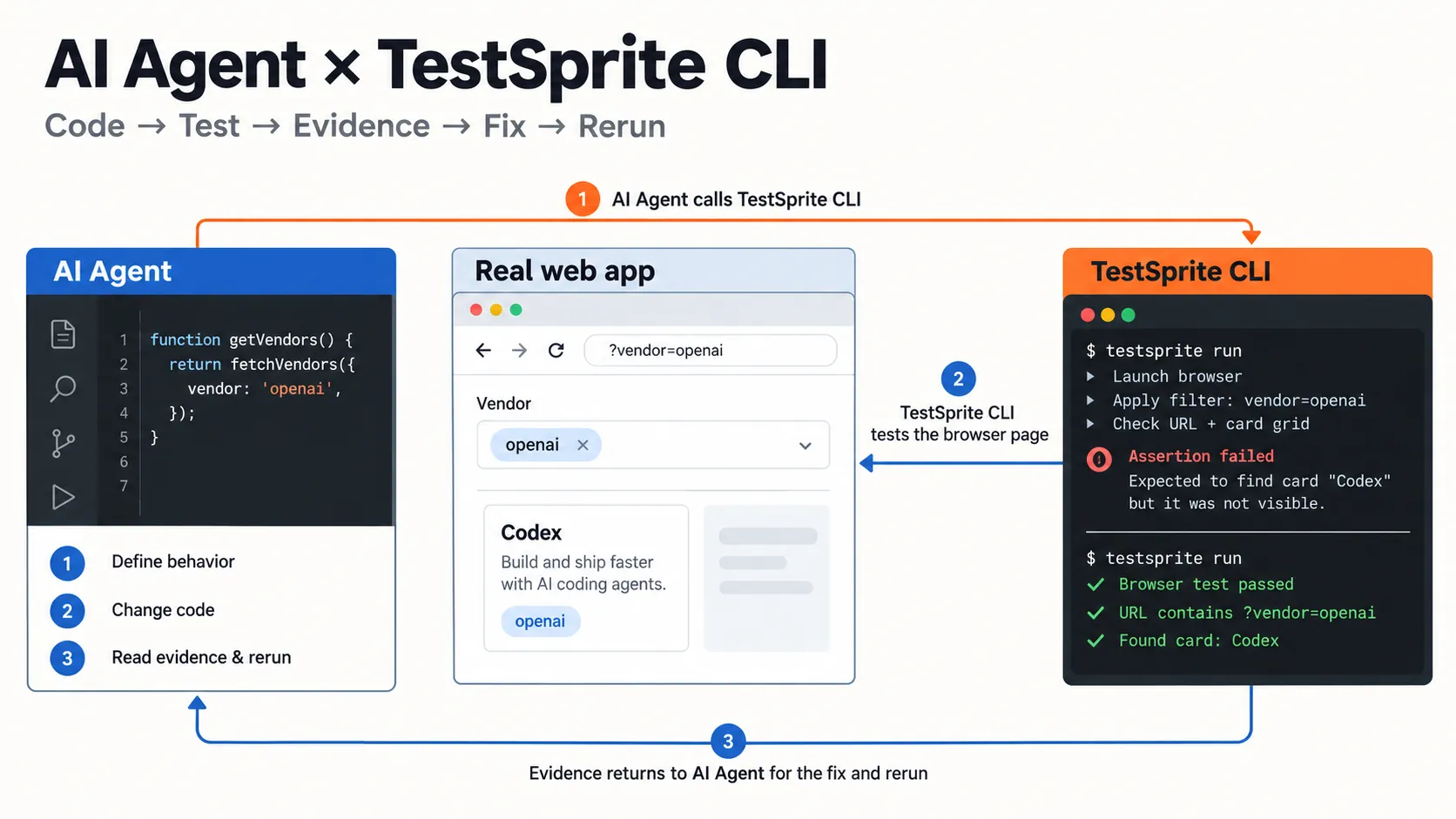
An AI coding agent can make a web app change quickly. The next question is whether that change works when someone actually uses the page. We explored this with CoderCup, an open-source web app, using Codex as the coding agent and TestSprite CLI to check the behavior in a browser.
The task was to make the Vendor filter on CoderCup's /agents/ page shareable. When someone chooses openai, the address should become /agents/?vendor=openai. Opening or refreshing that link should restore the selection and show the Codex card in the shipped-agent card grid. Choosing all should remove the parameter and restore the full card list.
A small change with a user-visible failure
The original filter changed which cards appeared on the current page, but the address bar stayed at /agents/. A user could see the OpenAI result and copy the link, yet someone opening that link would not get the same filtered view.
The coding agent gave TestSprite a browser action—select the openai Vendor button—and an observable assertion: the URL should contain vendor=openai. The first run failed that assertion. The button was selected and the Codex card appeared, but the URL did not change. Inspecting the page code explained why: the click handler updated React state without updating browser history.
That failure gave the agent a precise place to work. It did not need to guess whether the card filter itself was broken; it needed to make the selected state shareable.
The fix: make the URL part of the filter state
The agent updated the page so it reads a supported Vendor value from the query string and writes a new value when someone clicks a Vendor button. Choosing all removes the query parameter. Browser Back and Forward also resync the selected button with the URL.
The buttons now expose aria-pressed, so their state is clear to assistive technology and browser checks. The page also distinguishes loading from an empty filter result: an empty card grid while data is arriving should not be mistaken for “no matching agents.”
What the browser checks showed
After the change, a TestSprite run confirmed that openai was selected and the shipped-agent grid contained one card, Codex.
We also checked the complete link journey in a browser. Starting from /agents/, clicking openai changed the URL to /agents/?vendor=openai and left one shipped card, Codex. Refreshing kept the same URL, selection, and card. Clicking all returned to /agents/ and restored the full card list.
There was one important testing detail. The page has a head-to-head comparison above the Vendor filter and a shipped-agent card grid below it. The comparison continues to show all agents; the Vendor button filters the card grid. An assertion that simply says “only Codex should appear anywhere on the page” would test the wrong scope. The useful assertion names the card grid.
Where TestSprite fits in the Agent loop
In this case, the working loop was define the behavior → run a browser test → inspect the failure → change the code → check the behavior again. TestSprite supplied the browser observation. The coding agent inspected it, made the change, and used the follow-up checks to evaluate the result.
The lesson is also about reading test evidence carefully. A green result should be tied to the steps and assertions it actually recorded. A red result may contain useful successful observations alongside an assertion that needs a more precise target. The run recording, the page state, and the test scope together tell a clearer story than the status label alone.
This was one focused exercise using a test environment and sample leaderboard data. It shows how TestSprite CLI can give an AI coding agent concrete browser feedback on a real project; it is not a claim about production deployment or general detection rates.