How to Verify That an AI-Generated Bug Fix Actually Works
 Rui Li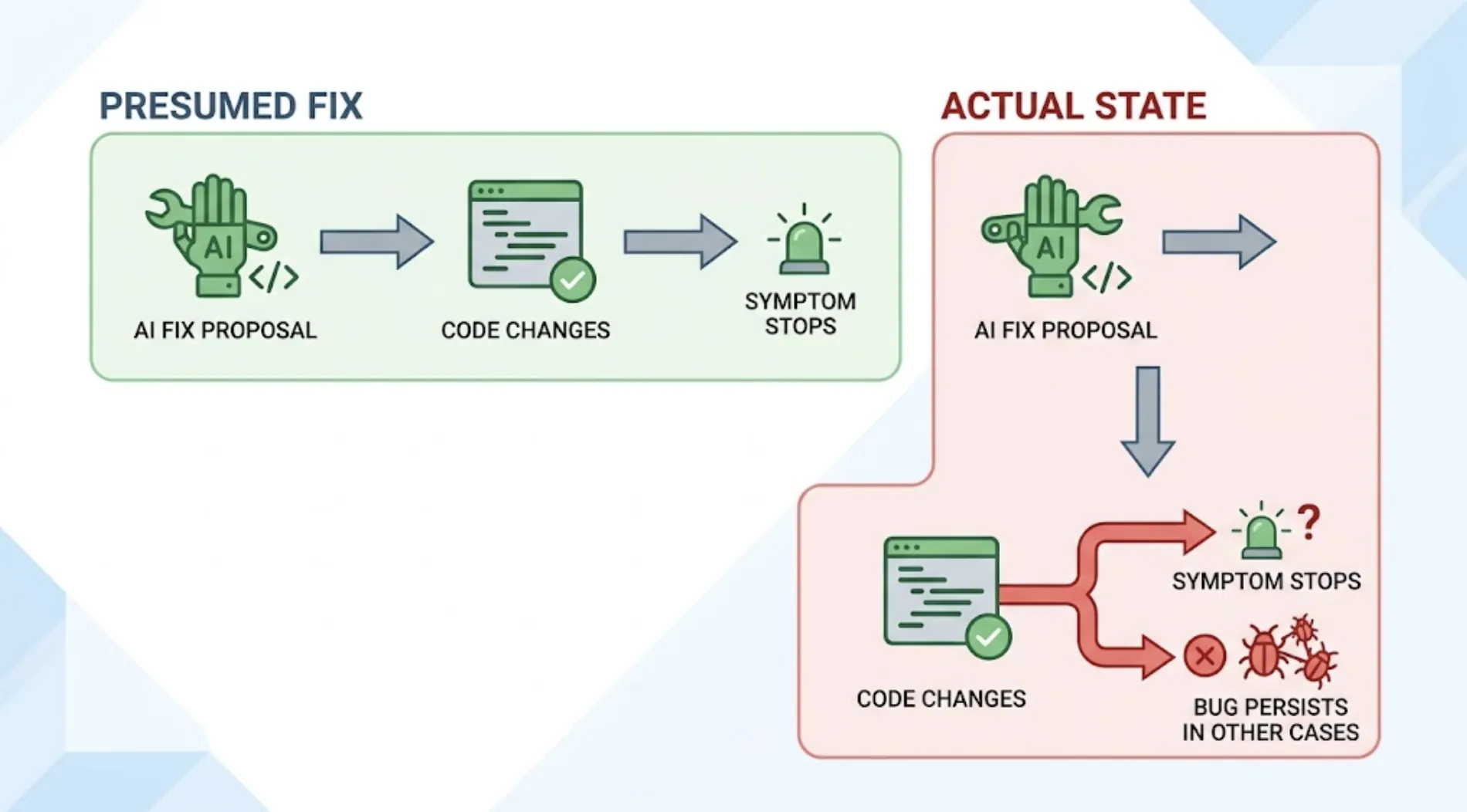
An AI coding agent proposes a fix for a bug, the code changes, the original error stops appearing. That's often treated as confirmation the fix worked. It's actually only confirmation that the specific symptom that was reported stopped showing up in the specific way it was checked, which is a narrower claim than "the bug is fixed."
Why "The Error Went Away" Isn't the Same as "It's Fixed"
A bug fix can resolve the reported symptom while leaving the underlying issue partially intact, or while introducing a new problem adjacent to the one that was fixed. Both patterns are common enough in AI-generated fixes that verifying "the error is gone" isn't sufficient on its own.
The first pattern happens when the agent addresses the immediate trigger of a bug report without addressing the broader condition that caused it. A null pointer error on one specific screen gets patched with a check that prevents that specific crash, while the same underlying data inconsistency that caused the null value in the first place still exists and can surface elsewhere.
The second pattern happens because a fix is itself a code change, and code changes can have side effects. A fix for one bug can introduce a regression in adjacent functionality that wasn't part of the original bug report at all.
What Actually Confirms a Fix
Confirming a fix worked means checking three separate things, not one.
The original reported behavior now works correctly. This is the obvious check, and it's necessary but not sufficient on its own.
The broader condition around the bug is also resolved, not just the specific trigger. If the bug was "the export button crashes when a report has zero rows," the check needs to cover zero rows specifically, not just confirm the button no longer crashes on the report that happened to be open when the bug was first noticed.
Nothing adjacent to the fix broke as a side effect. This requires testing beyond the immediate area of the fix, covering the flows that share code, data, or state with whatever changed.
Why This Needs Product-Layer Verification, Not Just a Rerun
Confirming a fix by rerunning the exact steps from the original bug report only checks the first of the three things above. It's the equivalent of checking that a patched hole doesn't leak from the one angle where the leak was originally noticed, without checking whether the patch holds under different conditions or whether it affected the surrounding material.
TestSprite verifies at the product layer, opening the running application and testing the fixed area under multiple conditions, not just the one from the original report.
Other verification tools read your code and guess. TestSprite opens your app and uses it.
Connected through the MCP Server, the same trigger instruction used to find the original bug, "Help me test this project with TestSprite," works to confirm the fix: the exploration agents revisit the flow, try the reported case and adjacent variations, and check surrounding functionality for side effects.
A Scenario: A Co-Working Space Booking App and a Fix That Broke Something Else
A team building a booking app for co-working spaces gets a bug report: a member with a day-pass membership can see meeting room booking options that should be restricted to members with a full membership tier.
Claude Code is asked to fix it. The agent locates the permission check controlling meeting room visibility and corrects it so day-pass members no longer see the restricted option. The developer reruns the original scenario manually, confirms the meeting room booking option is now hidden for a day-pass account, and considers the fix confirmed.
Before merging, the developer triggers TestSprite instead of relying on the manual spot check. The exploration agents test the fix across several account types, not just the one from the original report: day-pass members, full members, and admin accounts. The fix works correctly for day-pass members. For admin accounts, though, the same permission check now also hides the meeting room option, which is wrong. The fix was implemented as a check against membership tier, but the logic accidentally excluded the admin role from the allowed list entirely, since admin accounts don't carry a standard membership tier value.
That's a real regression, introduced by the fix itself, in an account type the original bug report never mentioned and the manual confirmation never checked. The failure description specifies exactly which account type and which permission behaved incorrectly. The coding agent adjusts the check to include admin roles explicitly, and TestSprite confirms all three account types now behave correctly: day-pass restricted, full member allowed, admin allowed.
Building Fix Verification Into the Same Loop as the Original Test
The most reliable way to make this a habit rather than an occasional extra step is treating fix verification as the same action as the original test, not a separate manual process. The same trigger sentence that surfaced the bug is the one that confirms the fix, run again after the change.
For fixes that land in a pull request rather than the same session, the GitHub Actions integration provides the same coverage automatically: the PR with the fix triggers a run against the preview deployment, checking the fix and the surrounding functionality before merge, with results posted as a comment the reviewer sees alongside the diff.
Conclusion
A bug fix that makes the original error disappear has cleared the lowest bar, not the whole verification. Confirming it actually works means checking the broader condition around the original trigger and checking that the fix didn't introduce a side effect somewhere adjacent.
TestSprite verifies fixes the same way it finds bugs in the first place: by opening the running application and testing the fixed area under real conditions, not by rerunning the one scenario from the original report.
Use TestSprite to confirm your fixes and stop treating "the error went away" as proof the bug is actually gone.