How to Generate UI and API Tests From the Same Product Requirements
 Zeshi Du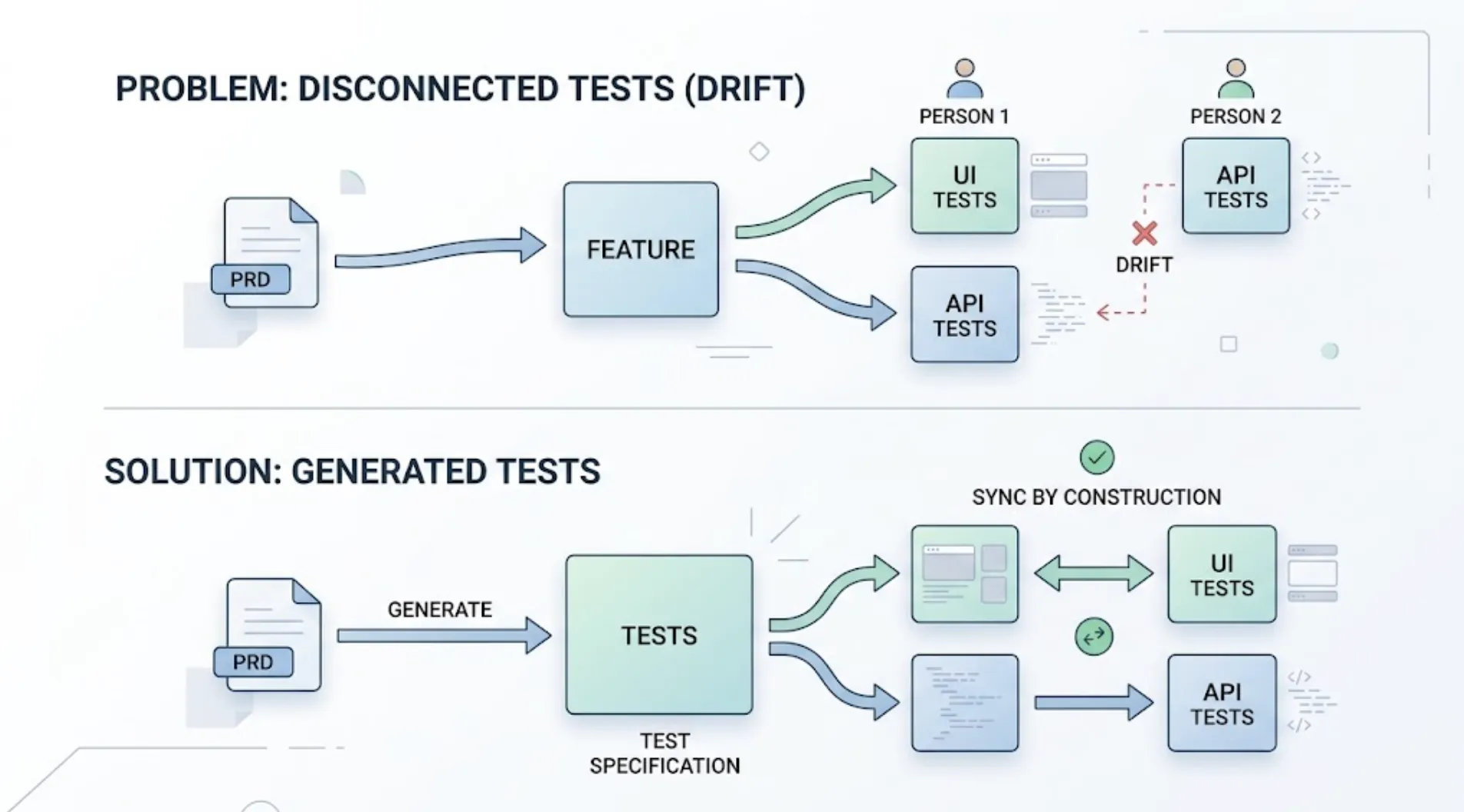
Most teams write one PRD for a feature and then, if testing happens at all, someone translates it into UI tests and someone else, or the same person on a different day, translates it into API tests. Those two translations often drift from each other, since they're done separately, sometimes by different people, referencing the same document but not referencing each other.
Here's how an ai test case generator can produce both directly from a single PRD instead, so they stay in sync by construction.
Why separate translations drift apart
A PRD describes a requirement once: "users can update their profile photo." A person writing UI tests reads that and thinks about the upload button, the file picker, the preview state. A person writing API tests reads the same sentence and thinks about the upload endpoint, file size limits, and the storage response.
Both are reasonable interpretations, but nothing forces them to agree on the specific edge cases each layer needs to handle, whether that's what happens on an oversized file, or what error state the UI should show when the API rejects an upload. The drift compounds over time: the PRD gets a small update ("also support drag-and-drop uploads"), and it's easy for the UI test suite to get updated while the API test suite doesn't. This is the specific drift TestSprite's PRD-driven generation is built to remove.
How TestSprite generates both from one source
“Other verification tools read your code and guess. TestSprite opens your app and uses it.”
TestSprite builds a normalized internal PRD from your requirements document, then generates UI and API test cases from that same normalized source rather than from two independent readings of the original text. Through the MCP Server, this happens in one pass, not two separate processes that never compare notes.
The practical steps
Point the agent at your PRD once. Whether it's a formal spec or a rough doc, this single upload becomes the source for both layers.
Let it generate UI test cases covering the interaction and error states. For a photo upload feature, this includes the file picker, the preview, and what the user sees on a rejected upload.
Generate API test cases covering the endpoint's actual contract, grounded in real observed behavior. Rather than assuming what the upload endpoint returns based on what the UI test expects, TestSprite's backend testing observes the real response, real status codes, real error payloads, and generates assertions from that. This is also where the size-limit requirement gets verified directly against the API, not just inferred from the UI's error-handling behavior.
Cross-check the two generated suites against each other, not just against the PRD independently. If the UI test expects a specific error message on an oversized upload, and the API test observes a differently worded error in the actual response, that mismatch is worth catching before it becomes a real bug where the UI silently fails to display the backend's actual error correctly.
Re-run both together whenever the requirement changes. Since both suites trace back to the same normalized PRD, adding coverage for a new feature or updating an existing one (say, raising the file size limit to 10MB) should regenerate or flag both the UI and API tests that reference that limit, rather than requiring you to remember and update two separate places by hand.
Where this matters most
This approach pays off most clearly on features where the UI and API genuinely need to agree on specifics: validation rules, error messages, and edge-case behavior a user would actually encounter. It matters less where the UI and API are trivially connected, like a static page with no real backend logic, so it's worth applying the most attention where the contract between layers actually carries risk.
The same logic applies to which requirements you write with the most precision in the first place. A vague requirement generates a vague test on both layers, and the two vague tests are more likely to happen to agree with each other by accident than a pair of precise ones generated from a genuinely specific requirement, which is a coincidence worth not relying on.
A quick way to check whether your current tests are already drifting
If you already have separately maintained UI and API tests, it's worth a quick audit before assuming they're still in sync. Pick two or three requirements that touch both layers, and check whether the error messages, field names, and edge cases each test suite checks actually agree with each other, not just with the PRD in isolation. It's common to find, on a project that's been running for a while, that one suite was updated after a requirement change while the other wasn't.
What this looks like on a team without a formal handoff process
Small teams often don't have a documented process for keeping frontend and backend test suites aligned. That kind of process usually exists at larger companies with separate frontend and backend sub-teams who need an explicit contract to coordinate across. On a small team, the informal version of that same discipline is simply: never let one person update a requirement's implementation without also checking whether both the UI and API tests tied to it still make sense.
Generating both from a shared source automates the part of that discipline that's easy to forget under deadline pressure, but the underlying habit, treating a requirement change as something that touches both layers by default, is worth keeping even once the tooling handles the mechanics. It's the same habit a good QA engineer would have enforced through a review process, just applied earlier and with less overhead.
Conclusion
Generating UI and API tests from the same requirements document, rather than from two independently maintained interpretations of it, removes the drift that usually creeps in between how a frontend team and a backend team each understand the same feature.
TestSprite generates both layers from a single normalized PRD, whether that PRD is one you wrote or one inferred directly from your codebase. Try it on your own PRD for free and see whether your current UI and API coverage already agree with each other. Running that quick audit before you switch is often the clearest way to see what a unified workflow would have caught.