Can TestSprite Automatically Fix Bugs After Running Tests?
Zeshi Du6 min read

Not directly. But it does something more useful: it gives the coding agent that wrote the code everything it needs to fix the bug in the same session.
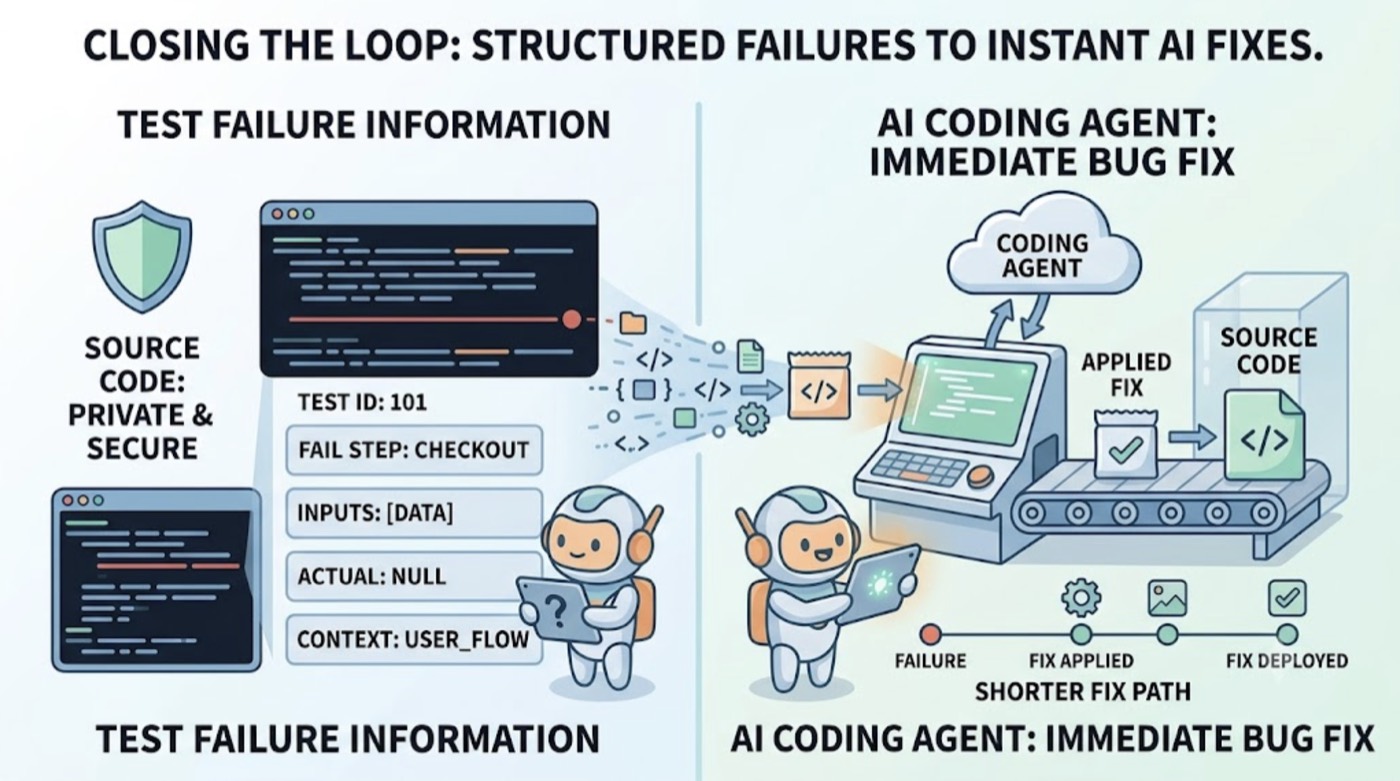
TestSprite closes the loop between test failure and applied fix. That's the precise claim. It isn't that TestSprite rewrites your application code when a test fails. It's that the failure information TestSprite produces is structured specifically for the AI coding agent to act on, which makes the fix path dramatically shorter than what most testing tools provide.
Understanding the distinction matters, because it changes what you should expect from the integration.
What "Closing the Loop" Actually Means
Most testing tools stop at the report. They detect a failure, describe what assertion failed, and present the result in a dashboard. The developer reads the report, interprets what it means for the product, identifies the likely location of the bug in the codebase, formulates a fix, and implements it.
That chain of steps from test result to applied fix typically involves multiple tool switches, manual investigation, and time.
TestSprite's design shortens that chain by changing what the failure description contains and where it goes.
Other verification tools read your code and guess. TestSprite opens your app and uses it.
Because TestSprite's agents navigate the live application and observe real product behavior, the failure descriptions contain exactly what happened from a user perspective: which flow was running, which action was taken, what the product should have delivered, and what it actually delivered. That's not an assertion mismatch. That's a product behavior description.
When that description arrives in the Claude Code terminal, the Cursor chat, or the Windsurf agent interface, the coding agent already has everything it needs to reason about the fix. The description of "the user navigated to billing, initiated an upgrade, and the account settings continued to show the free tier plan" gives the coding agent a complete picture of where the failure occurred and what behavioral change is required.
The coding agent proposes the fix. The developer reviews it. The fix is applied in the same session.
Auto-Heal: The One Category Where Fixing Happens Automatically
There is a category of automatic fixing in TestSprite, and it's worth being specific about what it covers.
Auto-Heal Rerun handles the case where a UI change causes a test to fail for structural rather than behavioral reasons. A component gets renamed. An element moves. A layout is refactored. The test was anchored to the old structure and now fails, but the product still works correctly.
In this case, Auto-Heal automatically adapts the test to match the current UI. The test doesn't report a false failure. The adaptation happens without the developer's involvement.
This is not Auto-Heal rewriting the application code. It's the test adapting to the application's new structure when the application's behavior hasn't changed. The fix is to the test, not to the product, and it happens automatically because the determination that "the behavior is correct but the structure changed" is the kind of judgment the agent can make reliably.
Genuine product regressions, where the behavior actually changed in a way that affects users, surface as real failures. Those require the developer and the coding agent to fix the product. Auto-Heal doesn't touch those.
How the Full Loop Works in Practice
Here's what the complete cycle looks like for a developer using Claude Code or Cursor.
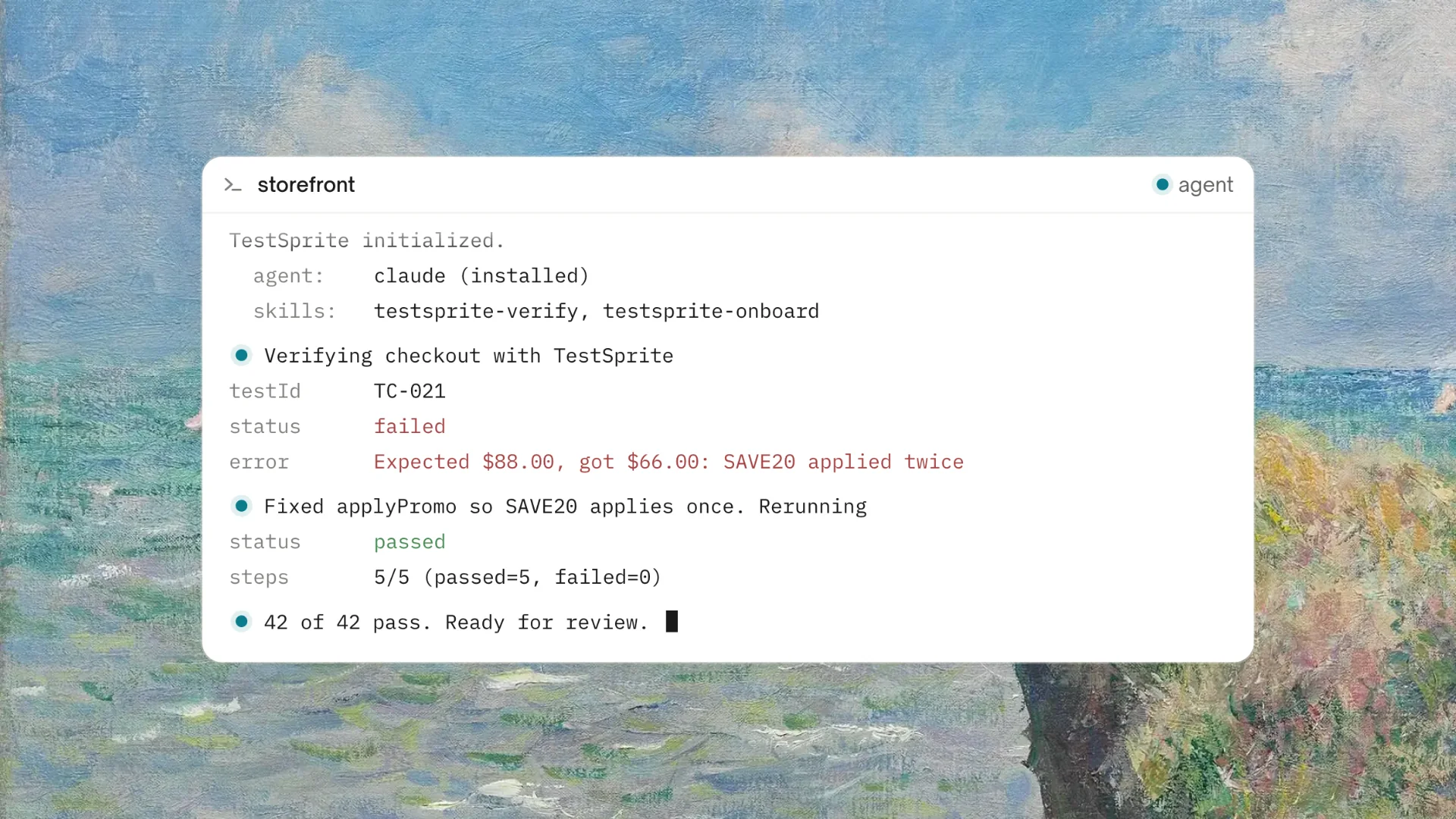
The AI coding agent produces changes in a session. The developer triggers TestSprite with one instruction: "Help me test this project with TestSprite."
The TestSprite agents navigate the live application and find a failure. The failure description arrives in the IDE: what the agent did, what it expected, what happened instead.
The AI coding agent in the same IDE session reads the failure description and proposes a fix. The developer reviews the proposed fix and applies it. If the fix looks right, the developer triggers TestSprite again to confirm the failure is resolved.
The whole cycle, from test to failure description to fix proposal to confirmation, happens inside one IDE session. That's the loop TestSprite closes.
For teams using Claude Code's autonomous coding mode, this cycle can run with minimal developer intervention. The test failure goes to the coding agent, the coding agent proposes a fix, the developer reviews and applies it. The testing and fixing become part of the same autonomous session that produced the code.
What TestSprite Doesn't Do
Being clear about what TestSprite doesn't do is as important as describing what it does.
TestSprite doesn't automatically rewrite your application code when a behavioral test fails. When the product does something wrong, a human or an AI coding agent that the human has oversight of makes the code change. TestSprite provides the information that enables that change to happen quickly and correctly.
TestSprite doesn't auto-apply fixes to your codebase without review. The failure description goes to the IDE where a human developer is present. The coding agent proposes a fix. The developer reviews it before it's applied.
This distinction is important for teams evaluating AI-assisted development tools. Autonomous code changes to production software without human review would be a different kind of product with different risk characteristics. TestSprite is a testing and verification agent that operates in the development loop with humans in the review and approval position.
A Scenario: From Test Failure to Applied Fix in One Session
A developer finishes a Cursor session that refactored how their SaaS application manages team workspace access. The session updated the access control logic, the API endpoints that enforce permissions, and the UI that displays which workspaces a user can access.
They trigger TestSprite from inside Cursor.
The exploration agents navigate the workspace access flow. They log in as a Member-role user, navigate to the workspace list, and observe which workspaces are visible. They also attempt to access an admin-only workspace directly through the URL.
The agents find that the Member user can access the admin-only workspace through a direct URL, even though the workspace list correctly hides it from the Member-role navigation. The access control logic was applied to the navigation display but not to the direct workspace access route.
The failure description arrives in the Cursor chat: which flow was navigated, which workspace was accessed, what the permission model requires, and what the actual response was.
Cursor's coding agent reads the description and identifies the missing access control check on the direct route handler. It proposes adding the permission check to the route, equivalent to the check that was already applied to the navigation logic. The developer reviews the proposed change, confirms it correctly addresses the access control gap, and applies it.
TestSprite runs again. The Member user attempting to access the admin workspace directly now receives the correct access denied response.
One session. One test. One fix. The loop closed.
Conclusion
TestSprite doesn't automatically fix bugs in your application code. It does something more appropriate: it produces failure descriptions structured for the AI coding agent to act on, which makes the fix path from test failure to applied change as short as it can be while keeping humans in the review loop.
Auto-Heal handles the one category that is automatic: structural test adaptation when UI changes without behavioral change. Everything that requires a real product fix gets a clear, actionable description that the coding agent can work from immediately.
For teams using Claude Code, Cursor, or Windsurf as their primary development environment, this means the verification cycle that used to require multiple tool switches and manual investigation now happens inside the same session that produced the code.
Connect TestSprite to your AI IDE and close the loop between testing and fixing today.