How to Automate E-commerce Regression Testing: A Worked Example
The checkout bugs that cost money rarely crash anything: a discount taken twice, free shipping below the threshold, a discount that disappears between the cart and checkout. Here is how to catch them on every change, on a demo shop with three planted bugs and one bad fix.
Yunhao Jiao15 分で読めます


この記事の内容12
- The short version
- Step 1: Hand it the PRD you already have
- Step 2: Watch it explore
- Step 3: Review the plan, and ask for what’s missing
- Step 4: Run it in real browsers
- Step 5: Read the failure
- Step 6: Test the fix before you merge it
- Exploring finds today’s bugs. The suite catches the next one.
- What a demo shop can’t show
- A checklist for your own shop
- To sum up
- Try it on your shop
An online shop changes every week. A new promo, a new shipping rule, a new product page. Each change can break a part of checkout nobody touched, and the breakage usually doesn’t throw an error. The cart just shows a number that is a little wrong.
Regression testing is how you catch that: a set of tests that walk through the shop the way orders actually happen, checked against your rules, and run again on every change.
For this post we built storefront, the linen shop from our homepage, as a working site, and planted three bugs in it. We gave TestSprite one line and a one-page PRD, and didn’t tell it about the bugs. Every screenshot below comes from that session and its test runs.
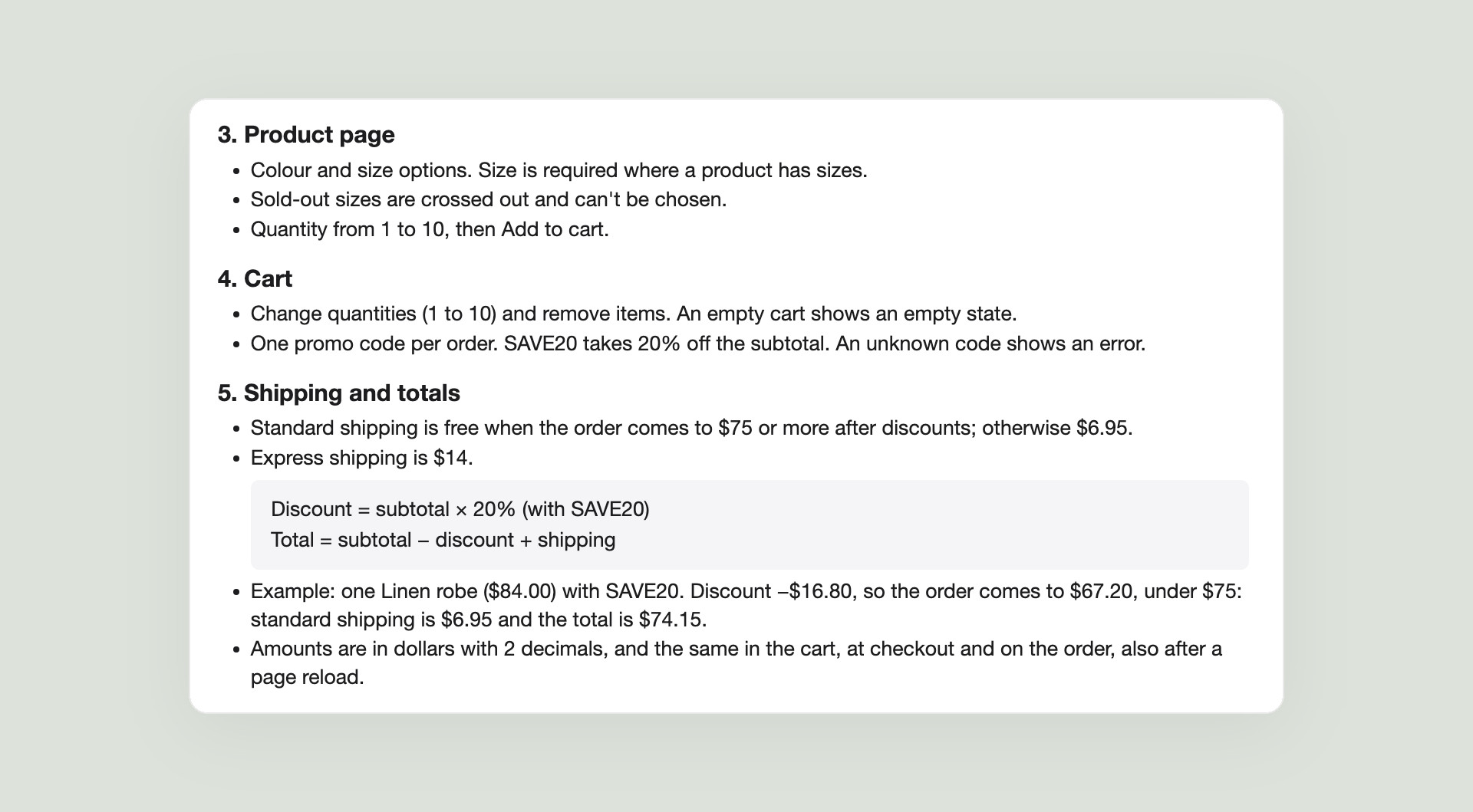
One basket runs through the whole post: one Linen robe at $84.00 with the promo code SAVE20. By the PRD, the discount is −$16.80, so the order comes to $67.20. That is under the $75 free-shipping line, so standard shipping is $6.95 and the total is $74.15.
The short version
- What we built: a linen shop with a cart, one promo code, free shipping from $75 and a test-card checkout, with three planted bugs. TestSprite got one line and the PRD.
- The catch that matters: a bug that didn’t exist yet when the agent explored. Our fix for the double discount dropped the discount at checkout. The test suite from the plan we approved ran on the fix build before merge and caught it: the pay button said $84.00 for a $67.20 cart.
- Day one: exploring the shop, the agent found all three planted bugs: SAVE20 applied twice after a reload, free shipping decided on the price before the discount, and a sold-out size that could still be bought. On our basket (one $84 robe with SAVE20), the order after the discount is $67.20, under the $75 free-shipping line, so the PRD says $74.15 with shipping; the cart shipped it free and charged $67.20.
- The lesson: exploring shows you today’s bugs; a suite that runs on every change catches the ones your next fix introduces. Follow the money all the way to the paid order, on every change.
Step 1: Hand it the PRD you already have
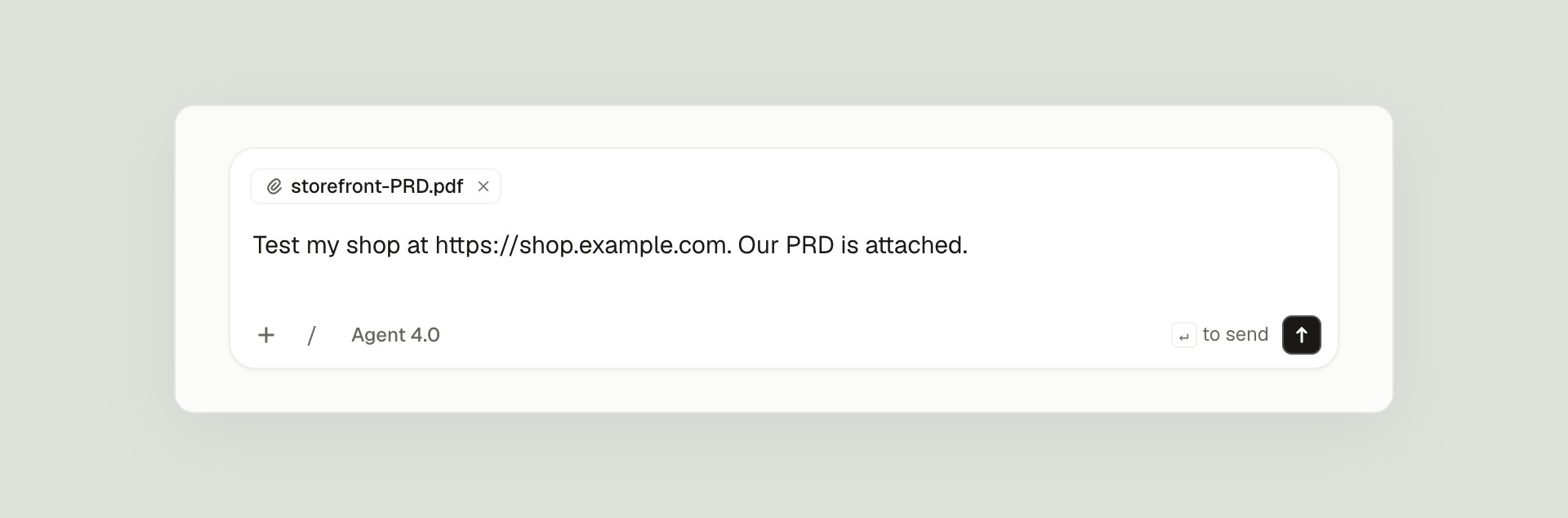
We attached the PRD and wrote one line.
The PRD is one page. What makes it testable is that the rules come with numbers: what a promo code takes off, when shipping is free, and that totals must match in the cart, at checkout and on the order. It even works through our basket.
Step 2: Watch it explore
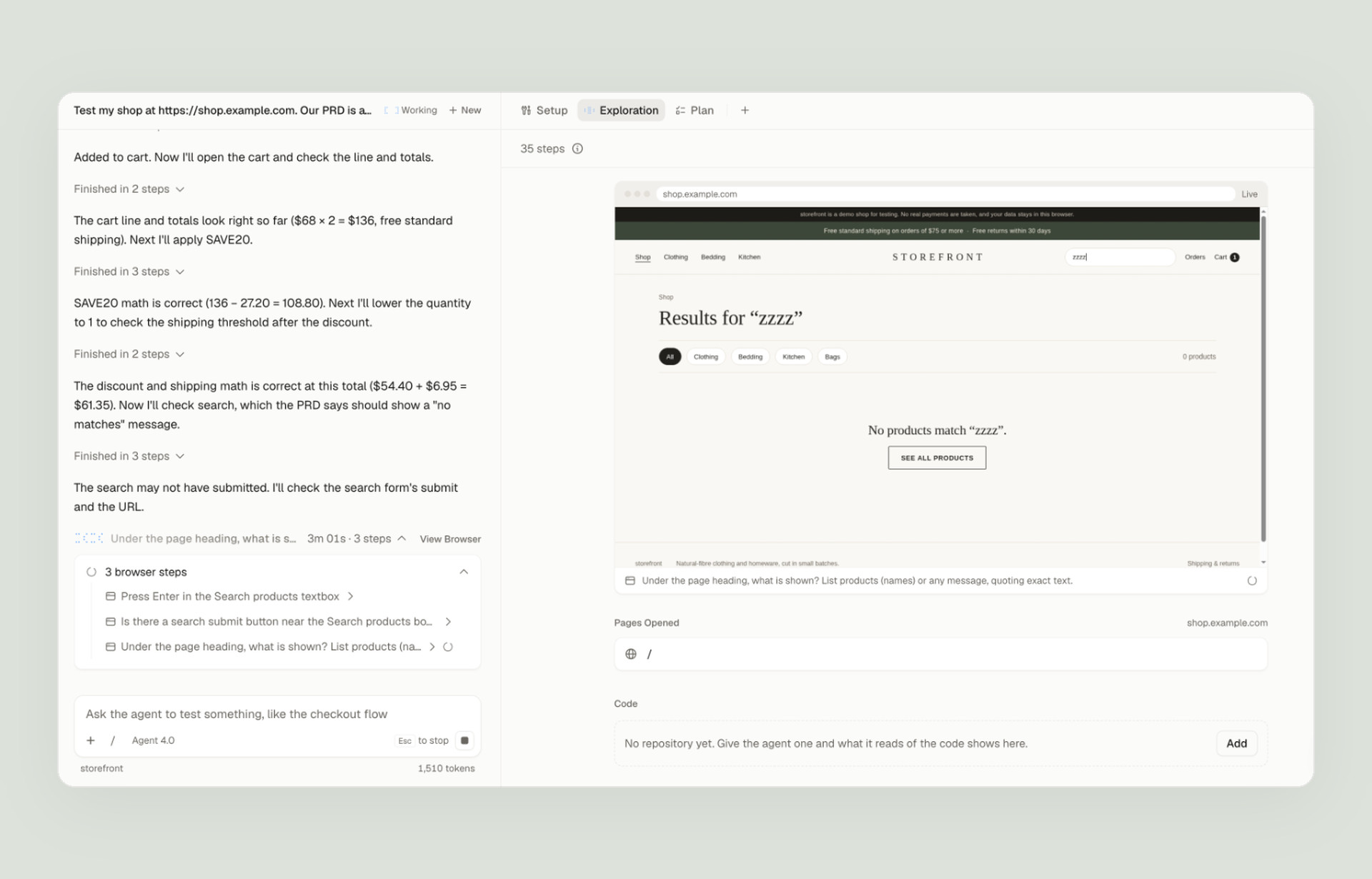
Exploring is how the agent learns your shop and works out what to test. It used the shop in a real browser: filters, search, product pages, the cart, promo codes, both test cards and the order pages. You can watch every step live, with its reasoning next to the browser:
Then it reported back, with all three planted bugs:
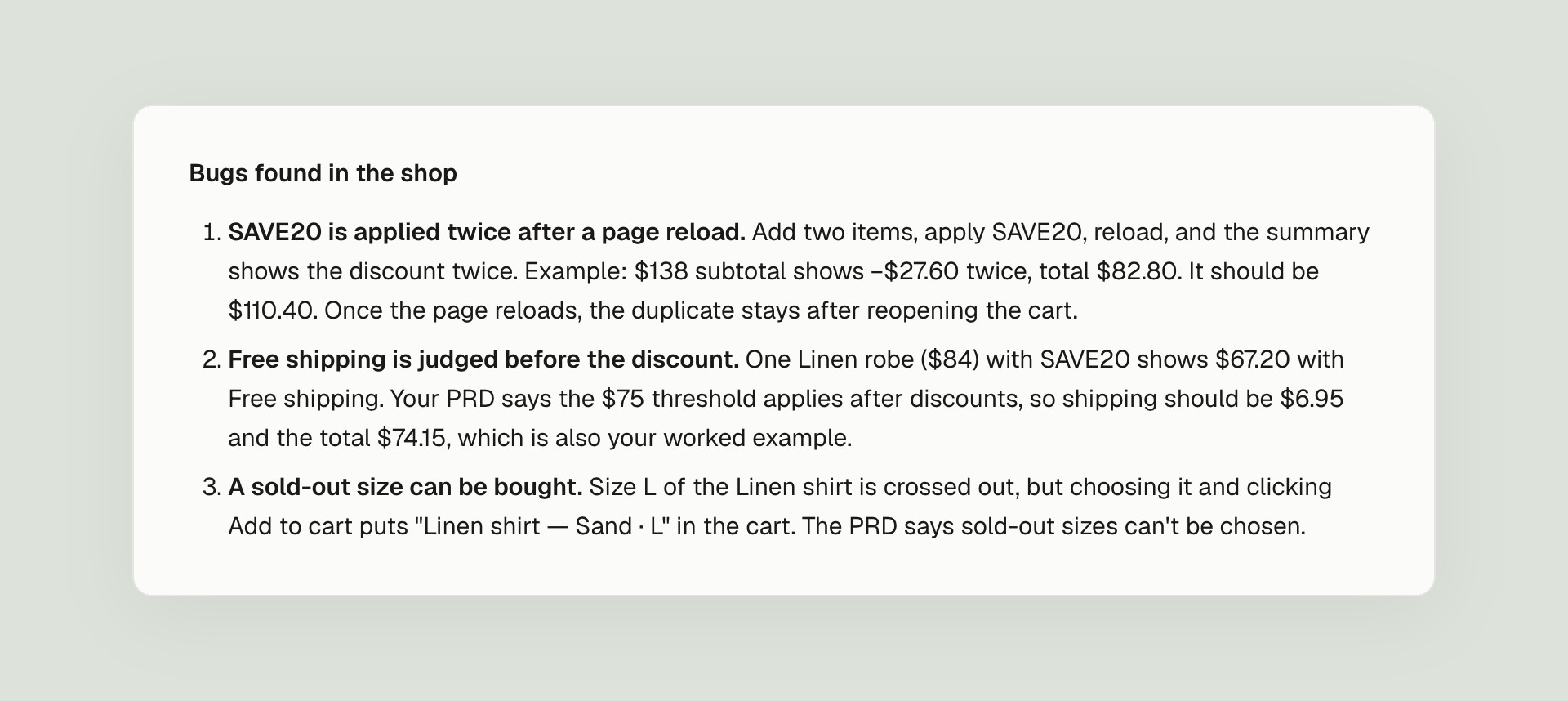
The double discount is the kind of bug that only shows up if you look for it. The agent reproduced it by hand: in a two-item cart ($138.00), a reload left two SAVE20 rows and a total of $82.80 instead of $110.40.
The free-shipping bug hits our basket directly. The rule, in the PRD and in the shop’s own note under the cart, is that standard shipping is free when the order comes to $75 or more after discounts. Work our basket through it, line by line:
| One Linen robe with SAVE20 | What the PRD says | What the cart showed |
|---|---|---|
| Linen robe | $84.00 | $84.00 |
| SAVE20 (20% off) | −$16.80 | −$16.80 |
| Order after the discount | $67.20 | $67.20 |
| Standard shipping (free only from $75 after discounts) | $6.95 | Free |
| Total | $74.15 | $67.20 |
The two columns agree until shipping. After the discount the order is $67.20, under the $75 line, so shipping should cost $6.95. The cart compared the $84.00 from before the discount with the $75 line instead, and shipped it free. With SAVE20, every order from $75.00 to $93.74 before the discount gets free shipping it shouldn’t, and the shop gives away $6.95 each time.
Step 3: Review the plan, and ask for what’s missing
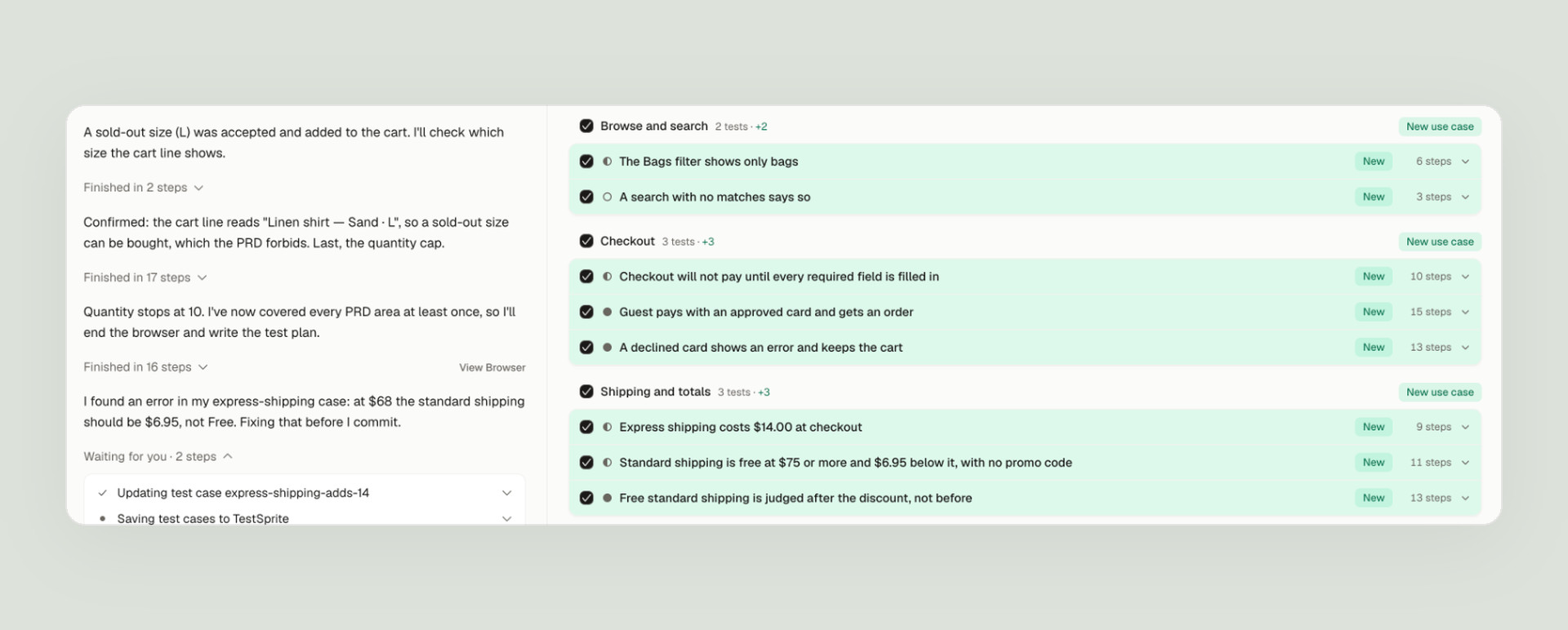
Next the agent wrote a plan grouped by journey: browse and search, the cart and promo codes, checkout, shipping and totals, and the product page. Each test starts by emptying the cart, so every run starts from the same place with the same products and prices.
Read the plan with the PRD next to it. The PRD says totals must match in the cart, at checkout and on the order, and nothing in the plan followed a promo code past the cart. So we asked for that journey, with our basket:
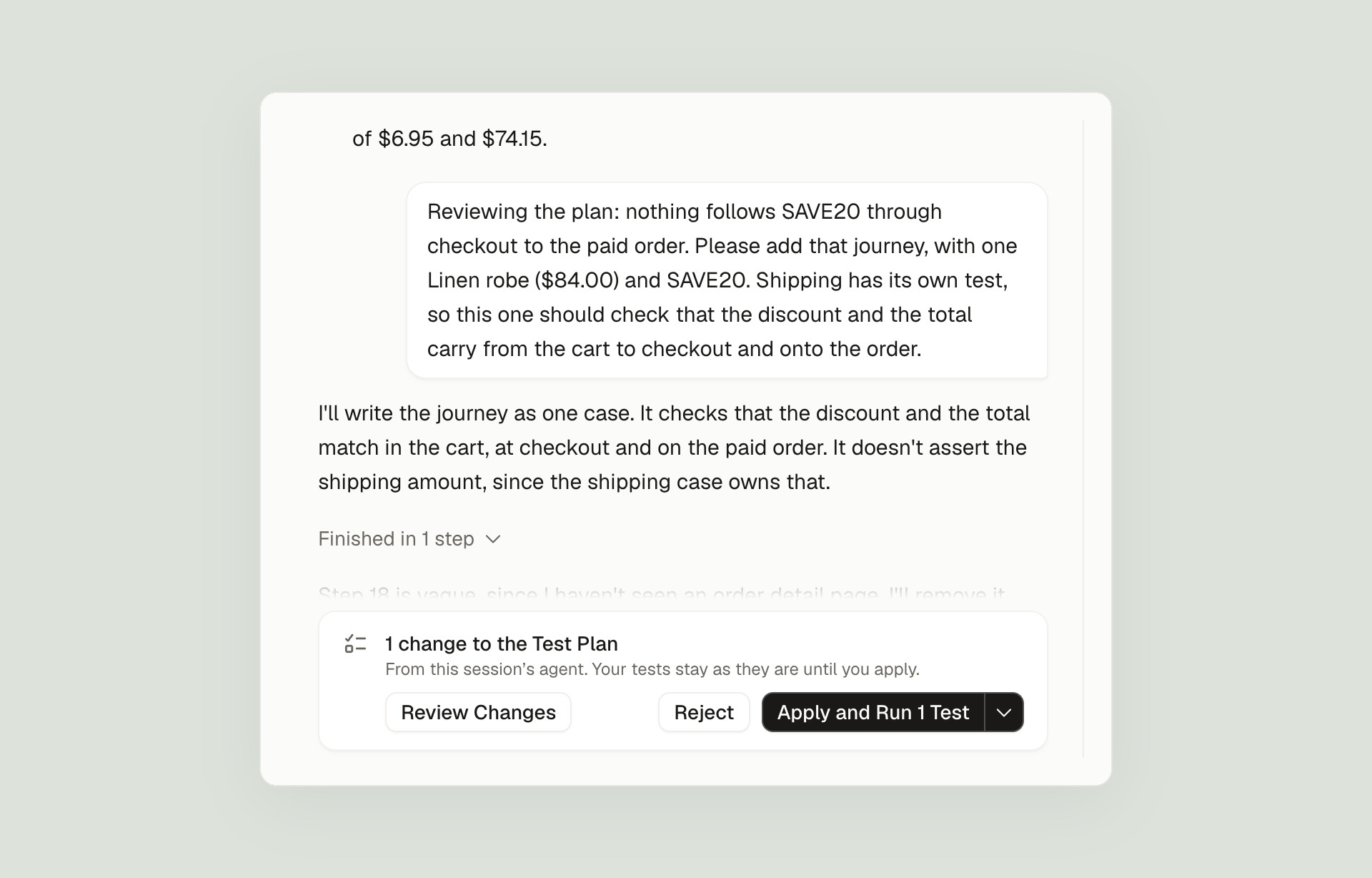
The agent wrote it as one test and showed every step before saving anything:
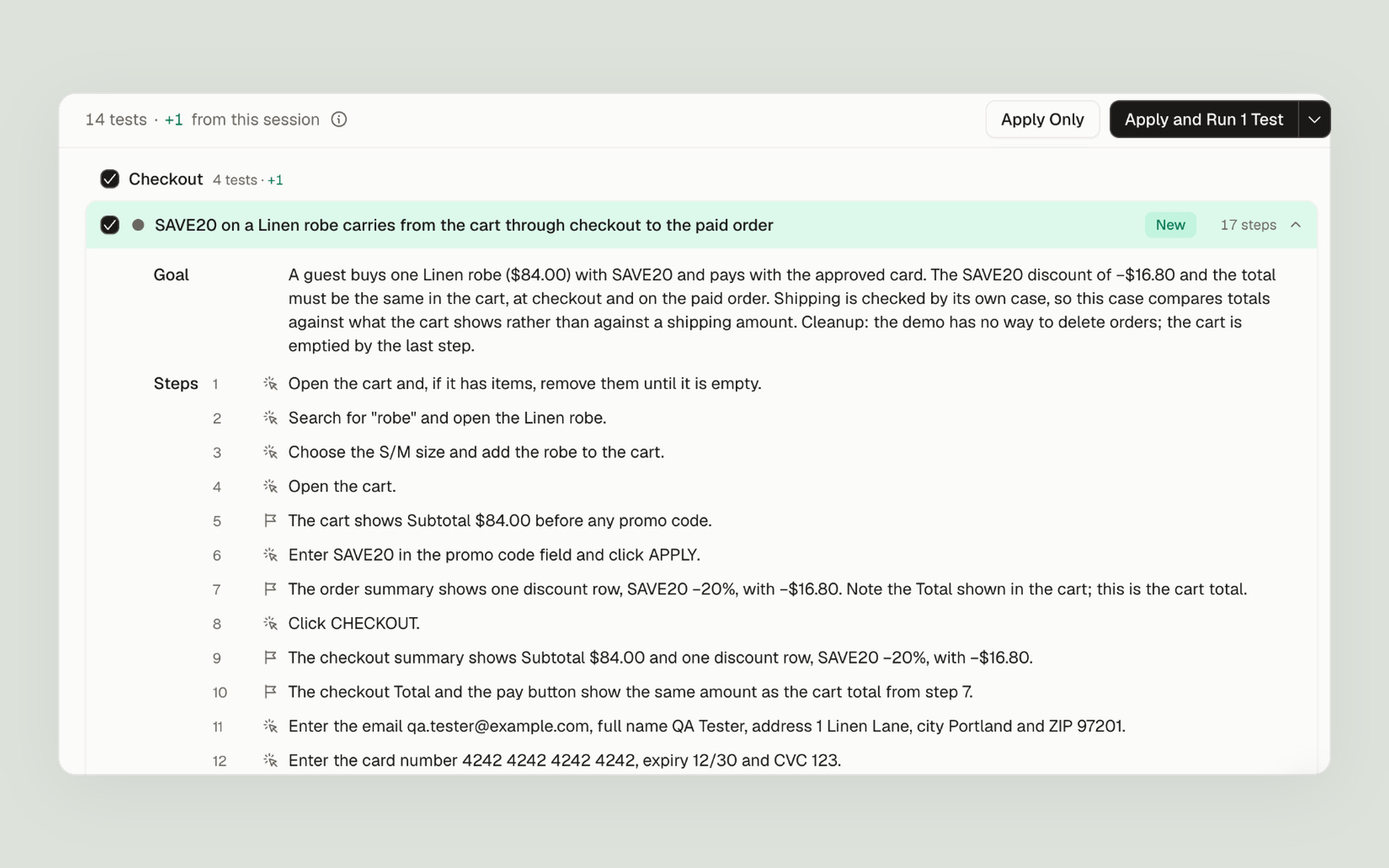
Shipping already has its own test, so this one doesn’t check the shipping amount. It checks that the discount and the total carry through, unchanged. We approved it.
Step 4: Run it in real browsers
We ran all 14 tests on main. They ran in parallel, each in its own browser, and the run page drew them live as a map of the shop’s pages:
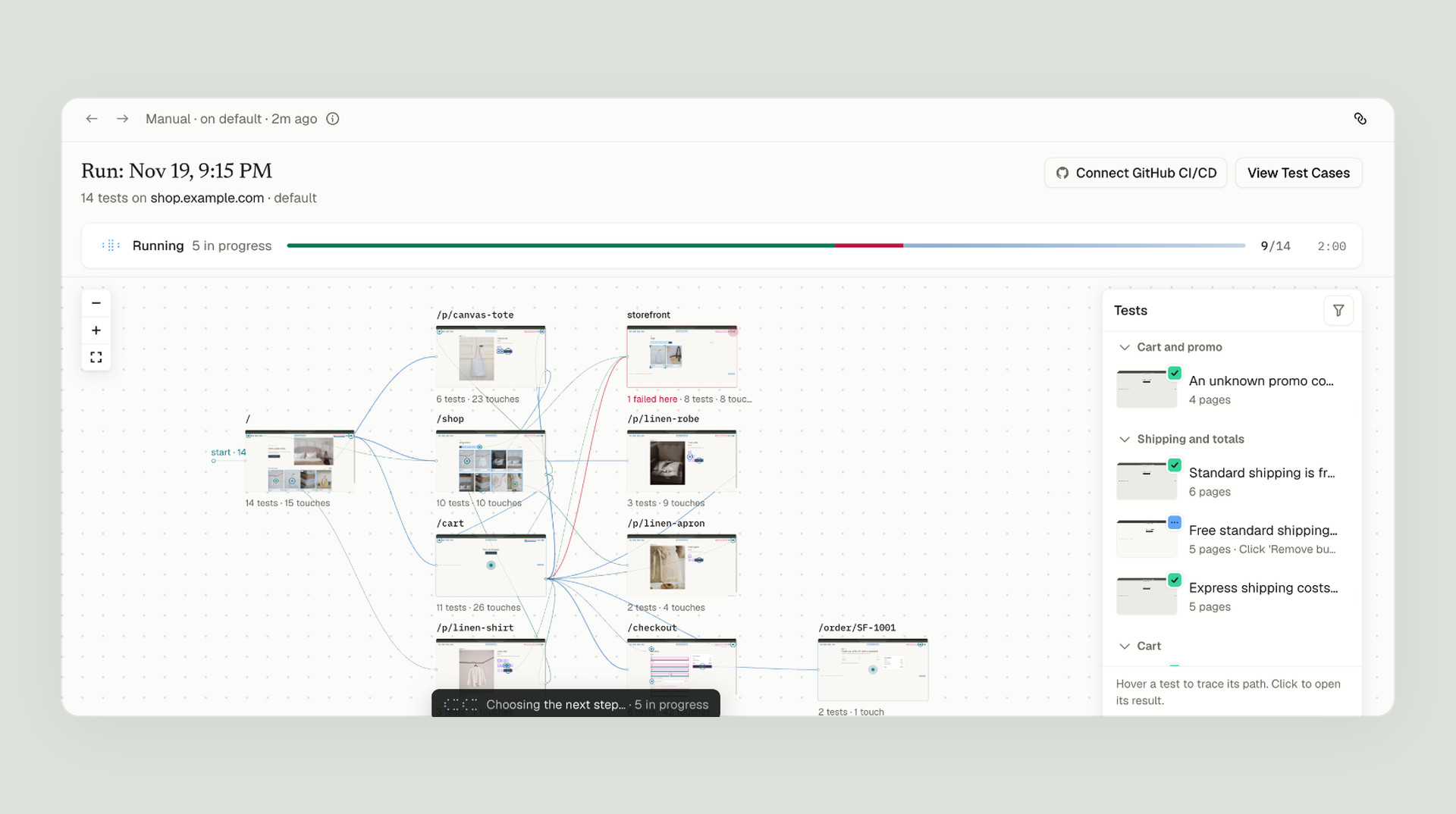
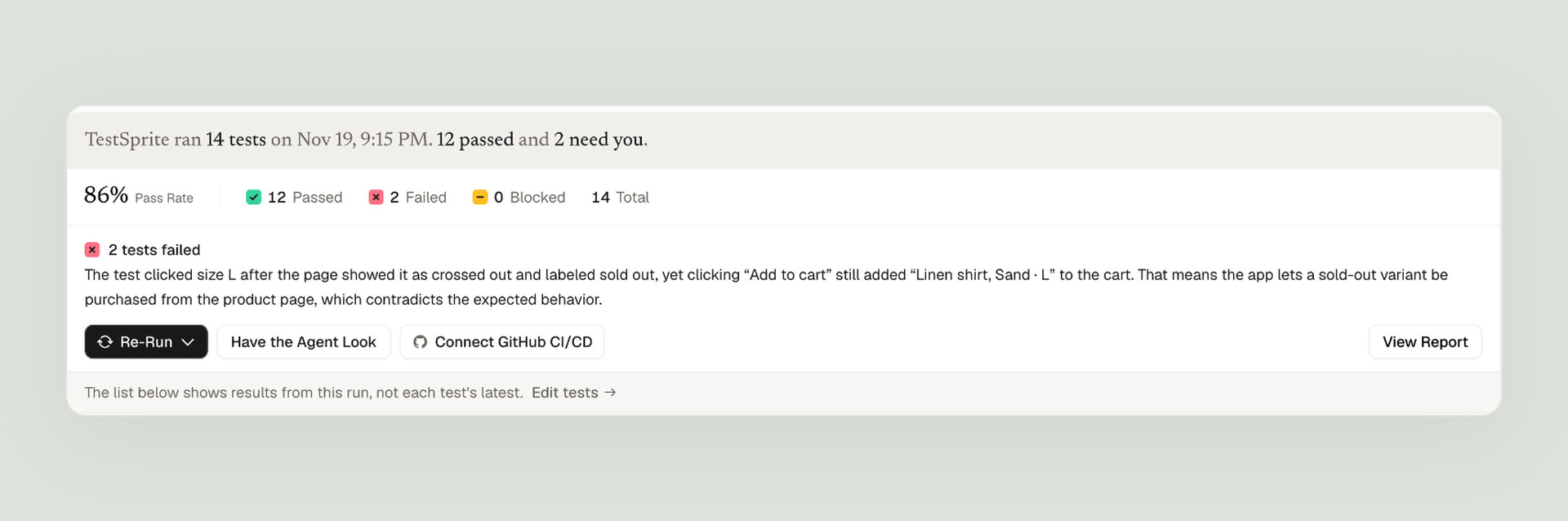
12 passed and 2 failed: the free-shipping bug and the sold-out size. The new checkout journey passed. On main, the discount reaches checkout and the order.
Step 5: Read the failure
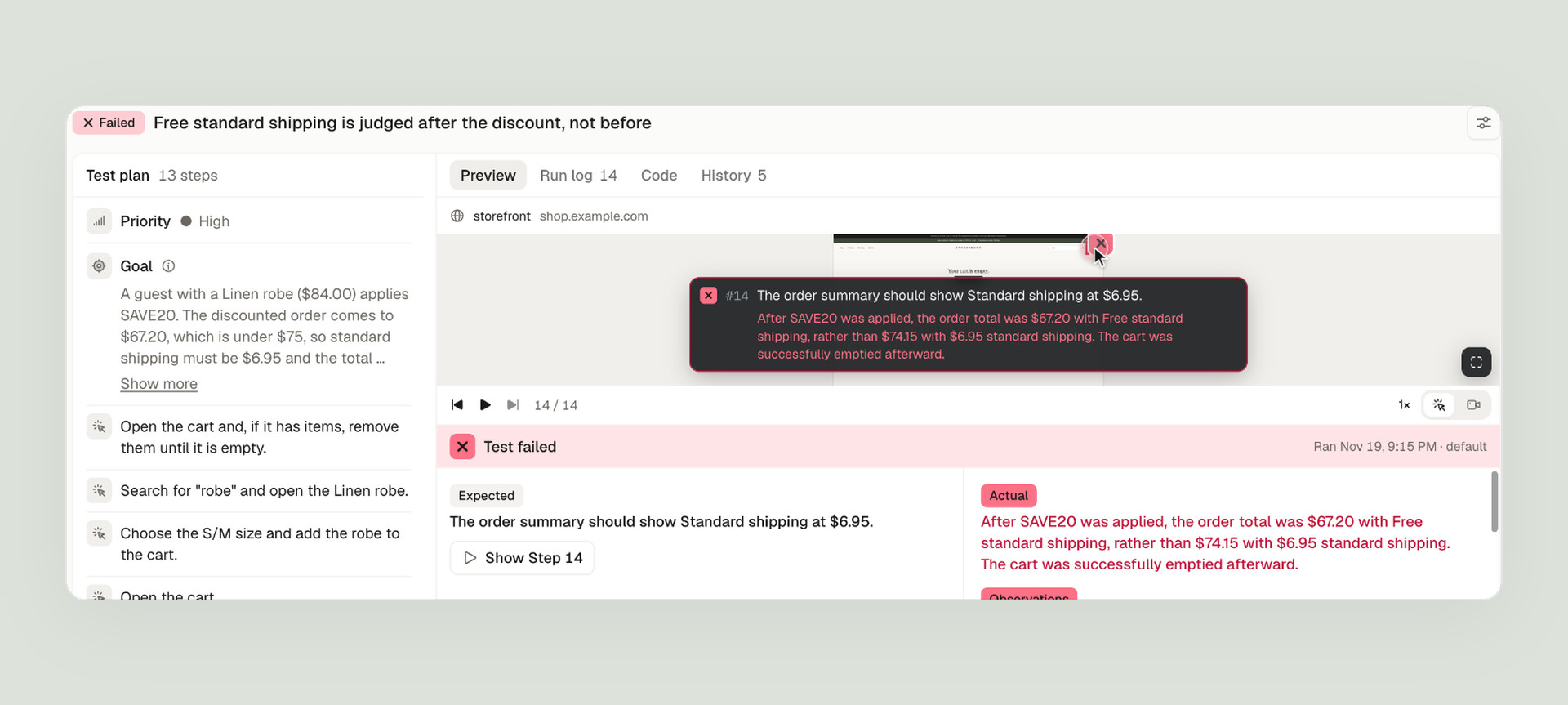
Open a failed test and you get what should have happened, what happened instead, and a replay of every step. Here is the shipping test on our basket:
And the cart the test saw, one step after applying SAVE20. Read the order summary top to bottom: $84.00, minus $16.80 for SAVE20, leaves $67.20. That is under $75, so standard shipping should be $6.95. The cart says Free, and the note right under it states the rule it just broke:
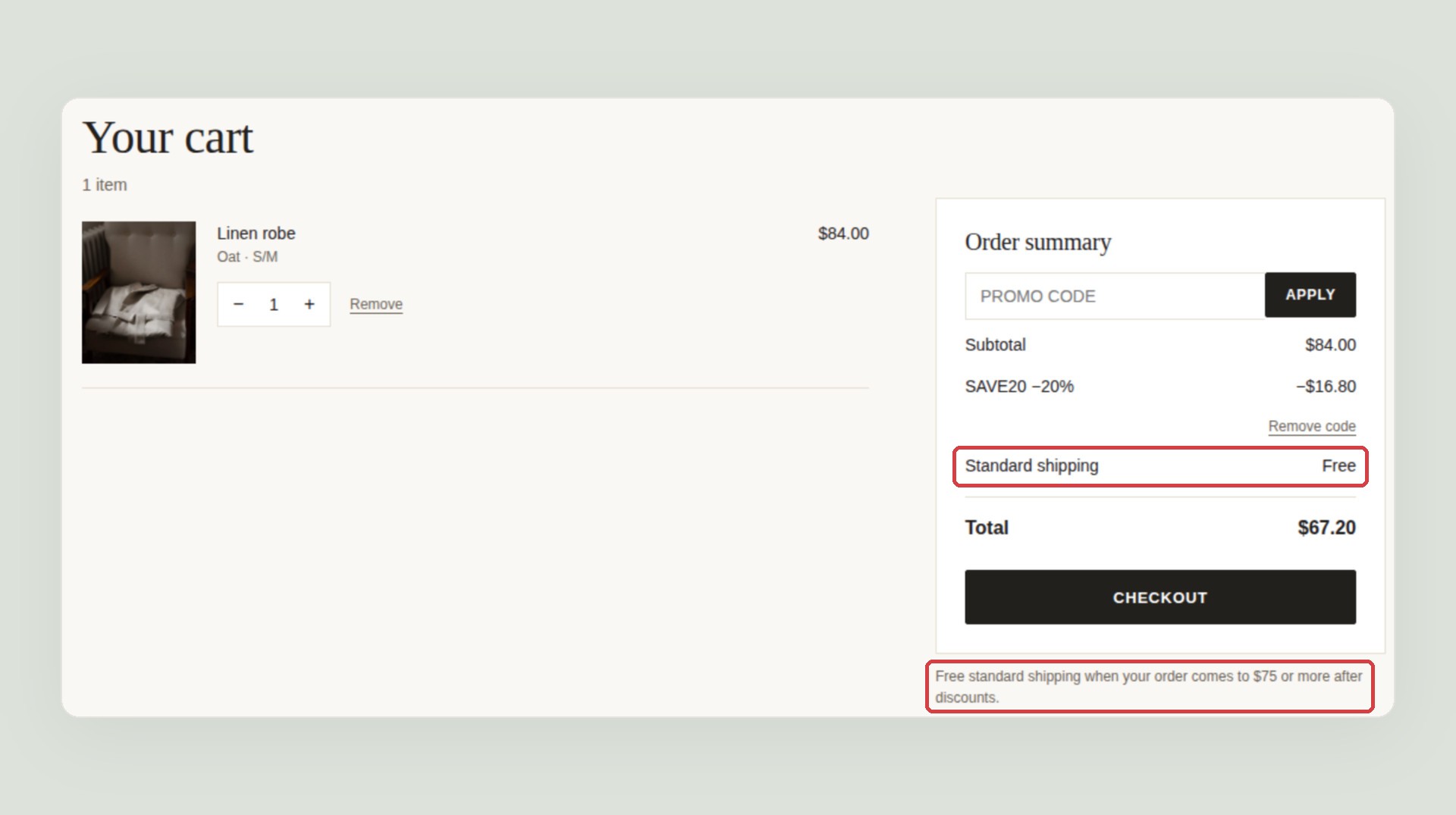
A test that only checked that a discount appeared would pass. This one checked the shipping line against the rule, on the amount after the discount.
Step 6: Test the fix before you merge it
Next we wrote a fix for the double discount, the way a rushed fix often looks. It stops a reload from adding a second SAVE20 row, but only the cart reads the saved code, so checkout and the order no longer see the discount. We deployed it to its own address, and the agent added it as an environment.
We ran the same 14 tests there and asked how the fix compared with main:
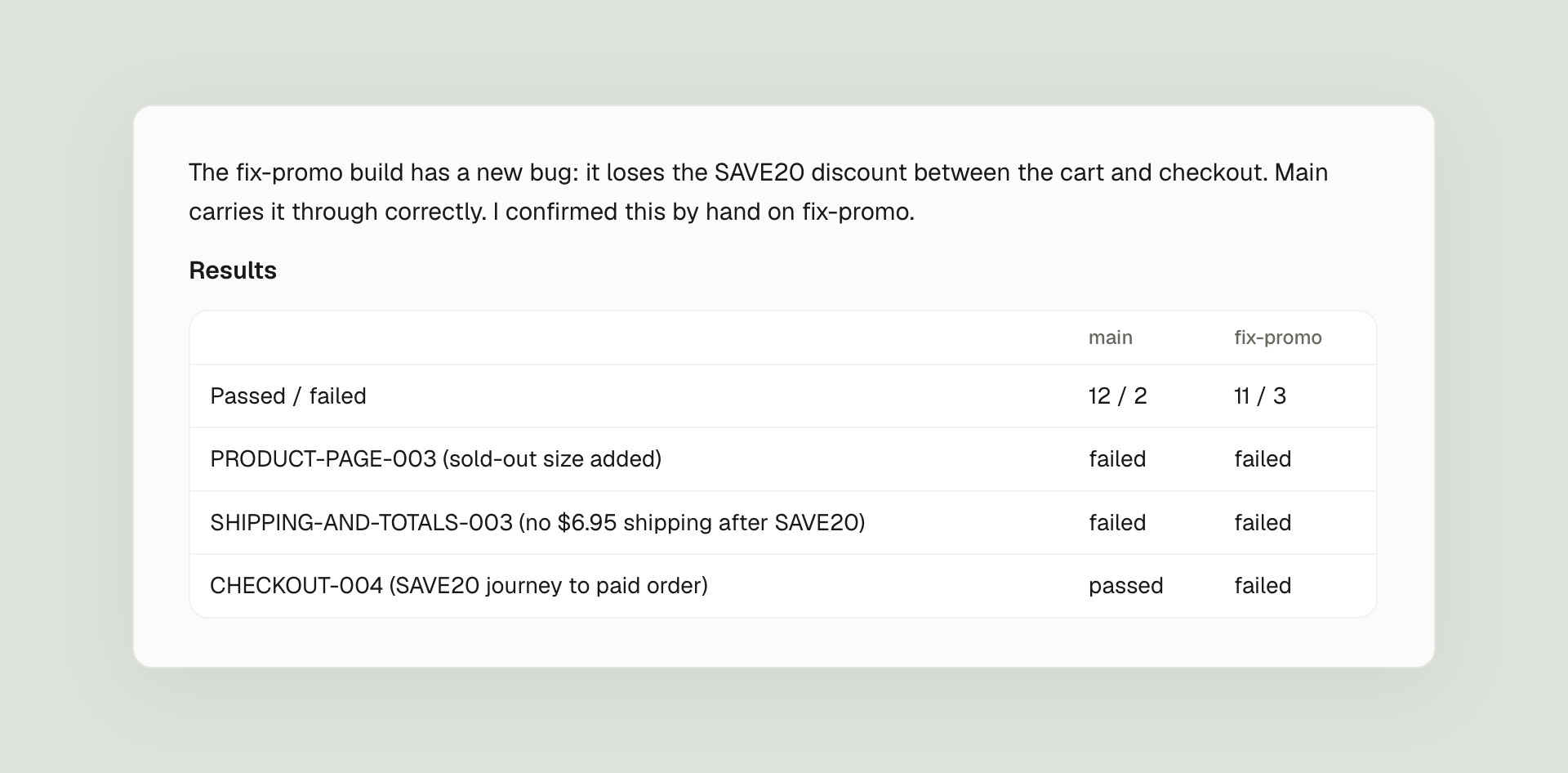
The test we asked for in step 3 is the one that caught it:
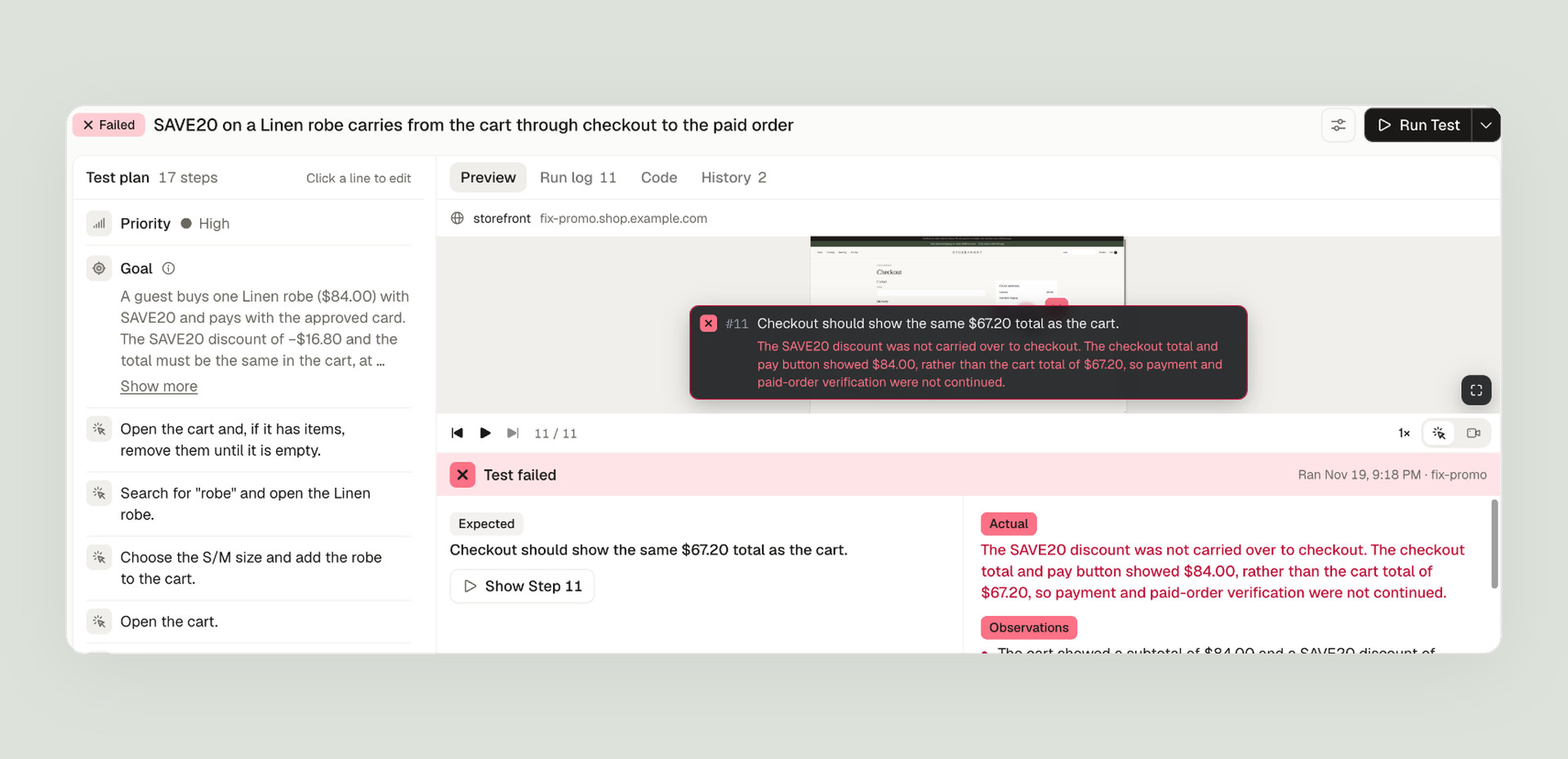
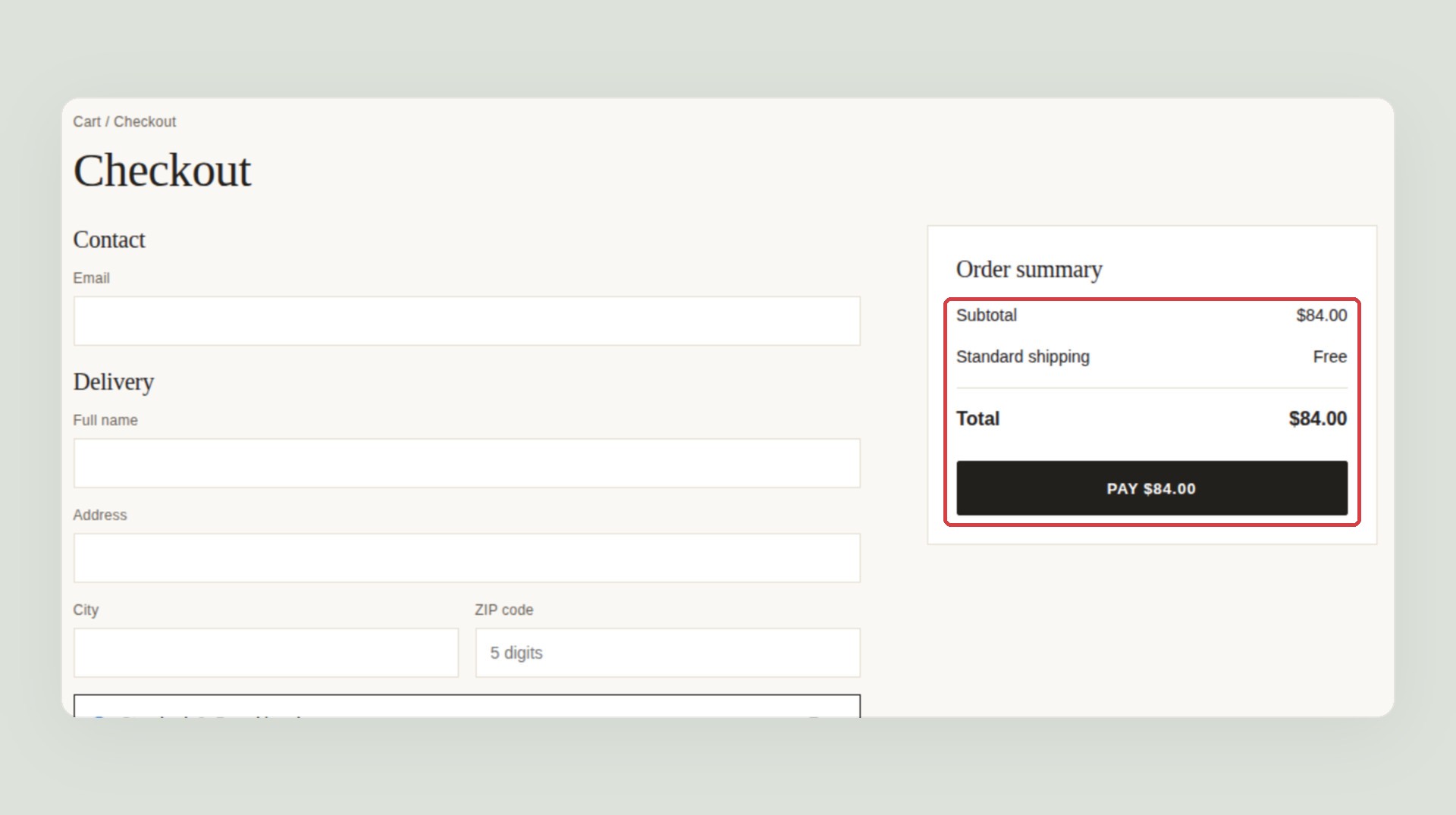
| One Linen robe with SAVE20 | Cart | Checkout |
|---|---|---|
| What the PRD says | $74.15 | $74.15 |
| main | $67.20 | $67.20 |
| The fix build | $67.20 | $84.00 |
Neither build was ready to ship, and we knew it before merging. Main undercharges by the $6.95 shipping it gives away. The fix promises $67.20 in the cart and charges $84.00 at the pay button, which is the kind of mismatch that turns into refunds and support tickets.
Connect GitHub and the same tests run on every pull request, so a fix like this one waits until the whole journey passes. It’s the same check that lets you review AI-written pull requests on what they do, not just on the diff.
Exploring finds today’s bugs. The suite catches the next one.
The agent explored the shop once, on day one, and found the bugs that were already there. That is useful, but it is a snapshot. The bug that would have cost the most here didn’t exist yet: our fix introduced it later, in a step of the order nobody was looking at.
Only a suite that runs on every change can catch that kind of bug, and it has to be checked against what the shop should do, not against what the code happens to do today. That is the part TestSprite is built for. The tests come from a plan you approved, and you can add to it in plain words, as we did here. They run on every change and on every pull request. What a test expects changes only when you approve it. And every failure arrives with a replay, the failing step, and expected versus actual.
What a demo shop can’t show
storefront takes “payments” with test card numbers in its own form. A real shop has more moving parts, and each one needs its own rules in the PRD:
- A real payment provider. Card fields hosted by the provider, 3-D Secure challenges, and a webhook that confirms the order after the redirect. Run your tests on staging in the provider’s test mode, use its test cards for approve, decline and challenge, and check the order after the webhook, not the thank-you page.
- Inventory sync. Stock usually lives in another system. A size can sell out after the page has loaded, or two shoppers can reach the last item at once. Write down what the shopper should see when stock runs out between the cart and payment.
- Regional tax. Tax depends on the shipping address: sales tax by state, VAT included in the price. Put worked examples in the PRD with the order of discount, shipping and tax, the way ours works through one robe and SAVE20.
A checklist for your own shop
- Follow the money to the paid order. Cart, checkout and the order should show the same total.
- Test promo codes against the shipping threshold. Pick a basket that crosses it only before the discount.
- Try what’s sold out or over the limit. Sold-out sizes, quantity 0 and 11, a second promo code.
- Use the provider’s test cards. One that approves and one that declines, and check the cart survives a decline.
- Start every test from an empty cart. No test should depend on what another left behind.
- Run the whole suite on every fix. The fix for one bug broke the next step of the same journey.
To sum up
One bad fix, caught on its own build before it merged, by a suite test we asked for while reading the plan next to the PRD, for a bug that didn’t exist when the agent explored. The three planted bugs showed up while exploring, and two of them fail in the suite on every run until they’re fixed. What made it work was a PRD with worked numbers, and a suite that follows the order to the end, not just to the cart, on every change.
For a SaaS app instead of a shop, see our worked example on testing payment and billing flows: invoices, tax and a Pro upgrade that takes the money but keeps the old plan.
Try it on your shop
Sign up, attach your PRD, paste your shop’s address, and the agent starts exploring. It works on any web app it can open in a browser, and you can start on the free plan; pricing has the rest.