How to Test Payment and Billing Flows: A Worked Example
Billing bugs rarely crash anything. The payment goes through, the screen says thank you, and the account is still on the old plan. Here is how to catch that kind of bug, step by step, on a demo invoicing app with two planted bugs and one bad fix.
Yunhao Jiao8 min read


In this post12
- The short version
- Step 1: Hand it the PRD you already have
- Step 2: Watch it explore
- Step 3: Approve the plan
- Step 4: Run it in real browsers
- Step 5: Read the failure
- Step 6: Test the fix before you merge it
- Exploring finds today’s bugs. The suite catches the next one.
- What a demo can’t show
- A checklist for your own billing tests
- To sum up
- Try it on your app
Most billing bugs don’t throw an error. They show a number that is a little wrong, or they take the money and forget to change the plan. Unit tests often miss them, because each piece works on its own. The bug lives between the pieces: the payment, the saved account, and what every screen shows afterwards.
So a billing test has to go through the whole flow in a real browser. Pay, then check the plan everywhere it shows, and check every amount to the cent.
For this post we built Acme Invoices, a small invoicing app for freelancers, and planted two billing bugs in it. We gave TestSprite one line and our one-page PRD, and didn’t tell it about the bugs. Every screenshot below comes from that session and its test runs.
The short version
- What we built: a demo invoicing app with a free plan, a $19 Pro plan and two planted billing bugs. TestSprite got one line and the PRD.
- The catch that matters: a bug that didn’t exist yet when the agent explored. Our fix for one planted bug stopped charging tax on invoices with no discount. The test suite from the plan we approved ran on the fix build before merge, and a tax-only test the agent had written on day one caught it: $75.00 where the PRD says $82.50.
- Day one: exploring the app, the agent found both planted bugs: tax charged before the discount ($392.00 instead of $388.80), and a Pro upgrade that took $19.00 but left the account on Free. Each became a failing test in the suite, so neither can come back unnoticed.
- The lesson: exploring shows you today’s bugs; a suite that runs on every change catches the ones your next fix introduces. Test every combination of the money rules, and after a payment, check the plan, not the thank-you message.
Step 1: Hand it the PRD you already have
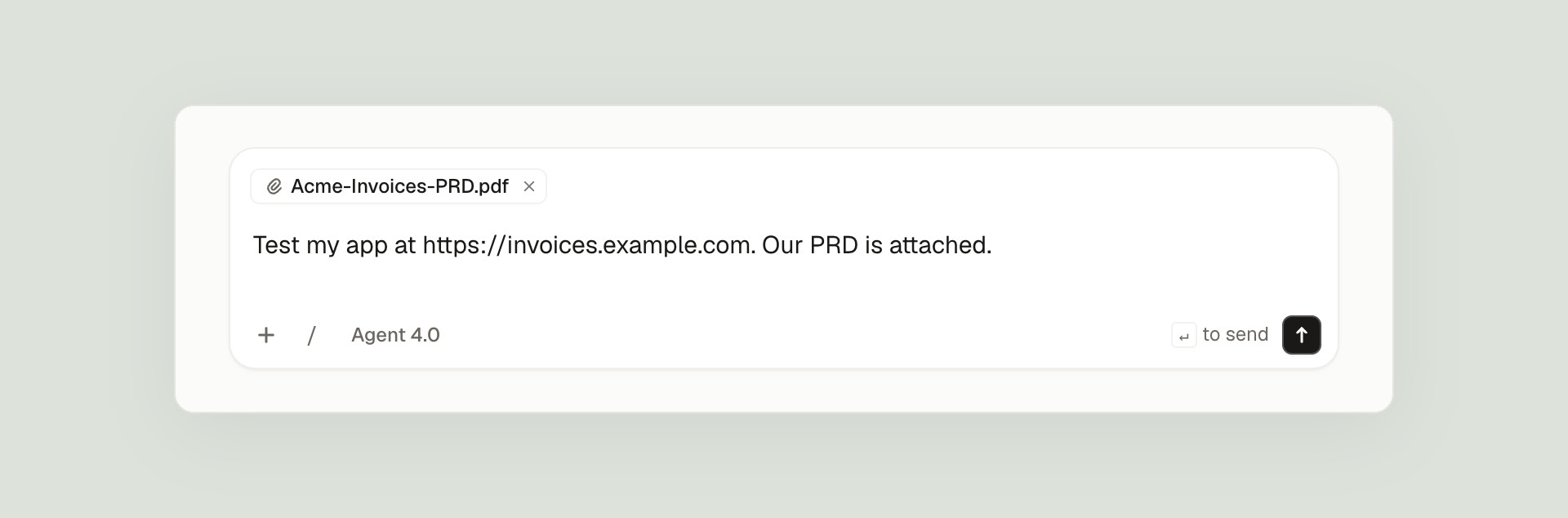
You don’t need a long prompt or a special format. We attached the PRD and wrote one line.
What matters is in the PRD, not the prompt. Ours is one page. For billing, the important part is that it’s exact: how each amount is worked out, in what order, and what “upgraded” means.
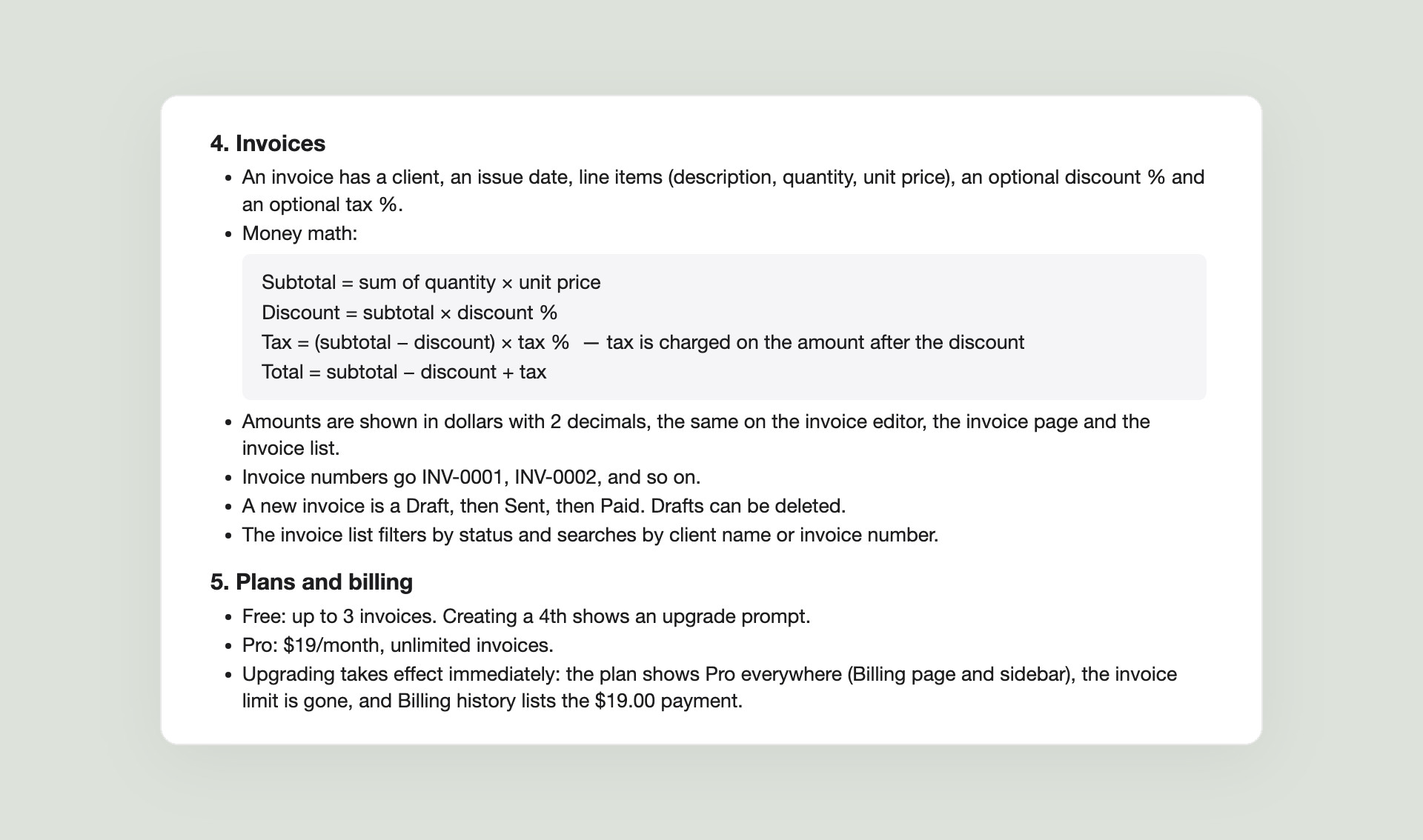
Three lines in it do most of the work:
- The order of the math. Tax is charged on the amount after the discount, and total = subtotal − discount + tax.
- The format. Dollars with 2 decimals, the same on the editor, the invoice page and the list.
- What “upgraded” means. The plan shows Pro everywhere, the invoice limit is gone, and Billing history lists the $19.00 payment.
If your PRD is vague about money, fix that first. A test can only be as exact as the rule behind it.
Step 2: Watch it explore
The agent asked two questions first: whether the address was a demo copy where it could create accounts and invoices freely, and which parts of the PRD the first plan should cover. We took the recommended answers: a demo, and all of it.
Then it signed up and used the app in a real browser, saying what it was checking as it went. You can watch every step live:
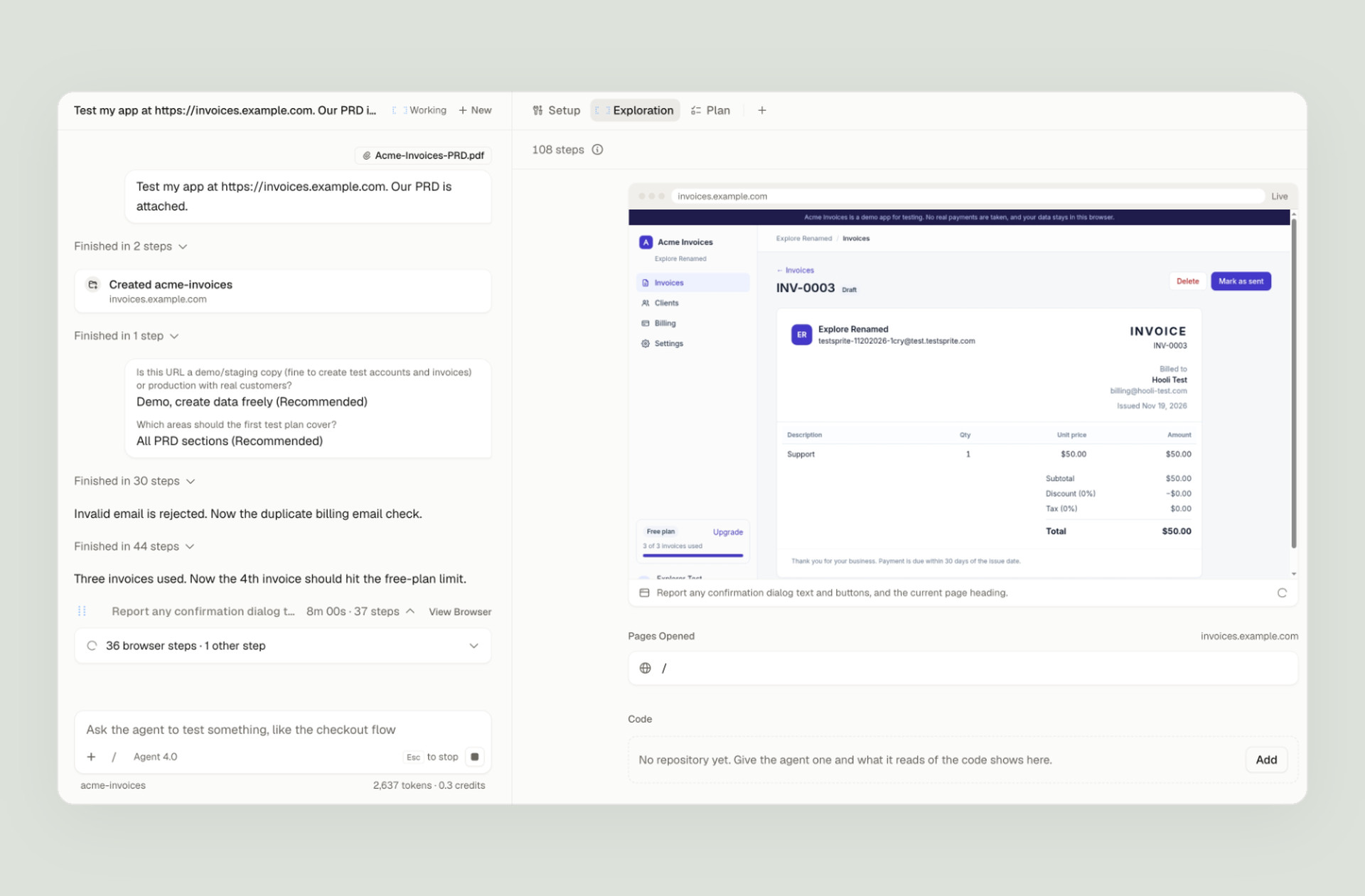
Exploring is how the agent learns your app and works out what to test. It went through every area of the PRD and picked amounts that make mistakes easy to see. Then it reported back, with both planted bugs and the exact amounts:
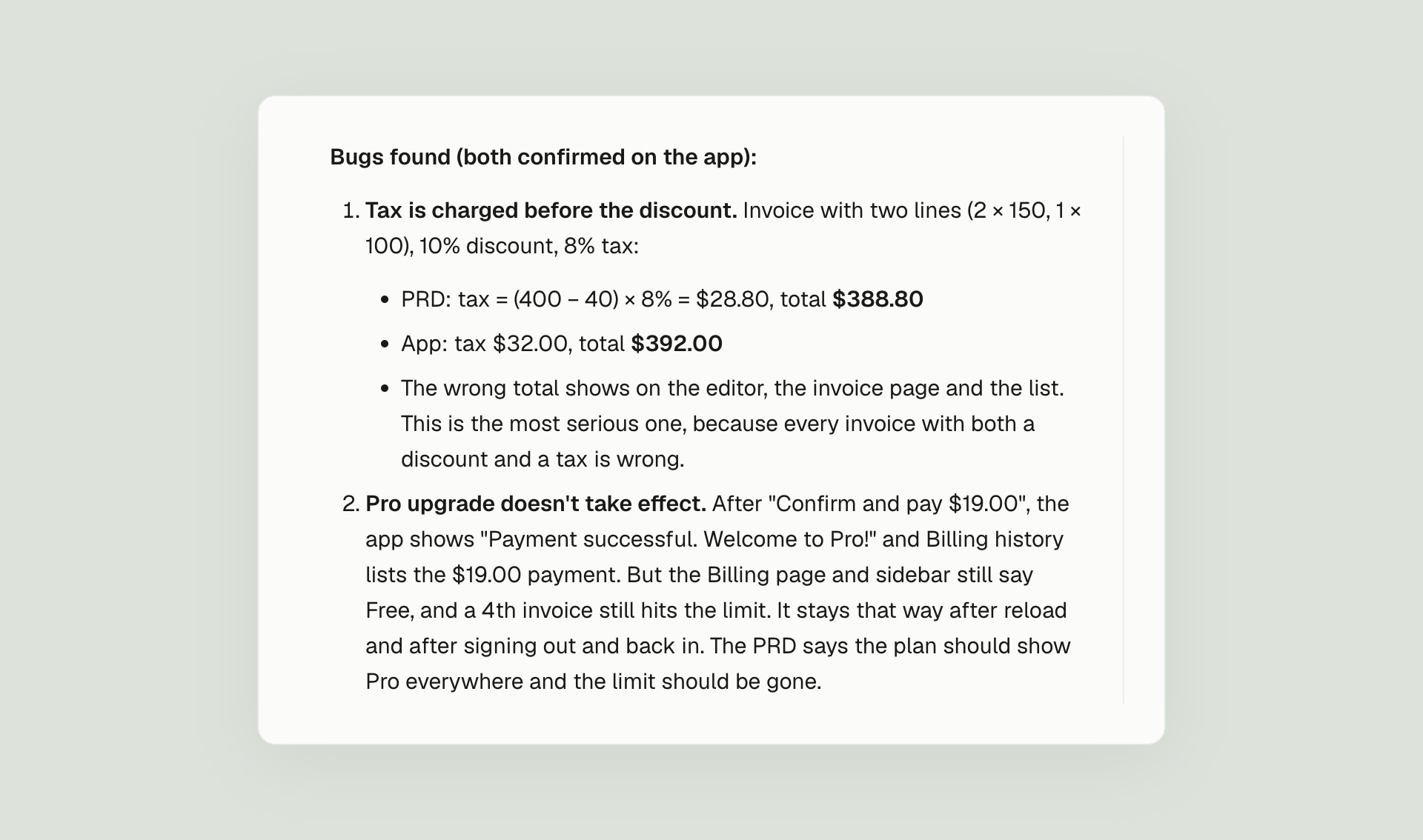
Look at the first bug. The agent’s test invoice has 2 × $150 and 1 × $100, a 10% discount and 8% tax:
| On this invoice | The app | The PRD |
|---|---|---|
| Tax is charged on | $400.00 | $360.00 |
| Tax (8%) | $32.00 | $28.80 |
| Total | $392.00 | $388.80 |
The app taxed the amount before the discount and overcharged by $3.20, on the editor, the invoice page and the list. The bug only shows when an invoice has both a discount and a tax. With just one of them, the order of the math doesn’t matter, and the agent checked that too: tax alone, $75 plus 10%, came to the right $82.50. Remember that invoice; it comes back in step 6.
Step 3: Approve the plan
Next the agent wrote a plan: 15 tests in 5 groups, each a plain sentence about what must be true. Nothing is saved until you apply it.
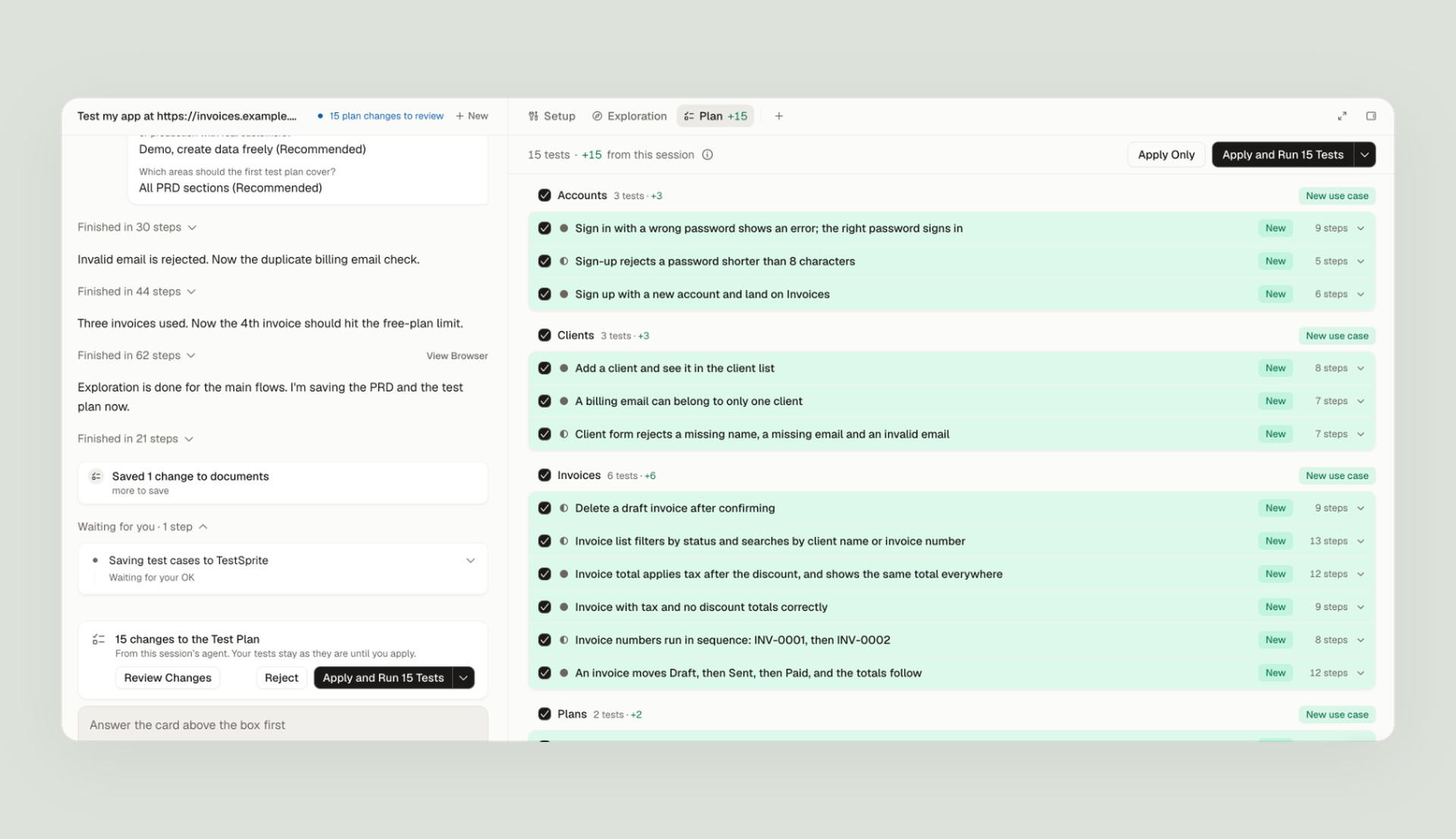
Two of the 15 carry the risk found while exploring: the money math with a discount and a tax, and the Pro upgrade. A third looks routine and turns out to matter most: an invoice with tax and no discount.
Step 4: Run it in real browsers
We clicked Apply and Run. The 15 tests ran in parallel, each in its own browser with its own new account, and the run page drew them live as a map of the app’s pages:
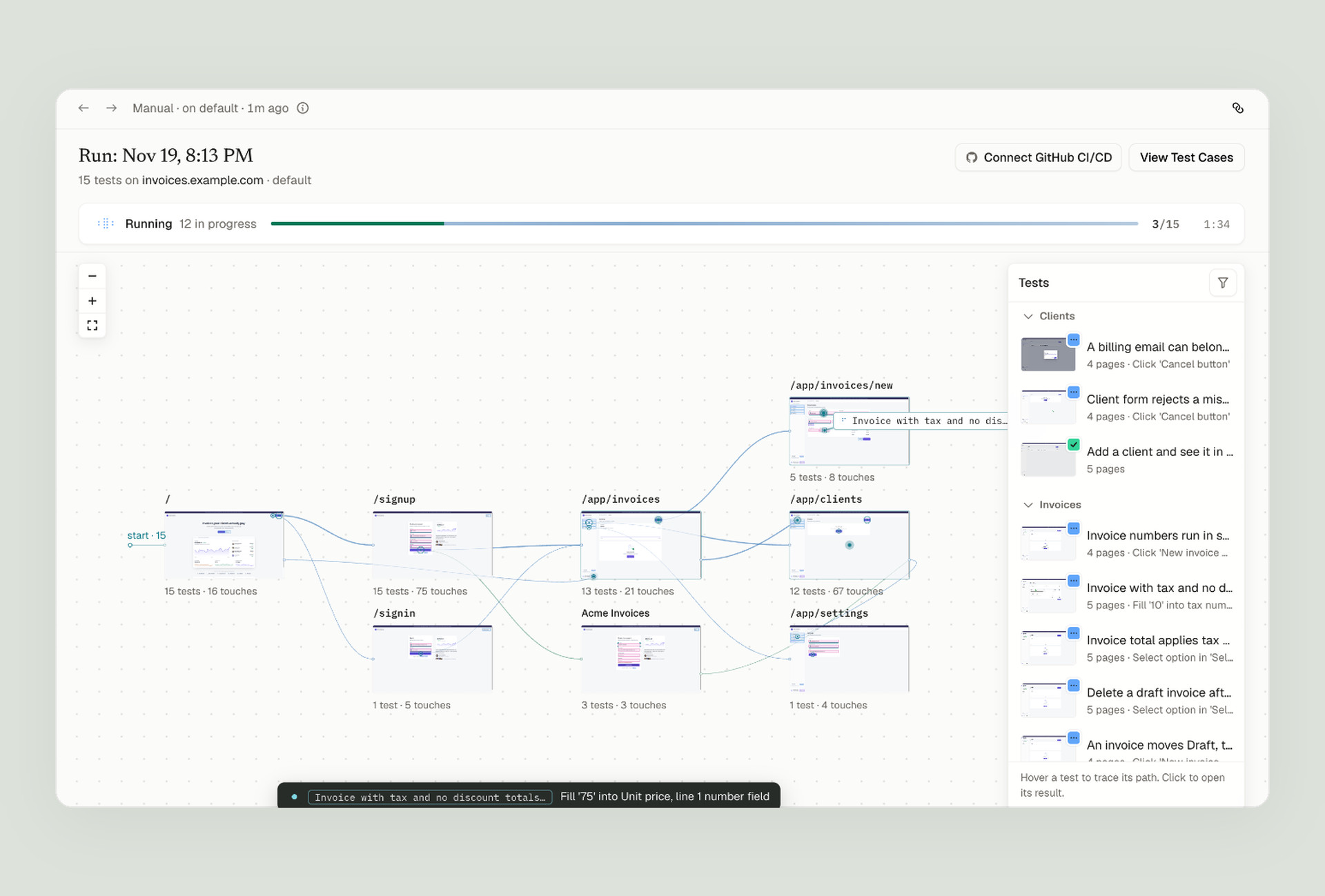
A few minutes later, 13 passed and 2 failed, and the 2 failures were the 2 planted bugs. The summary gives the amounts and says why it is a bug in the app rather than in the test: the same wrong total shows on every screen.
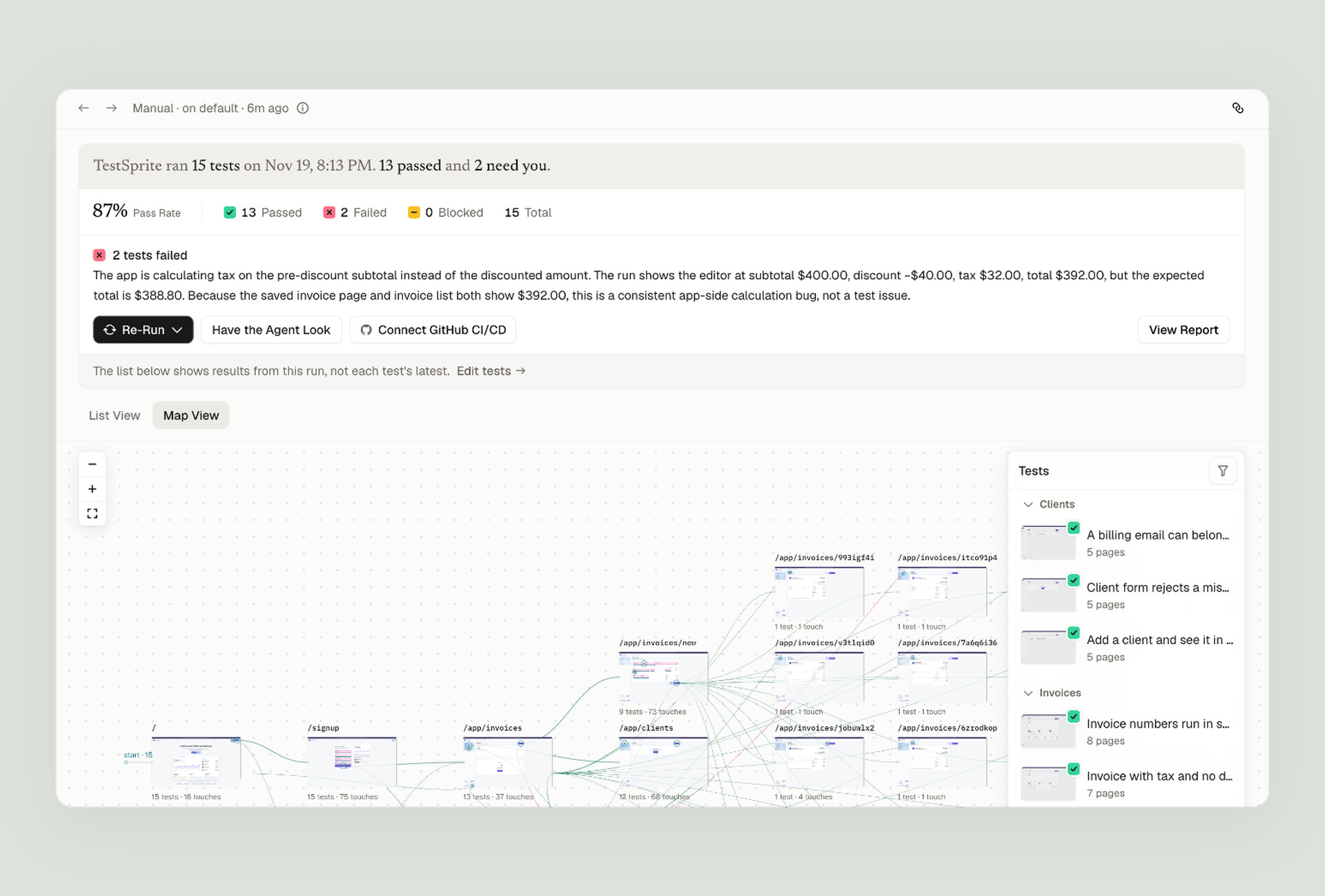
Step 5: Read the failure
Open a failed test and you get what should have happened, what happened instead, the observations behind it, and a replay of every step.
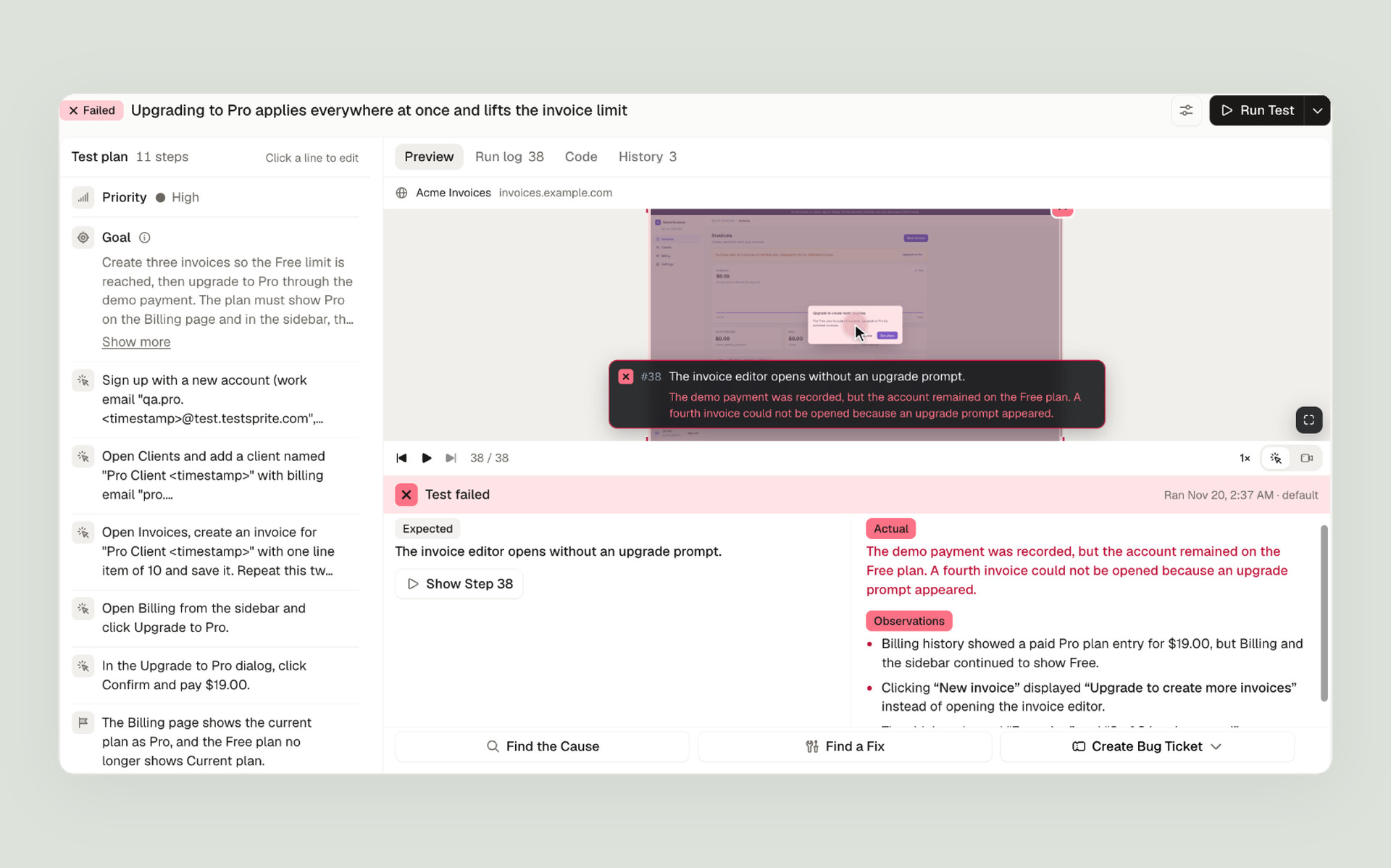
Here is the replay one step after paying. The Billing page says Free plan, right above a $19.00 payment marked Paid:
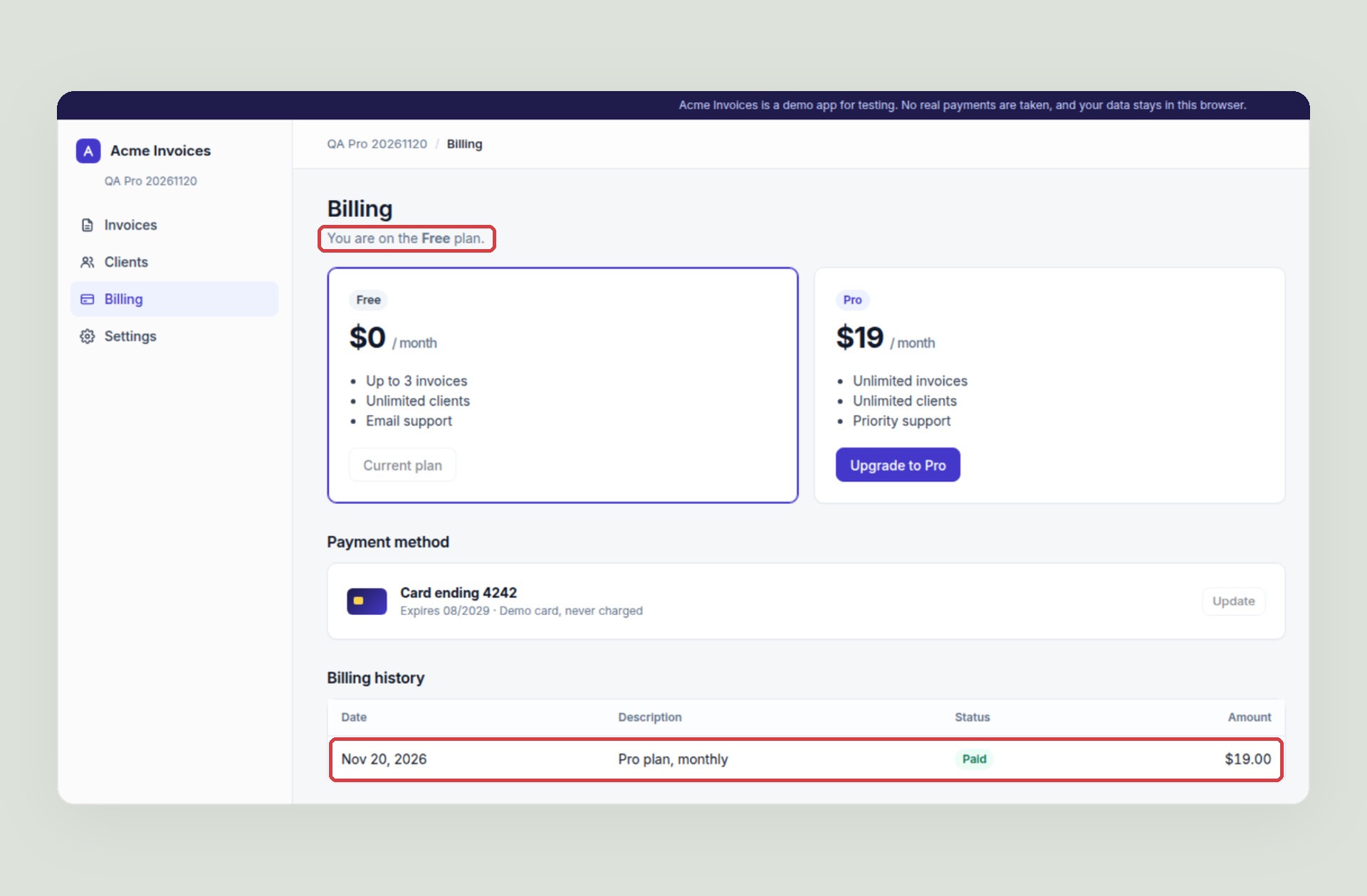
This is the kind of billing bug that costs the most. The customer paid, saw “Welcome to Pro!”, and is still blocked at 3 invoices. A test that only checked the success message would pass. Each failure also comes with buttons to find the cause, find a fix and file a bug ticket.
Step 6: Test the fix before you merge it
Next we wrote a fix for the tax bug, the way a rushed fix often looks. It charges tax after the discount, but only inside the code path for invoices that have a discount. We deployed it to its own address and asked the agent to add it as an environment and run the same 15 tests there.
On the fix build, the discount-and-tax test passed. The tax-only test, which had passed on main, failed. Here it is mid-test, with 10% tax on $75.00:
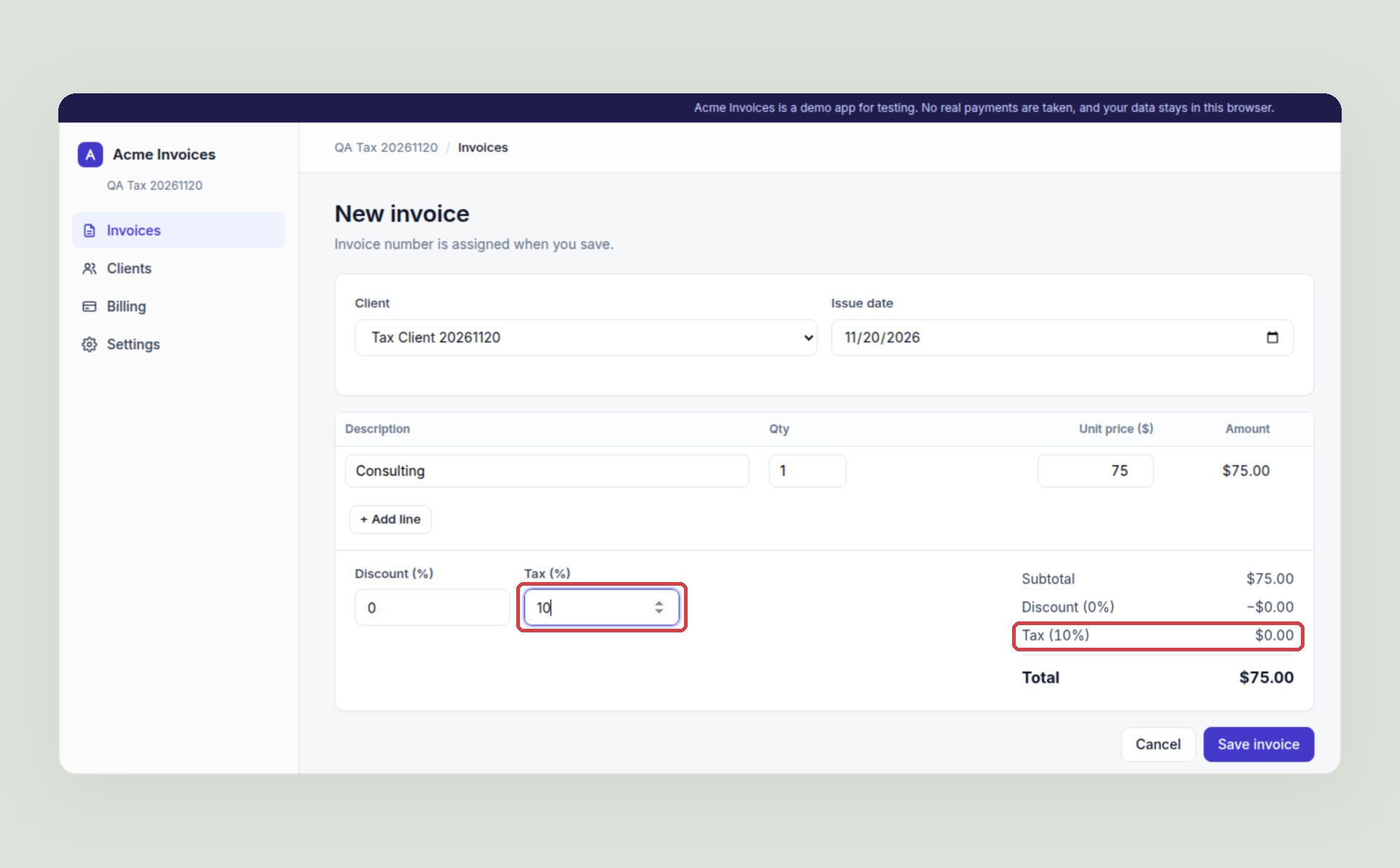
We asked how the fix compared with main. The agent lined up the two runs test by test:
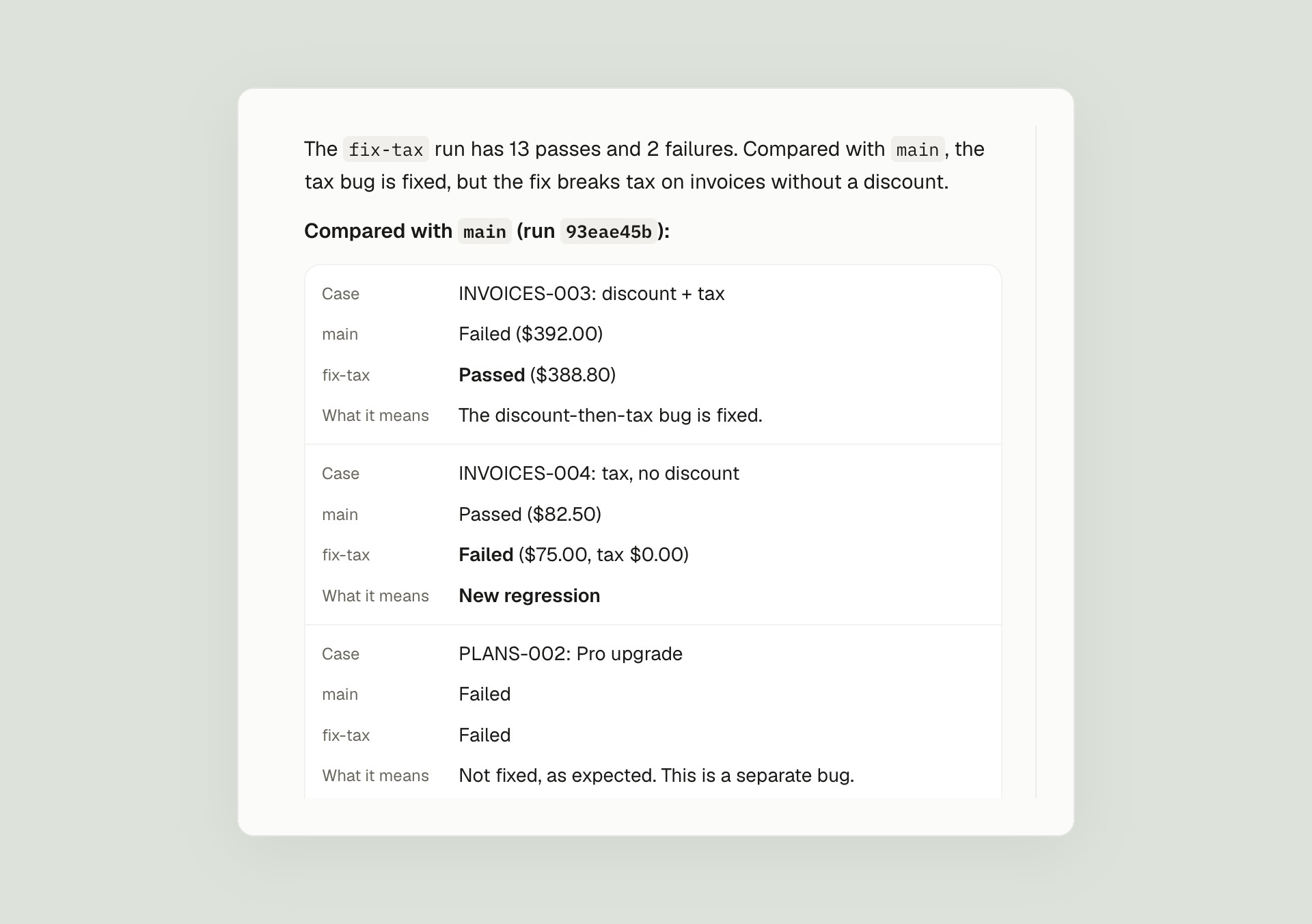
It also read the fix build’s code and named the cause: tax is only worked out when the discount is above zero, so every invoice without a discount gets no tax at all. Neither build was ready to ship, and we knew it before merging. Main overcharges invoices with both a discount and a tax. The fix undercharges every invoice with tax alone, which is probably the more common case.
The test that caught it was written on day one, next to the one that found the original bug, because the PRD’s rule covers both cases. Connect GitHub and the same tests run on every pull request, so a fix like this one waits until its tests pass.
Exploring finds today’s bugs. The suite catches the next one.
The agent explored the app once, on day one, and found the bugs that were already there. That is useful, but it is a snapshot. The bug that would have cost the most here didn’t exist yet: our fix introduced it a day later, in a case nobody was looking at.
Only a suite that runs on every change can catch that kind of bug, and it has to be checked against what the product should do, not against what the code happens to do today. That is the part TestSprite is built for. The tests come from a plan you approved. They run on every change and on every pull request. What a test expects changes only when you approve it. And every failure arrives with a replay, the failing step, and expected versus actual.
What a demo can’t show
Acme Invoices takes its “payment” in a dialog. A real app has a payment provider, and that adds failure points this demo doesn’t have:
- The provider’s own form. Run your tests on staging with the provider’s test mode, and put its test cards in the PRD: one that approves and one that declines. Then write what a decline should look like.
- Webhooks. In a real app, “paid but still Free” usually means the webhook that updates the plan arrived late, twice, or not at all. The check is the same one that caught the bug here: after paying, give it a moment, then look at the plan, the limits and the history.
- Time. Renewals, proration and failed renewals happen over days. Stripe, for one, has test clocks that move a test customer’s time forward. Write down what each of those dates should change.
The test that catches the bug checks the outcome, not the path. That is why the same check works whether the bug is in a button handler or a webhook.
A checklist for your own billing tests
- Write the math down in the PRD. The order (discount, then tax), the rounding, and how money is shown.
- Test the combinations. Discount only, tax only, both, and neither. Our tax bug only showed with both, and the bad fix only showed with tax alone.
- Pick amounts that expose mistakes. With a discount and a tax on the same invoice, a wrong order changes the total.
- Check money everywhere it shows. On the form, on the saved invoice and in the list.
- After a payment, check the plan, not the thank-you message. The plan name, the limits and the payment history.
- Give every test its own fresh account. Here each test signs up its own, so no test depends on another’s data.
- Run the whole suite on every fix. Fixes break the case next door.
To sum up
One bad fix, caught on its own build before it merged, by a test the agent had written on day one, for a bug that didn’t exist when it explored. The two planted bugs showed up while exploring, and the suite keeps them from coming back. What made it work was a PRD that states the money rules exactly, and a suite that checks the outcome on every screen, on every change: the total, the plan and the limit.
Try it on your app
Sign up, attach your PRD, paste your app’s address, and the agent starts exploring. It works on any web app it can open in a browser, and you can start on the free plan; pricing has the rest.