Why Your AI Coding Agent Keeps Breaking Things (And How to Fix It)
 Zeshi Du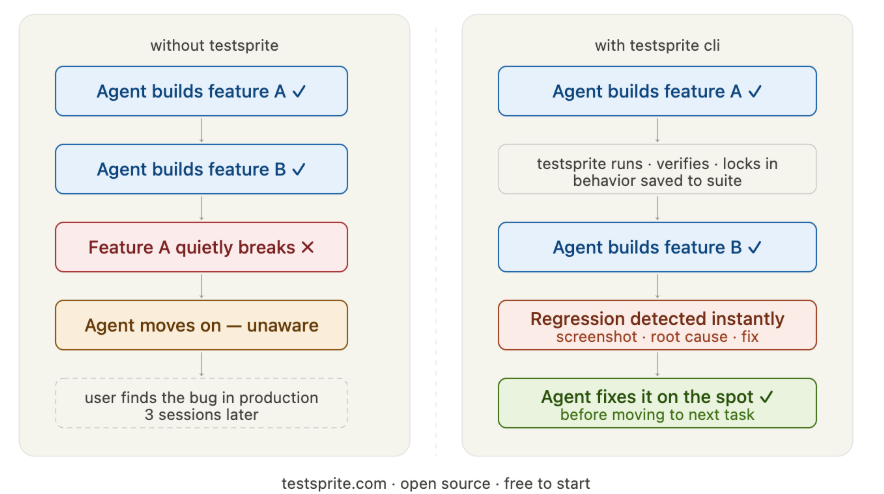
You asked your coding agent to add a checkout flow. It did. You moved on. Two hours later, you realized the login page stopped working — and the agent had no idea.
This is not a model problem. It is a verification problem. And it happens to every team using AI agents at scale.
The Pattern You've Seen Before
Here's how it usually goes. Your agent builds something, tests pass (or there are no tests), it reports the feature complete. You move to the next task. The agent, now operating with a compressed context window, no longer holds the full picture of what it built an hour ago.
Then it changes something related. The logic shifts. An import breaks. A form stops submitting. The agent doesn't notice because it was never watching.
By the time you catch it, the regression is three sessions deep and hard to trace.
This isn't a bug in your agent. It's a structural limitation baked into how large language models work.
Why AI Agents Are Wired to Regress
Every AI coding agent — Claude Code, Cursor, Cline, Codex — runs inside a context window. That window has a hard size limit. As a session grows, the model compresses older information to make room for new instructions.
The requirement you gave it two hours ago? It may still be in the window. It may not. The agent can't tell you which.
This creates three failure modes that repeat across every team that ships with AI agents:
Requirement drift. The agent forgets a constraint you stated early in the session and builds something subtly wrong. The code looks correct. The feature works in isolation. But it violates a rule the agent no longer remembers.
Silent regression. The agent builds feature B and quietly breaks feature A. Without a test watching feature A, neither you nor the agent will know until a user finds it.
Hallucinated completion. The agent reports a task as done. It wrote the code, the code compiled, the function exists. But when a real user navigates to that page, nothing works. The agent never actually ran the app.
These three failure modes compound. The longer an agent session runs, the more likely any one of them appears — and the harder it becomes to recover.
Why Traditional Testing Tools Don't Solve This
The natural response is to add tests. Set up Playwright. Write some Cypress specs. Run them in CI.
This works well when developers write the tests. It does not work well when you're trying to close a real-time feedback loop with an autonomous agent mid-session.
The problems:
- Someone has to write the tests. If your agent is writing the test code too, you now need it to maintain two things in sync: the feature and the tests for the feature. When context gets compressed, one of them slips.
- CI runs after the fact. By the time a pipeline catches a regression, the agent has already moved on. Unwinding three tasks of progress is painful.
- Mocks lie. Many test setups mock the database, the API, the browser. The mock passes. The real app fails. The gap only shows up in production.
What you actually need is a tool the agent can call on its own, mid-build, that runs the real app and reports back immediately.
The Right Mental Model: Verification as a Feedback Loop
Think of it this way. A human developer writes code, runs it in a browser, and sees whether it works. That tight loop — write, run, observe, fix — is what keeps quality high.
AI agents are missing that loop. They write code and assume. They don't run the browser. They don't observe the output. They infer completeness from the shape of the code, not from the behavior of the running app.
TestSprite CLI closes that loop. It gives the agent a tool to call itself, mid-build, that runs real end-to-end flows in a live browser and returns a structured report the agent can read and act on immediately.
No human in the loop. No waiting for CI. The agent writes code, calls TestSprite, reads the result, fixes the issue, and continues — all within the same session.
How TestSprite Works in Practice
Take a shopping site as an example. You ask your agent to build a checkout flow. Before reporting the task complete, the agent calls TestSprite. Here is what happens:
- TestSprite spins up a real browser in the cloud
- It logs into the app with a test account
- It searches for a product, adds it to the cart, proceeds to checkout, fills in payment details, and submits the order
- It confirms the order confirmation page actually rendered with the correct order number
If any step fails — the cart button doesn't respond, the payment form returns an error, the confirmation page is blank — TestSprite captures the exact failure point: a screenshot, the DOM state, a root-cause hypothesis, and a recommended fix.
All of that goes back to the agent, which reads the report and fixes the issue on the spot.
The whole flow runs in real infrastructure. Not a mock. Not a simulation. The same paths a real user would take.
The Compounding Advantage: Tests as Persistent Memory
Here is the part that matters most for long-running agent sessions.
Every behavior TestSprite verifies successfully gets locked into a growing test suite. The first time the agent proves that login works, that test is saved. The first time checkout is confirmed end-to-end, that test is saved.
Now those verified behaviors live outside the context window. The agent's memory may shrink and compress, but the test suite doesn't. It holds the full history of what the project is supposed to do — hundreds of requirements, far more than fit in any context window.
Every subsequent change gets validated against the entire suite. If something that was proven correct in session one breaks in session four, TestSprite flags it immediately. The agent fixes it before moving on.
Progress stops leaking. Requirements stop drifting. The agent gets better, not just busier.
Getting Started in Under a Minute
Setup is three commands:
npm install -g @testsprite/testsprite-cli
testsprite config set-key YOUR_API_KEY
testsprite agent install
The last command registers TestSprite with your agent's tool list. After that, the agent calls it on its own. You don't run another command. You watch the portal as the session runs — every test generated, every recording, every root cause, all logged and browsable.
A free tier is available with 150 credits per month, enough to integrate TestSprite into a real project and see how your agent performs with a verification layer in place.
The Bottom Line
Your AI coding agent is not breaking things because it is bad at coding. It is breaking things because it has no way to confirm that what it built actually works — and no memory of what it already proved correct.
TestSprite CLI gives it both. A real-time feedback loop that catches failures the moment they happen, and a persistent record of verified behavior that outlasts any context window.
Regressions don't have to be the cost of moving fast with AI agents. With the right verification layer, they become the exception — caught and fixed before they ever reach you.
Get started: github.com/TestSprite/testsprite-cli