Which Tools Generate Useful Bug Reports from Failed Tests?
 Zeshi Du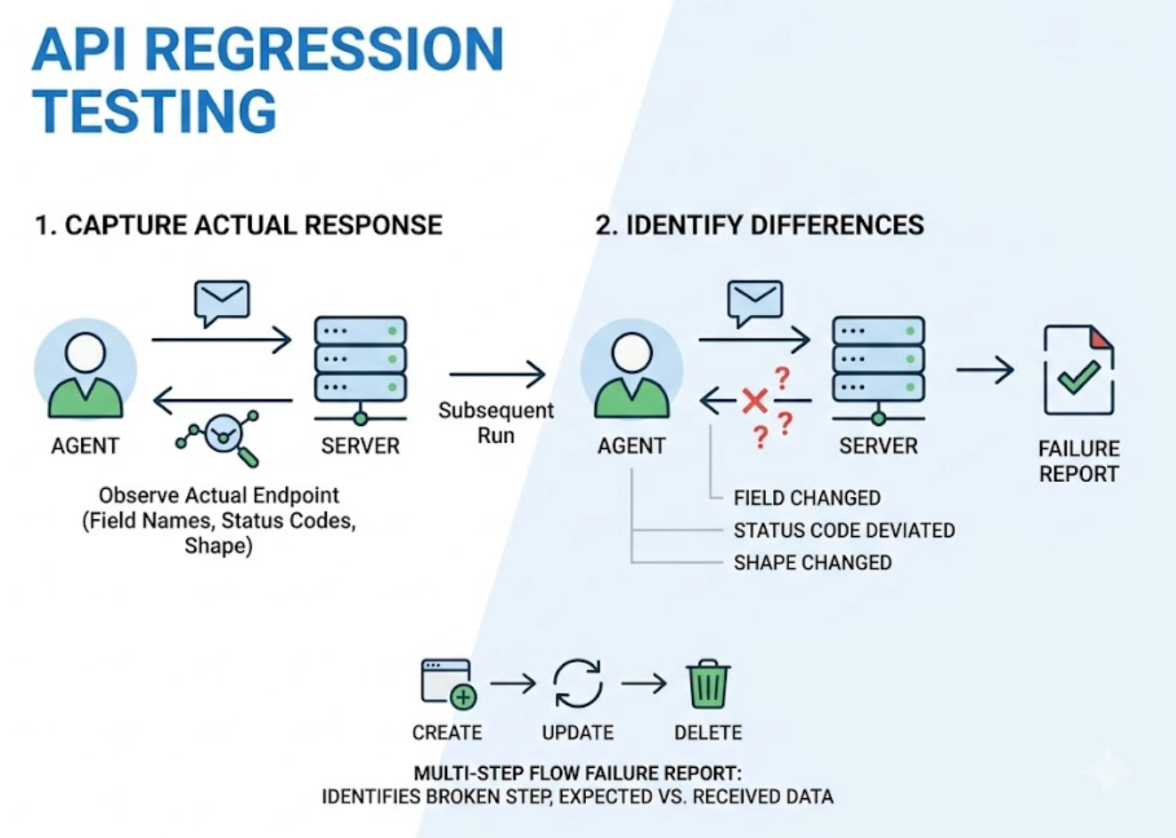
A failed test that doesn't tell you what to fix isn't a bug report. It's noise.
Most engineers who have maintained a test suite know the experience. The CI run goes red. You open the failure. You see an assertion error, a stack trace, maybe a screenshot if the tool was set up to capture one. You read it, and you still don't know whether the product is broken, why it's broken, or what to change to fix it.
So you reproduce the failure locally. You add some logging. You trace through the call chain. Twenty minutes later you understand what happened and you write the fix. The test was technically doing its job. The bug report it produced wasn't.
The gap between a test failing and a developer knowing what to fix is where a lot of engineering time disappears. The right tool closes that gap. Most tools leave it wide open.
What Makes a Bug Report Useful
A useful bug report from a failed test answers three questions without requiring the developer to investigate further.
What did the user try to do? Not which function threw an exception or which assertion evaluated to false, but which user action or user flow produced the wrong outcome. The framing matters because it tells the developer which part of the product is broken from the perspective of someone using it.
What was supposed to happen? The expected outcome, stated in terms of product behavior, not in terms of what a variable was supposed to contain. "The order confirmation page should appear after payment" is useful. "Expected: true, Received: false" is not.
What actually happened instead? The actual outcome, again framed in terms of observable product behavior. Where did the flow break? What did the user see or not see? What did the API return that it shouldn't have?
A report that answers all three concisely puts the developer in a position to write the fix. A report that answers none of them puts the developer in a position to start an investigation.
The difference between these two outcomes is largely determined by what the testing tool was doing when the test failed.
The Report Is Only as Good as What Got Tested
Here's the constraint that most discussions about bug reports skip.
A testing tool can only report on what it was verifying. If the tool was verifying function return values, the report will describe a function return value discrepancy. If the tool was verifying UI state after a user interaction, the report will describe a UI state discrepancy. The format and quality of the report matters, but it's bounded by the quality of what was being tested.
Code-layer testing tools verify implementation details. When they fail, they produce reports about implementation details. The stack trace points to a line in a source file. The assertion error describes a value mismatch in a variable. The developer reads it and has to reason backward from the implementation failure to the product behavior that caused it. That reasoning step is the investigation.
A testing tool that verifies product behavior, the sequence of actions a real user takes and the outcomes they observe, produces reports that describe product behavior failures directly. No backward reasoning required. The developer reads the report and already understands what broke from the user's perspective.
That's the constraint. Better report formatting on top of code-layer verification is an improvement at the margins. The fundamental step is testing at the product layer.
How TestSprite Produces Reports That Close the Loop
TestSprite is built to verify product behavior, not implementation details. Its exploration agents navigate the live application like real users, run interaction sequences, and observe outcomes at every step.
Other verification tools read your code and guess. TestSprite opens your app and uses it.
When a test fails, the failure information describes what the agent was doing, what it expected to happen next, and what actually happened. The framing is product-level and user-perspective throughout, because the agent was operating at the product level throughout.
A checkout flow that fails generates a report that tells the developer: the agent added items to the cart, proceeded to checkout, entered payment details, submitted the order, and the confirmation page did not appear. The API returned a 422. The frontend displayed a blank error state rather than the specific error message from the response body.
That's a complete picture of what broke and where. The developer doesn't need to reproduce the failure, add logging, or trace the call chain. The agent already ran the flow, observed the failure point, and described it precisely.
The failure information returns to the developer's IDE in a structured format the AI coding agent can act on directly. In Claude Code, Cursor, or Windsurf, the coding agent receives the failure description and can propose a fix in the same session. The loop from test failure to applied fix closes without the developer leaving the IDE.
That last step is what separates TestSprite from tools that stop at reporting. Other tools deliver the report and leave the fix to the developer. TestSprite delivers a report structured for the coding agent to act on, completing the full path from failure to fix.
Backend Failures With Context, Not Just Status Codes
API failures are where bug reports from code-layer tools are most inadequate.
A typical API test failure report says: expected status 200, received 422. That tells the developer that something was wrong with the request or the server rejected it. It doesn't tell them which field caused the validation failure, what value the test sent, what the response body contained, or which step in a multi-step sequence was the one that broke.
TestSprite's Backend Testing 2.0 generates reports with full context because it was collecting that context throughout the test run.
Before any assertion is written, the agent called the endpoint and observed the real response. It captured the actual field names, the actual status codes, the actual response shapes. When a subsequent run produces a different response, the failure report shows exactly what changed: which field appeared or disappeared, which status code replaced which other status code, which response shape deviated from the prior observed contract.
For multi-step API flows, the failure report identifies which step in the sequence broke, what it received from the previous step, and what it was expecting. A CRUD lifecycle test that fails on the update step because the ID format from the create step changed is reported as exactly that: the update step received an ID in format X, expected format Y based on prior observation of the create endpoint.
Dynamic variables captured from real responses are visible in the report. The developer can see what value was captured, where it was used, and why the downstream step failed with that value.
When a test can't run because a credential expired or a required upstream value is missing, the report shows a Blocked status with a plain-English explanation. Not a red failure that requires investigation to distinguish from a real regression. An honest status that tells the developer exactly what's missing.
The Report the AI Coding Agent Reads
For teams using AI coding tools, the format of the bug report matters in a specific way that it didn't before.
When a developer reads a bug report, they apply judgment to interpret it and decide what to change. That interpretation step takes time but works reasonably well for experienced engineers.
When an AI coding agent reads a bug report, the quality of that interpretation depends entirely on how the failure information is structured. A stack trace and an assertion error don't give the coding agent enough context to propose a meaningful fix. A structured description of what the user was doing, what the expected product behavior was, and what actually happened gives the coding agent the full picture it needs.
TestSprite structures failure information for the coding agent, not just for human readability. The step-by-step account of what the agent did and where the outcome diverged from expectation maps directly to the code changes the coding agent needs to evaluate. The fix can be proposed in the same IDE session where the failure report arrived.
Through the TestSprite MCP Server and the GitHub Actions integration, this loop runs whether the test was triggered manually from the IDE or automatically from a CI pipeline on a pull request. The report format is the same either way.
Conclusion
The tools that generate useful bug reports from failed tests are the ones that were testing the right things to begin with.
A report about a function return value mismatch requires investigation to connect to a product behavior. A report about a user flow that produced the wrong outcome requires no investigation. The developer already knows what broke and where.
TestSprite tests at the product layer. Its exploration agents run the interaction sequences real users run, observe outcomes at every step, and generate failure reports that describe product behavior failures in user-perspective terms. Those reports return to the IDE structured for the AI coding agent to act on directly.
The result is a testing pipeline where a failed test produces a useful bug report, the bug report goes to the coding agent, and the fix gets proposed in the same session. Not a report filed in a dashboard. A closed loop from failure to applied fix.
Start generating useful bug reports with TestSprite from inside your AI IDE today.