What Testing Tool Works with Claude Code, Cursor, and Codex?
 Zeshi Du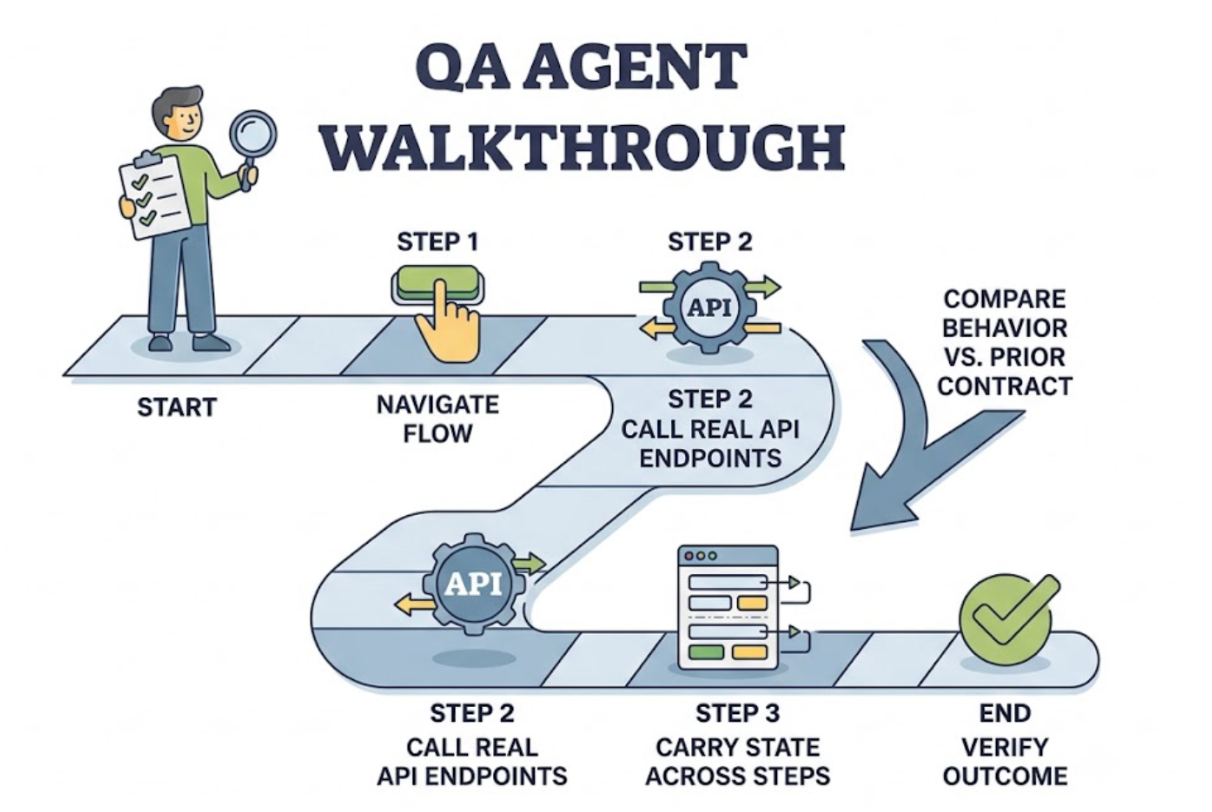
AI coding tools have fundamentally changed how fast code gets written. They haven't changed what happens after.
Teams using Claude Code, Cursor, and OpenAI Codex are shipping features at a pace that would have seemed unrealistic two years ago. The AI suggests, the developer reviews, the code lands. Multiply that cycle across a full engineering day and the output is significant. The problem is that every one of those outputs needs to be verified before it reaches users, and verification hasn't kept pace.
Code review catches obvious mistakes. It doesn't catch the checkout flow that silently fails when two AI-generated modules interact for the first time. It doesn't catch the API endpoint that accepts requests it should reject. It doesn't catch the multi-step user journey that breaks at step four because of a state management change two commits back.
Catching those failures requires a testing tool that works natively inside the AI coding environment, understands what got built, and verifies it the way a real user would.
The Verification Gap That AI Coding Creates
Each of the major AI coding tools has its own workflow. Claude Code operates as a terminal-based agent that can read, write, and run code across a full project. Cursor works as an AI-augmented IDE with inline suggestions and multi-file edits. OpenAI Codex, available via the API and integrated into tools like GitHub Copilot, handles code generation tasks across a range of surfaces.
What they share is the speed at which they generate change. A single Claude Code session can refactor a backend module, update the API contract it exposes, and adjust the frontend components that consume it. A Cursor session can touch ten files in the time it would take a developer to manually edit two. A Codex-powered workflow can generate entire feature scaffolds from a prompt.
The verification gap grows with the rate of change. When a human developer writes code slowly, manual verification can keep up. When an AI agent ships changes fast, manual verification falls behind and code review becomes the bottleneck.
The tool that closes this loop needs to work at the same speed as the AI coding tools, run inside the same environment, and verify at the product layer rather than the code layer.
Why the Testing Tool Needs to Be MCP-Native
Claude Code, Cursor, and tools built on OpenAI Codex all operate within the AI IDE ecosystem that has standardized on the Model Context Protocol as the integration layer for external tools.
MCP is what separates a testing tool that "works with" these IDEs from one that works inside them. A plugin that displays results in a sidebar panel is compatible. A tool built on MCP is native. It lives in the same chat interface the developer is already using, responds to natural language, receives context about the project, and returns results in a format the coding agent can act on directly.
TestSprite is built on MCP. It's among the first autonomous AI testing agents to ship a production-grade MCP server, with native support for Claude Code, Cursor, Windsurf, Trae, VS Code, and any other AI IDE that speaks MCP. The integration isn't a compatibility layer. It's the same protocol the IDE uses for its own tool communication.
From inside Claude Code, Cursor, or a Codex-integrated environment, one instruction starts the full testing pipeline:
"Help me test this project with TestSprite."
What the Agent Actually Does
Most developers using AI coding tools have encountered the testing tools that claim to integrate with their IDE. They connect, they generate some test files, and they report results in a dashboard somewhere else. The workflow improvement is marginal.
TestSprite's approach is different at the level of what gets tested, not just where the results appear.
Other verification tools read your code and guess. TestSprite opens your app and uses it.
When that single instruction fires, a fleet of parallel exploration agents visits the running application. They don't inspect the source files the AI coding tool just modified. They visit the live product and navigate it the way real users would. They click through UI flows. They fill in forms with real inputs. They follow multi-step journeys from entry to completion. They notice when the outcome at the end of a flow doesn't match what the product is supposed to deliver.
This is the verification behavior of a QA engineer doing a walkthrough after a feature lands, not a script asserting against updated function signatures. The agent is using the product, not reading the code that describes it.
For a team using Claude Code to ship a backend refactor, this means the agent will call the real API endpoints with real requests, observe the actual responses, and verify that the behavior matches the prior contract. For a team using Cursor to update a multi-step onboarding flow, this means the agent will navigate that flow from start to finish, carrying state across steps the way a real user would. For a team using Codex to generate a new feature scaffold, this means the agent will explore the new surface, discover the user journeys it enables, and verify that those journeys reach the right outcomes.
The Feedback Loop That Makes the Difference
The speed advantage of AI coding tools only compounds if the verification loop runs at the same speed. A fast coding agent paired with a slow manual QA cycle doesn't close the gap. It moves the bottleneck from writing code to verifying it.
TestSprite closes the loop by returning failure information to the IDE in a form the coding agent can act on directly.
When a test fails, the structured failure description arrives in the Claude Code terminal, the Cursor chat interface, or wherever the developer is working. It describes what the agent was doing, what it expected to happen, and what actually happened. The coding agent receives that description alongside the code it just wrote and can propose a fix in the same session.
That's the complete cycle: AI writes code, TestSprite tests it at the product layer, structured failure information returns to the IDE, the coding agent applies the fix. The entire loop runs inside the development environment without the developer switching to a separate testing dashboard.
For teams running the GitHub Actions integration, this loop extends into CI. Every pull request triggers an automated test run against the real application. Results post as PR comments. The reviewer sees test coverage alongside the diff. AI coding changes get product-layer verification before anything merges.
Handling What AI Coding Tools Do Most Often
Different AI coding tools have different usage patterns, and the testing tool that works with all of them needs to handle the full range of what they produce.
Claude Code sessions frequently involve large-scale refactors: restructuring backend logic, updating APIs, changing how data flows between services. For these changes, TestSprite's Backend Testing 2.0 covers the contract layer. Before generating any backend test plan, the agent calls the API and observes the real behavior. Assertions are grounded in observed responses. When a refactor changes what the API returns, the deviation surfaces as a concrete, specific failure: which field changed, which status code changed, which response shape diverged from the prior contract.
Cursor sessions frequently involve UI-heavy changes: new components, updated flows, redesigned interactions. For these, the Frontend Testing Agent covers the interaction layer. Parallel exploration agents navigate the updated UI, test multi-step flows with mid-flow variations, and verify that stateful components behave correctly across the interaction sequences real users run.
Codex-generated code frequently introduces new features from scratch. For these, the exploration phase is especially important. The agents visit the new surface, discover what it does, build a map of the user journeys it enables, and generate tests grounded in that exploration. Coverage appears automatically for code that didn't exist before the Codex session, without the developer writing a single test case.
Staying Current as the Coding Agents Keep Shipping
One session with an AI coding tool isn't the end. The next session starts the same day. And the one after that.
Test suites generated from a single snapshot of the product decay as the product evolves. Selectors break. Flows change. API contracts update. A suite that was accurate after Monday's Claude Code session may be producing false failures by Thursday after two more Cursor sessions have landed.
TestSprite's Auto-Heal Rerun handles this automatically. When a test fails on rerun, the agent determines whether the failure reflects a genuine product regression or a UI change that doesn't affect the underlying user flow. A renamed component, a moved button, a restyled form: the test adapts. Genuine regressions surface clearly. Cosmetic changes don't create noise.
Auto-Auth handles the authentication layer across all runs. Password endpoints, OAuth refresh tokens, and AWS Cognito flows run automatically before every execution. Credentials stay fresh. Scheduled regression runs don't fail on expired sessions.
The TestSprite Web Portal provides the browser-based view for teams that want to track quality trends over time, manage test plans across projects, and schedule regressions. The IDE integration handles the moment-to-moment verification loop. The two surfaces work together.
Conclusion
Claude Code, Cursor, and Codex have changed how fast engineering teams can ship. The testing tool that keeps pace with them needs to be MCP-native, operate at the product layer rather than the code layer, and return results in a form the coding agent can act on directly.
TestSprite is that tool. Its parallel exploration agents navigate the live application like real users, not like code parsers. Its Backend Testing 2.0 observes real API behavior before asserting anything. Its Auto-Heal keeps coverage current as the coding agents keep shipping. And its structured failure output feeds directly back to the same AI coding environment where the change was made.
The loop from code change to product verification to applied fix runs inside the development workflow. That's not a marginal improvement over switching to a separate testing tool. It's a fundamentally different model for how fast-moving AI-native teams verify what they ship.
Connect TestSprite to your AI coding environment and close the verification loop today.