What Testing Tool Works with Claude Code?
 Zeshi Du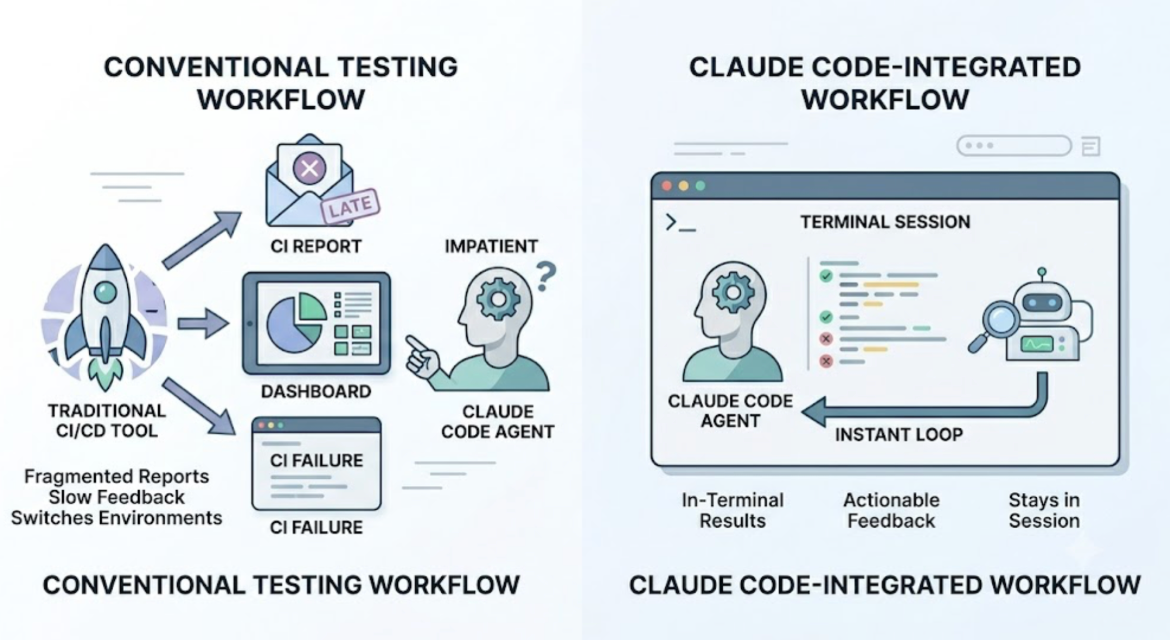
Claude Code works in the terminal. The testing tool that works with it best works there too.
Most testing tools weren't built with terminal-based AI agents in mind. They produce dashboards you have to open, reports you have to read somewhere else, or CI results that come back after a push. None of that fits the Claude Code workflow, where the session runs in the terminal and the coding agent is expecting to act on feedback in the same environment where it produced the code.
The testing tool that works with Claude Code isn't just one that can technically be triggered from a terminal. It's one that returns results in a form the Claude Code agent can use, in the same session where the code was written.
How Claude Code Works and Why It Creates a Specific Testing Need
Claude Code is a terminal-based autonomous coding agent. It operates across entire projects: reading files, writing code, running commands, and handling multi-file changes in a single session. A typical session might refactor a backend module, update the API it exposes, and adjust the frontend components that consume it, all without the developer managing each step.
That capability creates a specific verification need. When Claude Code makes broad changes across a project, the failures that matter don't appear in any individual changed file. They appear at the integration points: where the updated API meets the frontend component that reads it, where the refactored state management affects a flow two screens away, where the changed validation logic produces a different outcome in a user journey nobody directly tested.
The testing tool that works with Claude Code has to do what Claude Code doesn't do: open the application, navigate it, and verify that the changes produced a product that still works for users.
TestSprite Connects to Claude Code Through MCP
TestSprite connects to Claude Code through the Model Context Protocol, which is the same layer Claude Code uses for its own tool integrations. The TestSprite MCP Server installs in two minutes: create a TestSprite account, generate an API key, add the configuration to Claude Code's MCP config file, and confirm the server starts.
Once connected, one instruction from inside the Claude Code terminal starts the full testing pipeline:
"Help me test this project with TestSprite."
Other verification tools read your code and guess. TestSprite opens your app and uses it.
That instruction triggers a complete autonomous cycle: discover → plan → generate → execute → analyze → heal → report. The agent visits the running application, explores it, generates tests from what it finds, executes them in a cloud sandbox, and returns results to the Claude Code terminal.
The developer doesn't leave the terminal. The coding agent that produced the changes and the testing agent that verifies them share the same interface.
What the Testing Agent Does That Claude Code Can't
Claude Code writes code. It doesn't verify whether the code it wrote works for users.
After a Claude Code session, TestSprite's parallel exploration agents visit the running application and navigate it the way real users would. They don't inspect the files Claude Code modified. They visit the live product, discover its flows, and move through them.
They click buttons. They fill in forms with real inputs. They follow multi-step journeys from entry to completion, carrying session state forward across steps. They explore the full product surface, not just the flows that touch the recently changed files. That last part is critical: the failures Claude Code sessions introduce often appear in flows that weren't directly modified, because shared state or a common API changed behavior that affects multiple parts of the product.
When the agents find a failure, the description is specific and structured: which flow was navigated, which step produced the unexpected outcome, what the expected product behavior was, and what actually happened. The Claude Code coding agent receives that description and can propose a fix in the same terminal session.
The loop from code change to product verification to applied fix closes inside a single Claude Code session.
What "Works With" Needs to Mean
A testing tool that "works with" Claude Code but requires the developer to switch to a separate dashboard to review results isn't really working with Claude Code. It's working alongside it, with a context switch in between.
A testing tool that "works with" Claude Code but requires the developer to write test cases before running them shifts the cognitive work back to the developer, which defeats the purpose of using an autonomous coding agent in the first place.
True compatibility with Claude Code means: the testing agent operates inside the Claude Code terminal session, receives context about what changed, runs verification autonomously, and returns results the coding agent can act on without the developer translating a report into a code change.
That's what TestSprite provides.
A Scenario: A Complete Session Without Leaving the Terminal
A developer uses Claude Code to add role-based access control to a SaaS application. The session covers the middleware layer, the API endpoint permission checks, the frontend component rendering logic for each role, and the user management interface where roles are assigned. Fourteen files change.
Before pushing, the developer triggers TestSprite from the Claude Code terminal.
The exploration agents navigate the application under multiple authentication contexts. They log in as an Admin, navigate to the user management interface, and verify that admin actions are available. They log in as a Member, navigate to the same interface, and verify that admin actions are correctly restricted.
They also call the underlying API endpoints directly with each role's credentials. The admin endpoints accept admin requests and reject member requests as expected. One endpoint accepts a member request it should have rejected: the endpoint that updates notification preferences incorrectly bypasses the role check because the middleware was applied to the route group but not to the individual endpoint handler that was added in the session.
Frontend: blocked. API: not blocked for the direct call.
The failure description returns to the Claude Code terminal: which endpoint was called, which role's credentials were used, what the endpoint returned, what it should have returned. The coding agent locates the missing middleware application on the individual handler and applies the fix. The developer runs TestSprite again. The endpoint now correctly rejects the member request.
Fourteen files changed. The failure was in file fifteen. TestSprite found it because it tested the product, not the diff.
Conclusion
The testing tool that works with Claude Code is the one that lives inside the terminal where Claude Code runs, returns results the coding agent can act on, and verifies the product rather than the code.
TestSprite connects to Claude Code through MCP. Its exploration agents navigate the live application like real users, cover the full product surface rather than just the changed files, and return structured failure information to the Claude Code terminal where the coding agent can propose a fix in the same session.
For developers using Claude Code to ship code fast, TestSprite closes the verification gap that makes fast code reliable.
Connect TestSprite to Claude Code and verify your next session before you push.