What Is the Best QA Workflow for Claude Code Users?
 Zeshi Du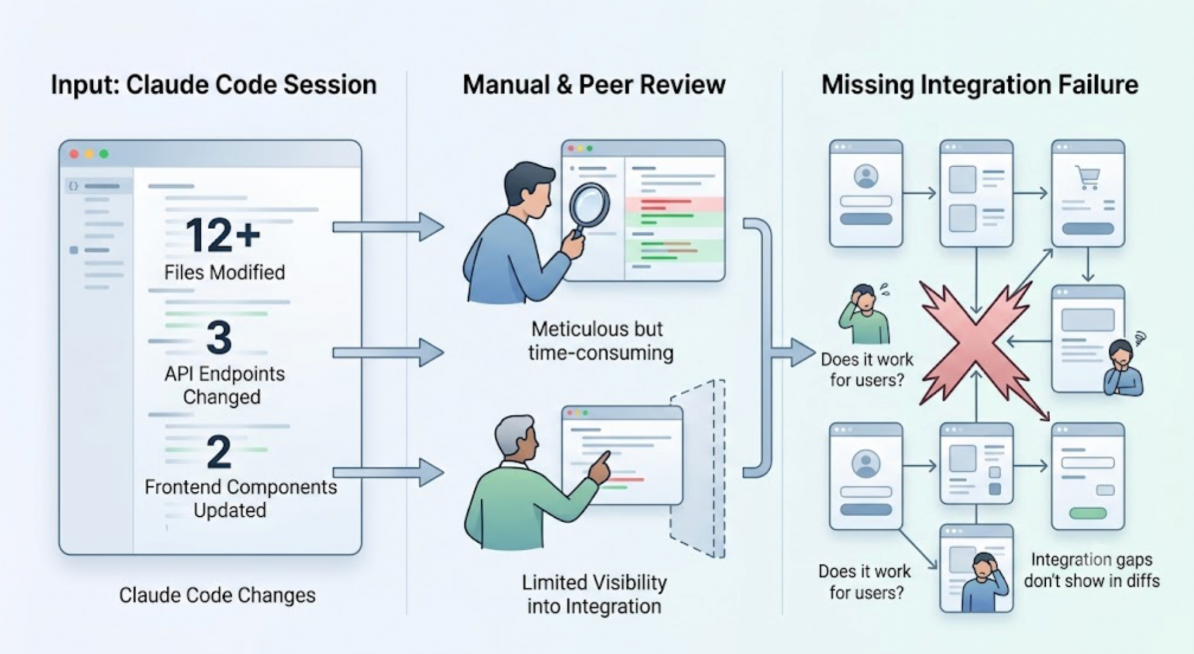
Claude Code users have a specific QA problem. The solution has a specific shape.
The problem: Claude Code sessions generate changes at a pace that manual verification can't follow. A session that touches twelve files, modifies three API endpoints, and updates two frontend components leaves the developer with a lot of code that looks right and a limited way to know whether the product still works correctly for users.
Code review helps. It's not sufficient. The integration failures that matter most after a Claude Code session don't appear in the diff. They appear when a real user runs a flow that depends on all the changed pieces working together correctly.
The best QA workflow for Claude Code users is one that runs at the same speed as the code, operates inside the same environment, and verifies at the product layer rather than the code layer.
Why Most QA Workflows Don't Fit Claude Code
Traditional QA workflows were designed for a different development pace. Code changes happen over hours or days. A QA engineer has time to review the changes, write or update test cases, run them, and report back.
Claude Code changes that pace. A session might produce a week's worth of changes in an afternoon. The QA workflow that follows it needs to respond in minutes, not days.
The other mismatch is environment. Traditional QA workflows involve a context switch: the developer pushes, CI runs, someone opens a dashboard, results come back, the developer reopens the IDE to make fixes. Each round trip adds friction and breaks the cognitive context that connects the code change to the test result.
Claude Code users need QA results to arrive in the same terminal window where the session ran. The coding agent that made the change and the feedback about whether the change worked need to be in the same place at the same time.
The Workflow That Works: Three Stages
The best QA workflow for Claude Code users has three stages that happen in sequence after every significant session.
Stage one: in-session validation. Immediately after the Claude Code session, trigger product-layer verification from inside Claude Code using the TestSprite MCP Server. One instruction. The validation runs. Results come back to the terminal.
Stage two: pre-merge CI verification. When the developer pushes a branch, GitHub Actions automatically triggers the same testing pipeline against the preview environment. Results post as PR comments before anyone reviews the code.
Stage three: scheduled regression. Nightly regression runs verify that no accumulated change has broken a flow that was working before. Results arrive in the morning before the next session starts.
Each stage serves a different purpose. In-session validation catches failures while the code is still fresh in the developer's context. Pre-merge CI verification catches anything that slipped through. Scheduled regression catches the slow regressions that accumulate across multiple sessions.
Stage One in Detail: In-Session Validation with TestSprite
TestSprite connects to Claude Code through the TestSprite MCP Server. Once configured, one instruction from the Claude Code terminal starts the full pipeline:
"Help me test this project with TestSprite."
Other verification tools read your code and guess. TestSprite opens your app and uses it.
A fleet of parallel exploration agents visits the running application after the Claude Code session's changes have been deployed to the staging or preview environment. They navigate the product the way real users would: clicking through flows, filling in forms, following multi-step journeys, carrying session state across steps.
Critically, they cover the full product surface, not just the flows Claude Code touched. The failure that follows a Claude Code session most commonly appears in a part of the product that wasn't directly modified, because shared state, a common API, or a downstream component behaves differently now that something upstream changed.
When tests fail, the structured failure description returns to the Claude Code terminal. The coding agent receives the description and can propose a fix in the same session. The loop from change to test to fix closes before the developer pushes.
Stage Two in Detail: Pre-Merge CI Verification
After in-session validation, the developer pushes the branch. The GitHub Actions integration runs TestSprite automatically against the PR's preview environment.
This catches what in-session validation might miss: failures that only appear on a clean build, failures caused by the interaction between the current branch and main, and failures in flows that weren't covered in the developer's in-session run.
Results post as PR comments. The reviewer sees product-layer test coverage alongside the diff. If a flow broke, it surfaces before the PR is approved. The developer doesn't have to revisit a merged bug; the fix happens before merge.
Auto-Heal Rerun handles the structural false positives that accumulate in an active CI environment. When a UI change in the PR causes a test to fail for reasons unrelated to product behavior, the test adapts. Genuine failures surface clearly.
Stage Three in Detail: Overnight Regression
Nightly regressions run automatically on a schedule without anyone triggering them. Auto-Auth handles authentication automatically: OAuth tokens, password endpoints, and AWS Cognito flows run before every scheduled execution. The tests arrive at authenticated states through the real login flow. Stale JWTs don't cause false failures at 3 AM.
The "Changes vs previous" column shows which tests changed status between the overnight run and the previous one. A test that's been passing for two weeks and suddenly failed is immediately visible as worth investigating. A test that's been consistently passing remains quietly green.
Failure emails include an AI-authored explanation of the cause inline. The engineer who checks the overnight results in the morning doesn't need to log into a dashboard to understand what broke. The information is in the email.
A Scenario: The Three-Stage Workflow Catching Different Failures
A Claude Code session builds out a new multi-tenant project sharing feature. The session covers the sharing permissions UI, the API endpoints that manage access, and the notification emails that fire when a project is shared.
Stage one catches: In-session validation finds that the notification email fires correctly but contains the wrong project name. The session updated how project names are displayed elsewhere in the UI, and the email template was referencing the same display logic but hadn't been updated. The coding agent proposes the fix in the same session.
Stage two catches: The PR's CI run finds that the sharing permissions UI works correctly for projects created after the feature shipped, but produces an error for projects created before the feature. The migration script for existing projects wasn't included in the session's scope. The reviewer sees the CI failure alongside the diff and the developer adds the migration before merging.
Stage three catches: Two weeks later, an overnight regression finds that the sharing notification email now fires when a user edits an already-shared project, not just when sharing for the first time. An earlier Claude Code session modified the project edit handler and introduced a side effect. The issue surfaced in the overnight run before any user encountered it.
Three failures, three different stages. None of them visible in a diff. All of them caught before reaching users.
Conclusion
The best QA workflow for Claude Code users is a three-stage pipeline: in-session validation through the TestSprite MCP Server, pre-merge CI verification through GitHub Actions, and overnight scheduled regressions.
Each stage covers a different category of failure. Together, they close the verification gap that Claude Code's pace creates, without requiring the developer to switch tools, write test cases, or manage a test suite manually.
TestSprite provides all three stages. Its exploration agents navigate the live application like real users, Auto-Heal keeps the suite current as the product evolves, and Auto-Auth keeps scheduled runs reliable without credential management overhead.
Set up TestSprite in Claude Code and run the complete QA workflow after every session today.