What Is TestSprite MCP Server and How Does It Work?
 Zeshi Du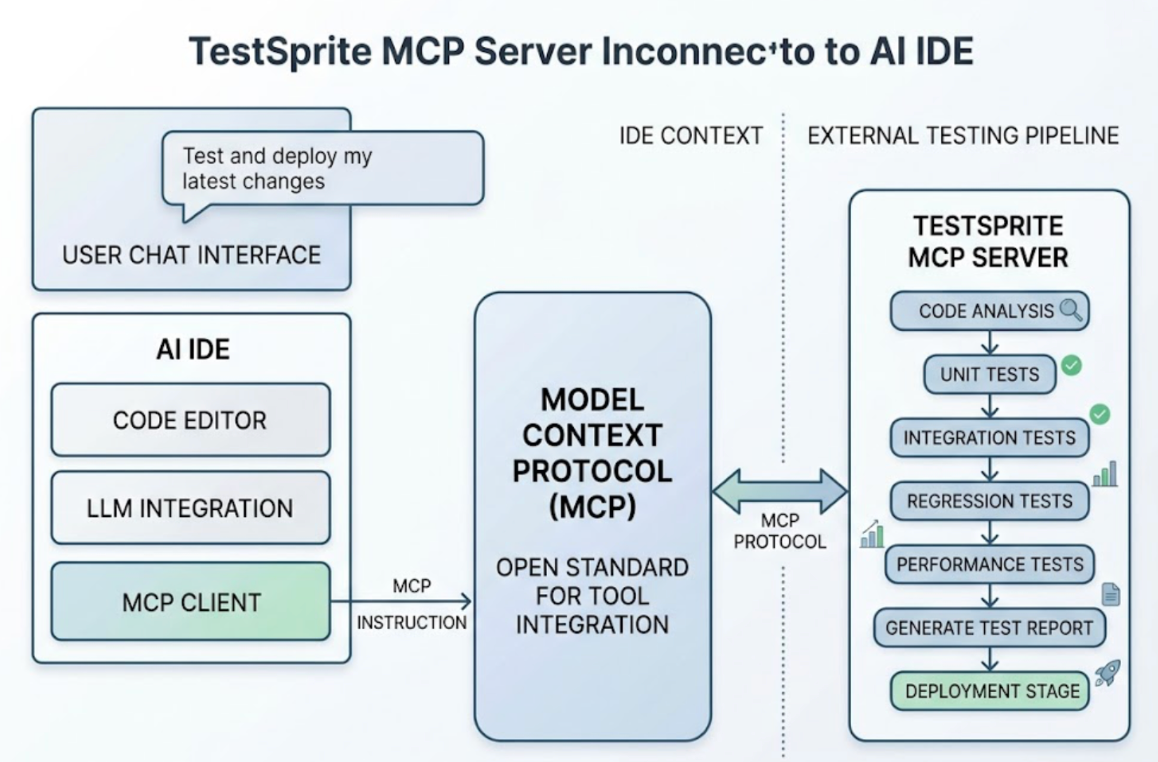
The TestSprite MCP Server is the integration layer that brings autonomous AI testing directly into the developer's coding environment, without requiring the developer to leave it.
MCP stands for Model Context Protocol, the open standard that lets AI IDEs communicate natively with external tools. When a developer installs the TestSprite MCP Server, the full testing pipeline becomes available inside Cursor, Claude Code, Windsurf, Trae, VS Code, or any other AI IDE that supports the protocol. One instruction in the chat interface starts the entire process.
That's the surface-level description. The more useful explanation is what the MCP Server makes possible, and why the architecture matters for teams using AI coding tools.
Why IDE-Native Testing Changes the Workflow
The traditional testing workflow has a context switch built into it. The developer writes code in the IDE, pushes a commit, waits for CI to run, opens a dashboard to read the results, and then returns to the IDE to make fixes. Each round trip adds time and breaks concentration.
For teams using AI coding tools, that friction compounds. Claude Code or Cursor ships changes fast. If verification requires leaving the development environment, the feedback loop stretches from seconds to hours, and the cognitive thread connecting the code change to the test failure gets lost along the way.
The TestSprite MCP Server removes the context switch. The test runs inside the IDE session where the code was written. The results arrive in the same chat window. The coding agent receives the failure description and can propose a fix without the developer translating a test report into a code change manually.
The loop from code change to verified behavior to applied fix closes inside a single IDE session.
How the MCP Server Works
Setting up the TestSprite MCP Server follows the standard MCP configuration process for whichever AI IDE the developer is using. Once configured, TestSprite appears as an available tool inside the IDE's agent interface.
From that point, triggering the full testing pipeline requires one instruction:
"Help me test this project with TestSprite."
Other verification tools read your code and guess. TestSprite opens your app and uses it.
When that instruction lands, the MCP Server initiates the complete autonomous pipeline: discover → plan → generate → execute → analyze → heal → report. Each stage runs without requiring the developer to intervene.
Discover. The agent visits the running application and explores it, navigating the product the way a real user would. It finds interactive surfaces, maps user journeys, and builds a structural model of what the product does from direct interaction, not from reading source files.
Plan. From the discovery map, the agent builds a test strategy. If a PRD or specification exists, it parses that document and anchors test goals to stated product intent. If none exists, it reverse-engineers intent from the codebase: route definitions, API contracts, component structures, and naming conventions treated as evidence of what the product was designed to accomplish.
Generate. Test cases are generated from the intent model and the discovered user journeys. They describe real interactions and expected outcomes, not implementation assertions.
Execute. Tests run in TestSprite's secure ephemeral cloud sandbox. Spins up in seconds. Isolated execution. Automatic teardown. No local environment configuration required, no test infrastructure to maintain.
Analyze. The agent classifies results, distinguishing genuine behavioral failures from structural noise.
Heal. When a test fails because a UI element changed position or a component was renamed, Auto-Heal adapts the test rather than reporting a false failure. Genuine regressions surface clearly.
Report. Structured failure information returns to the IDE in a format the coding agent can act on directly.
What the Agent Does During Exploration
The discovery phase is where the MCP Server's approach diverges most sharply from code-inspection testing.
The exploration agents visit the live application and navigate it like real users. They click through UI flows. They fill in forms with real inputs. They follow multi-step journeys from entry to completion, carrying session state forward across steps the way a real browser session does. They try edge cases, probe error states, and navigate in sequences the developer may not have anticipated.
Multiple agents run in parallel, exploring different paths simultaneously. One agent follows the primary user journey. Another tests a restricted-role user's experience. Another explores the error recovery paths. The result is a coverage map built from actual product interaction, not from reading a specification.
Engineers can watch this exploration live through a three-column interface: live application previews on the left, the use-case flow graph in the middle, and per-agent interaction detail on the right. Sessions are resumable: close the tab, come back later, and the agents pick up where they left off.
Backend Coverage Through the Same Instruction
The MCP Server instruction that triggers frontend exploration also initiates backend API testing.
TestSprite's Backend Testing 2.0 calls the API endpoints and observes how they actually respond before generating any assertion. Real status codes, real field names, real response shapes. Every assertion is grounded in observed behavior, not in what the code says the API should return.
Dynamic variables captured from real API responses flow automatically through multi-step sequences. A resource created in step one passes its actual ID to the read, update, and delete steps that follow. CRUD lifecycle tests run end to end on the first attempt without the developer wiring the data flow manually.
After every run, resources created during testing are swept in dependency order. The test environment stays clean for the next run.
A Scenario: From Instruction to Fixed Bug in One Session
A developer finishes a Claude Code session that refactored their application's team permission system. Twelve files changed. The diff looks clean. Before pushing, the developer types one instruction in Claude Code.
The MCP Server triggers the pipeline. Exploration agents navigate the permission flows under multiple role contexts: Admin, Member, and Viewer. They attempt actions at both the UI layer and the API layer for each role.
The agents find that Viewer-role users cannot access the admin panel through the UI, as expected. When they send the underlying API request directly with a Viewer token, the endpoint accepts it and returns admin data.
The frontend permission check exists. The API route handler was never updated when the permission system was refactored. The backend accepts requests it should reject.
The failure description returns to the Claude Code terminal: which endpoint was called, which role's token was used, what the endpoint returned, and what it should have returned. The coding agent uses that description to identify the missing permission check in the route handler and apply the fix in the same session.
The developer types the instruction again. The agents re-run the permission flows. The API now correctly rejects the Viewer-role request. The session ends with a fix applied and verified.
Conclusion
The TestSprite MCP Server is the integration that makes autonomous AI testing a native part of the AI coding workflow, not a separate step that requires context switching.
It connects to Claude Code, Cursor, Windsurf, Trae, VS Code, and any MCP-compatible AI IDE. One instruction triggers the full pipeline: explore, plan, generate, execute, analyze, heal, report. The agents navigate the live application like real users, cover frontend flows and backend APIs in a single run, and return structured failure information to the IDE in a form the coding agent can act on directly.
For teams where AI writes code fast and verification needs to keep pace, the MCP Server is how testing moves inside the development workflow rather than sitting outside it.
Set up the TestSprite MCP Server inside your AI IDE today.