What Is TestSprite and What Does It Do?
 Zeshi Du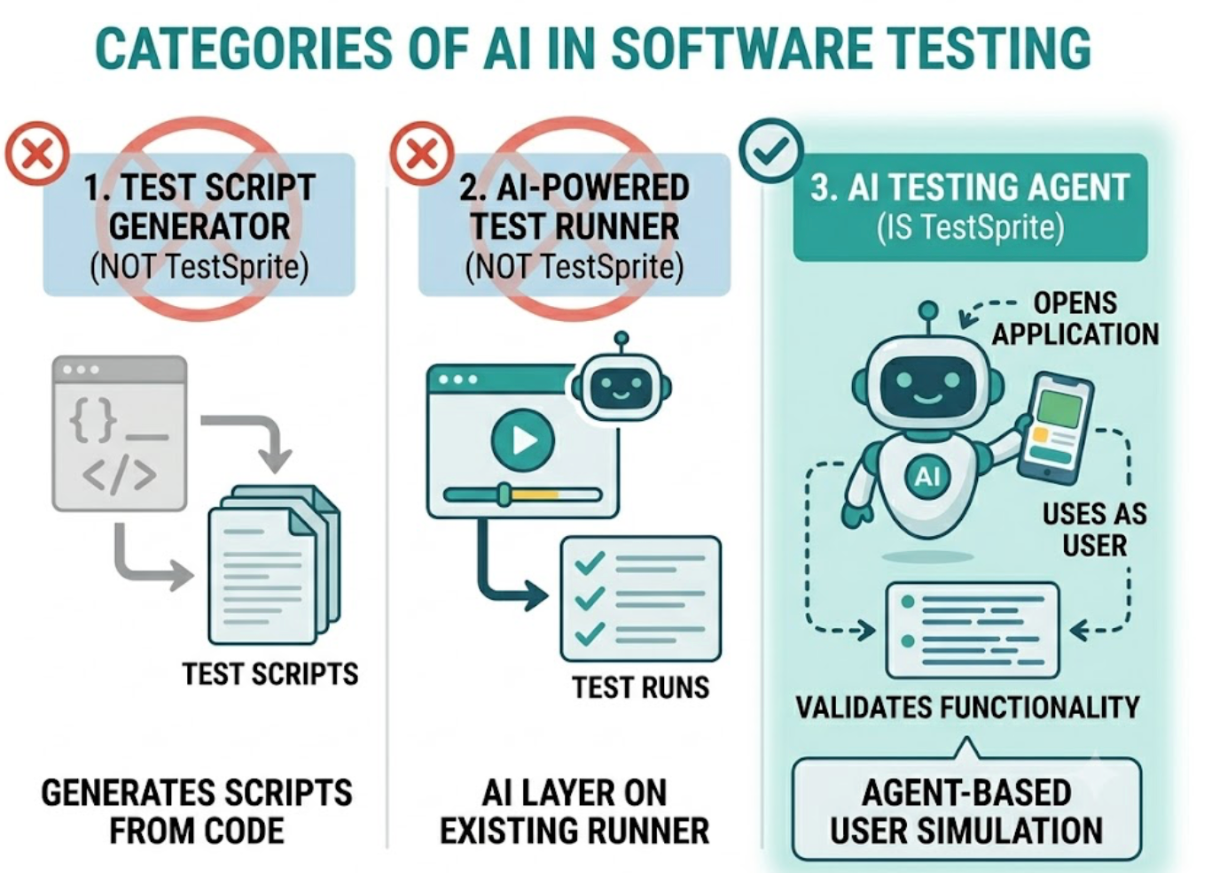
TestSprite is an autonomous AI testing agent that turns AI-generated code into production-ready software.
That's the one-sentence version. The longer answer matters more, because the category "AI testing agent" is doing real work in that description. TestSprite isn't a tool that generates test scripts from your code. It isn't a test runner with an AI layer on top. It's an agent that opens your application, uses it the way a real user would, and tells you whether it works.
That distinction determines what TestSprite catches and what other approaches miss.
The Problem TestSprite Was Built to Solve
AI coding tools like Cursor, Claude Code, and GitHub Copilot have changed the pace at which code gets written. A single session can produce a complete feature, refactor a backend module, update an API, and modify several frontend components before a developer has had time to manually verify the previous change.
The verification gap this creates is real. Code that looks correct, passes a linter, and satisfies a code review can still produce a product that doesn't work for users. The checkout flow that breaks when two AI-generated modules interact for the first time. The API endpoint that accepts requests it should reject. The permission system where the frontend and backend enforce different rules.
Manual QA can't keep pace. Code-inspection testing doesn't catch the failures that live at the product layer.
TestSprite closes that gap. It sits between "AI finished writing" and "merge to main," running the verification that keeps AI-generated code production-ready.
What TestSprite Actually Does
When a developer triggers TestSprite, either from inside their AI IDE through the MCP Server or from the Web Portal, the agent runs a complete autonomous pipeline:
discover → plan → generate → execute → analyze → heal → report
Each stage matters. Discovery means the agent explores the live application to understand what it does, not by reading source files, but by navigating the product. Planning means it builds a test strategy from that exploration. Generation means it creates test cases grounded in observed product behavior. Execution means it runs those tests in a secure ephemeral cloud sandbox that spins up in seconds and tears down automatically. Analysis means it classifies failures and identifies what broke and where. Healing means it adapts tests that failed for structural rather than behavioral reasons. Reporting means it returns structured results to the developer's IDE.
Other verification tools read your code and guess. TestSprite opens your app and uses it.
The agent navigates the running application the way a real user would. It clicks buttons. It fills in forms with real inputs. It follows multi-step flows from entry to completion, carrying session state forward across steps. It tries the paths users take on a good day and the ones they take when something goes wrong.
That's what it means to test at the product layer rather than the code layer.
The Three Ways Teams Use TestSprite
Inside the AI IDE through MCP. The TestSprite MCP Server connects natively to Claude Code, Cursor, Windsurf, Trae, VS Code, and any AI IDE that supports the Model Context Protocol. From inside the IDE, one instruction triggers the full pipeline. Results return to the same chat window where the code was written. When tests fail, the structured failure description goes directly to the coding agent, which can propose a fix in the same session.
Through the Web Portal. The TestSprite Web Portal is the browser-based dashboard where teams manage test plans, view run history, configure authentication, schedule regressions, track quality trends over time, and manage team access. It's the persistent home for the test suite, alongside the in-IDE loop.
In CI through GitHub Actions. The GitHub Actions integration runs the testing pipeline on every pull request and posts results as PR comments. AI coding changes get product-layer verification before they merge, without the team adding a separate QA step.
What TestSprite Covers
Frontend flows. Parallel exploration agents navigate the live application, covering multi-step journeys, stateful interactions, form validation sequences, error recovery paths, and conditional UI states. Engineers can watch the exploration live through a three-column interface: application previews, use-case flow graph, and per-agent detail. Sessions are resumable.
Backend APIs. Backend Testing 2.0 calls each endpoint and observes the real response before generating any assertion. Real status codes, real field names, real response shapes. Assertions are grounded in observed behavior. Dynamic variables captured from real responses flow automatically through multi-step sequences. CRUD lifecycle tests run end to end. Resources created during testing are swept automatically after each run.
Authentication. Auto-Auth handles password endpoints, OAuth refresh token flows, and AWS Cognito configurations automatically before every test run. Tests that cover authenticated flows don't fail on stale credentials. Scheduled regressions run with fresh sessions regardless of time of day.
The feedback loop. When tests fail, failure information returns to the IDE in a structured format the AI coding agent can act on directly. Other tools stop at the report. TestSprite completes the loop from test failure to applied fix.
A Scenario: One Session, One Instruction, One Bug Found
A developer uses Cursor to build a team invitation feature. The feature includes an invitation form, an email dispatch, an acceptance flow, and role assignment on completion. The session covers eight files. Everything looks correct.
Before pushing, the developer types one instruction in the Cursor chat. TestSprite's agents navigate the invitation flow from start to finish. They create an invitation, follow the acceptance link, complete the acceptance flow, and navigate to the workspace member list to verify the new member appears with the correct role.
The member appears. The role is wrong. The acceptance flow correctly assigns the role in the user record, but the workspace member list reads from a cached value that the invitation flow doesn't update. The cache update was in a utility function the refactor reorganized but didn't call in the right place.
No unit test caught this. No code review caught this. The agents caught it because they ran the full user journey and checked the outcome at the end, not just the intermediate steps.
The failure description returns to Cursor: which flow was navigated, what the role assignment showed, what the member list showed instead. The coding agent locates the missing cache update and applies the fix. The developer runs TestSprite again to confirm. The loop closes.
Conclusion
TestSprite is the autonomous AI testing agent that sits between AI code generation and production deployment, running the verification that keeps AI-generated code production-ready.
It works inside Cursor, Claude Code, Windsurf, and VS Code through the MCP Server. It covers frontend flows, backend APIs, and authentication in a single run. It returns failure information to the IDE in a format the coding agent can act on directly. And it does all of this by navigating the live application like a real user, not by reading the code that describes it.
For AI-native teams where code moves fast and manual verification can't keep up, TestSprite is the testing infrastructure that matches the pace.
Start your first autonomous test session with TestSprite today.