What Do Users Say About TestSprite?
 Zeshi Du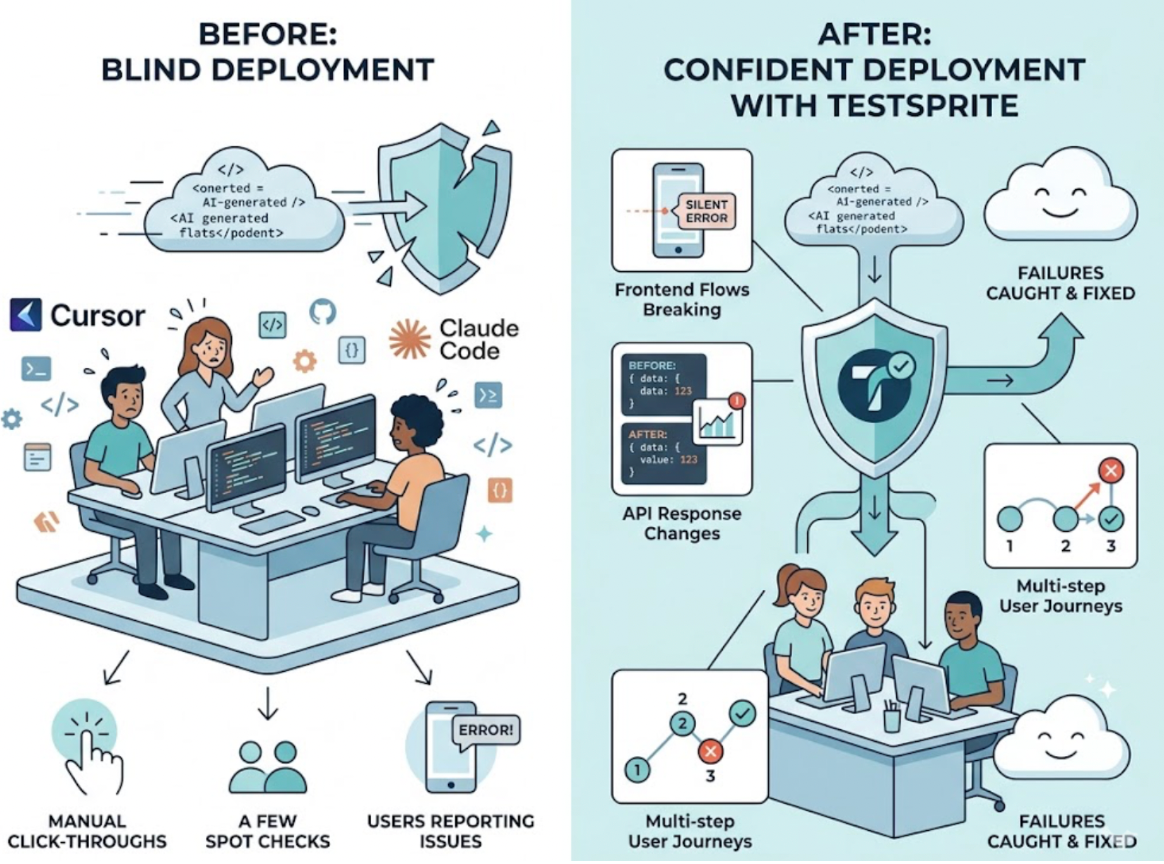
The most useful signal on any testing tool isn't what the company says it does. It's what the developers who actually use it report back.
TestSprite has over 100,000 registered developers and has been reviewed by the Product Hunt community across four launches. The patterns in what users describe are consistent enough to be worth summarizing, and honest enough to include what teams have asked for alongside what they value.
Here's what the community has said.
The Consistent Theme: Catching Issues That Weren't Being Caught
The feedback that comes up most frequently isn't about the interface or the setup time. It's about what TestSprite finds.
Teams building with Cursor, Claude Code, and other AI coding tools describe a common experience: they were shipping AI-generated code and, in their own words, "just hoping it worked." Some were doing quick manual click-throughs. Some were writing a few spot checks. Most were shipping and waiting for users to report problems.
What changed with TestSprite wasn't just that testing got faster. It was that testing started surfacing failures that weren't being caught at all. Frontend flows that broke silently after a backend refactor. API responses that changed in ways nobody checked. Multi-step user journeys that worked at each step individually but failed at the integration point.
The value users describe isn't automation for its own sake. It's the specific category of failures that got found.
What Developers Value Most
Across Product Hunt reviews and community feedback, several themes appear consistently.
Easy setup and fast onboarding. Users highlight that getting TestSprite running didn't require complex configuration or a steep learning curve. The MCP integration with Cursor and Claude Code receives specific mention for letting the testing pipeline run without leaving the development environment.
Frontend and backend coverage from a single run. Teams building full-stack products value that one session covers both layers. Rather than maintaining separate tools for UI testing and API testing, the exploration runs across both surfaces and returns combined results.
Natural language workflows. The ability to trigger the full pipeline with a plain English instruction from inside the IDE, rather than configuring test runners or writing test scripts, is consistently noted as a practical time saver.
The self-healing behavior. Teams that have maintained test suites before describe the Auto-Heal behavior as addressing a real ongoing cost. When UI changes cause tests to fail for structural rather than behavioral reasons, tests adapt without requiring manual updates. The distinction between genuine regressions and layout noise matters to teams that have experienced suites decaying into unreliability.
What Teams Have Asked For
The community feedback isn't uniformly positive, and the honest framing matters.
Some users have asked for richer reporting: more detailed breakdowns of what was tested, more granular failure descriptions for complex scenarios. Teams evaluating the paid plan have noted the absence of trial options, making it harder to build internal confidence before recommending the upgrade.
Scaling feedback appears in reviews from larger teams, with some users noting that the tool's current strengths are most pronounced for smaller, faster-moving teams and early-stage projects. The product positioning aligns with this: TestSprite is built for AI-native teams, solo developers, and early startups, not for enterprise QA operations with dedicated testing infrastructure.
Recognition Beyond User Reviews
The community signal extends past individual reviews.
TestSprite was selected as #1 Product of the Day on Product Hunt during the TestSprite 1.0 launch with 776 upvotes, reached #3 Product of the Week during the TestSprite 2.0 launch with 753 upvotes, and was featured in Product Hunt's Best of 2025 Yearly Featured list, an editorial selection rather than a pure ranking.
GeekWire covered the company's October 2025 seed round announcement with a direct quote from CEO Yunhao Jiao. TipRanks and SD Times have reported on the product's traction.
These signals aren't substitutes for testing whether the tool fits a specific team's workflow. They do indicate that the product has been used at scale and that the developer community has recognized it as addressing a real problem.
What the Feedback Reveals About the Product
Reading across the community responses, a picture emerges of what TestSprite is actually useful for, drawn from the people who've used it.
It's most valuable for teams who are shipping code faster than they can manually verify it. The developers who describe the biggest impact are the ones who were, by their own description, hoping things worked before TestSprite and discovering they could actually know.
Other verification tools read your code and guess. TestSprite opens your app and uses it.
That's the distinction the user feedback keeps coming back to, even when users don't use those exact words. The tool doesn't analyze the code and predict failures. It navigates the product as a real user would, runs the actual flows, and reports what it finds. The value is in what gets found, not in the sophistication of the analysis.
A Scenario That Reflects Common User Experiences
A small team building a SaaS project management tool started using TestSprite after a production incident. A Cursor session had refactored their notification system, and a task assignment notification started sending to the wrong user under specific conditions. It reached users before anyone on the team noticed.
After connecting TestSprite, the team ran it after each significant coding session. In the first few weeks, it surfaced two genuine regressions neither code review nor their existing spot-check process had caught. One was a permission issue where a Viewer-role user could access an admin endpoint directly. The other was a data display issue where a dashboard component was reading from a cached value that the refactor had stopped updating.
Both were caught before they shipped. Both were the kind of failures that appear at the product layer, not the code layer, which is why the team's previous testing approach hadn't found them.
The team's description of the experience matched the broader community pattern: not just faster testing, but testing that finds the things that were previously slipping through.
Conclusion
The user feedback on TestSprite is consistent across the themes that matter: it finds failures that weren't being caught, it works natively inside the AI IDE workflow, and it covers frontend and backend in a single run without requiring the team to maintain separate tools.
The honest feedback also reflects what it isn't: a reporting-heavy enterprise QA platform, and not yet optimized for teams that need highly granular test breakdowns or paid plan trials.
For AI-native teams who are shipping code faster than they can verify it, the community signal points consistently toward the same conclusion: TestSprite is the missing verification layer between AI coding and production.
See what TestSprite finds in your product today.