What Can Teams Do in the TestSprite Web Portal?
Zeshi Du5 min read

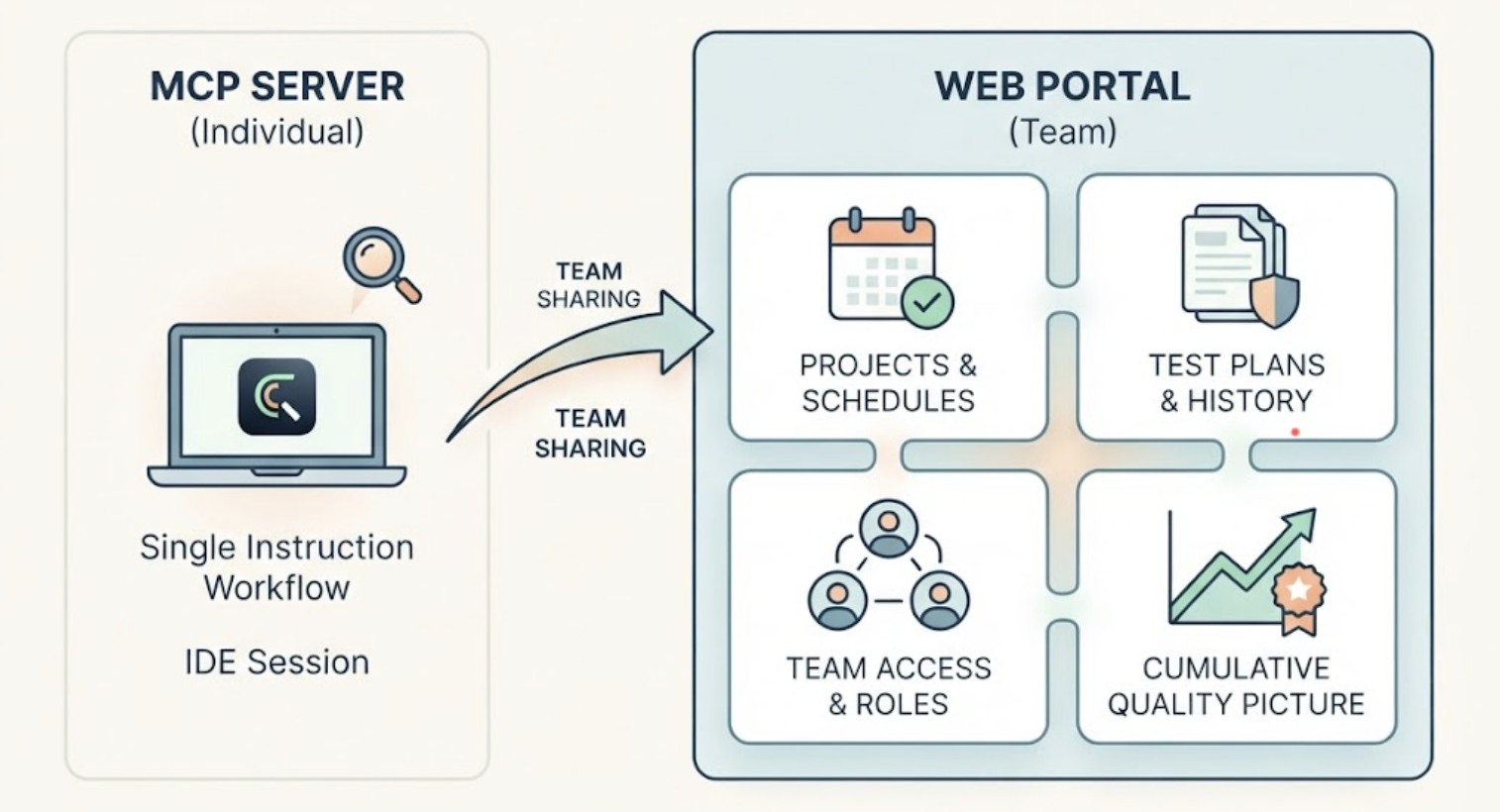
The MCP Server gets most of the attention because one instruction inside Cursor or Claude Code is a compelling workflow. But for teams, the Web Portal is where TestSprite becomes shared infrastructure rather than an individual developer's tool.
The Portal is the browser-based home for everything that outlives a single IDE session: projects, test plans, schedules, run history, team access, and the quality picture that builds across weeks of testing. Here's what teams actually do there.
Manage Projects and Watch Tests Run Live
Each product a team tests lives as a project in the Portal: the application URL, the authentication configuration, and the accumulated test plans and history that belong to it. Teams running multiple products or environments keep them as separate projects with separate histories.
When a frontend test session runs, the Portal's three-column interface shows the work as it happens. Live application previews on the left, showing what the exploration agents are seeing as they navigate. The use-case flow graph in the middle, mapping the journeys being covered. Per-agent detail on the right, showing what each parallel agent is doing at that moment.
Other verification tools read your code and guess. TestSprite opens your app and uses it.
Watching the agents work through the product in the preview grid does something useful beyond monitoring: it builds the team's trust in what the coverage actually is. Sessions are resumable, and individual features can be retried independently without rerunning everything.
Review Test Plans Before They Run
The Plan-Closure Preview gives teams a checkpoint between discovery and execution. Before test generation proceeds, the Portal shows a clear map of which test plans exist, how they depend on each other, and what will be covered.
Engineers can review the proposed coverage, deselect scenarios that aren't relevant for the current run, and see warnings only when something genuinely required is missing. The agents handle the translation from product exploration to test scenarios. The team keeps a review point over what runs.
For teams that provide a PRD, this is where the requirements-to-coverage mapping is visible: which stated behaviors are being verified by which plans.
Set Up Scheduled Regressions
Schedules turn TestSprite from a per-session tool into standing coverage. The Starter plan includes 5 Test Schedules; Standard includes 10, and Pro makes them unlimited.
A typical team setup: a nightly full-surface regression against staging, plus targeted schedules for critical flows at higher frequency. Auto-Auth, configured once per project in the Portal, handles password endpoints, OAuth refresh tokens, and AWS Cognito flows before every scheduled run, so authenticated coverage doesn't fail at 3 AM because a token expired that afternoon.
The morning review is built around the "Changes vs previous" column: which tests flipped status between last night's run and the one before. A test that's been green for two weeks and just failed stands out immediately from a suite-wide scan. Failure emails arrive with an AI-authored explanation of each cause inline, so the engineer triaging over coffee knows what broke before opening a laptop.
Track Quality Trends Across Runs
Every run is logged with its full result set: which flows were tested, which passed, which failed, and what the failure descriptions contained. Over weeks, this history becomes the team's quality picture.
Run history answers the questions teams actually ask. Is the failure rate trending down as we fix things, or up as we ship faster than we verify? Which sections of the product fail most often? Did the regression that appeared last Tuesday correlate with a specific merge?
For teams managing multiple projects, the Portal provides the consolidated view across all of them, per project and in aggregate.
Control Who Can Do What
Team access in the Portal runs on four roles: Owner, Admin, Member, and Viewer. Invitations go out by email, and access control applies at the project level, so a contractor can see the project they're working on without seeing everything else the organization tests.
Audit logs record who did what, which matters for teams with compliance requirements or simply for understanding who changed a schedule or reconfigured authentication. For organizations where testing infrastructure touches sensitive staging environments, the role separation and audit trail are the difference between a tool the security review approves and one it doesn't.
A Scenario: A Team's Week in the Portal
A six-person team building a healthcare scheduling SaaS runs TestSprite as shared infrastructure. Their Portal setup: two projects (the patient-facing app and the clinic admin console), a nightly regression schedule on each, and role-based access with the two contractors scoped to the patient app project only.
Monday morning, the "Changes vs previous" column shows one flip on the admin console: the appointment rescheduling flow, green for three weeks, failed overnight. The failure email's inline analysis already points at the cause: after rescheduling, the clinic's daily capacity counter didn't decrement the original slot, so the day showed one fewer available appointment than reality. Friday's merge had touched the capacity logic.
The lead assigns it in their tracker, and the developer who owns capacity opens the run in the Portal, reads the full navigation context, reproduces it in one click by retrying that feature independently, and fixes it before standup.
Wednesday, a developer finishing a Claude Code session on the patient app triggers a run from the IDE. The Portal's live preview shows the agents working through the new insurance card upload flow. The Plan-Closure Preview had flagged that the flow depends on the profile completion plan, so both run together. Everything passes, and the run joins the project history.
By Friday, the quality trend view shows the admin console's failure rate declining across the month, which goes into the team's sprint review as evidence rather than anecdote.
Nothing about this week required anyone to maintain a test suite. The Portal held the shared state: the schedules, the history, the access boundaries, and the picture of whether the product was getting more reliable.
Conclusion
The Web Portal is where TestSprite works as team infrastructure: projects and live test monitoring, plan review before execution, scheduled regressions with Auto-Auth and morning-ready reporting, quality trends across run history, and role-based access with audit logs.
The MCP Server puts testing inside each developer's IDE. The Portal makes the results, the schedules, and the coverage a shared asset the whole team operates from.
Set up your team's projects in the TestSprite Web Portal today. Free plan available, no credit card required.