What Are the Best Mabl Alternatives for Teams Using Cursor or Claude Code?
 Zheshi Du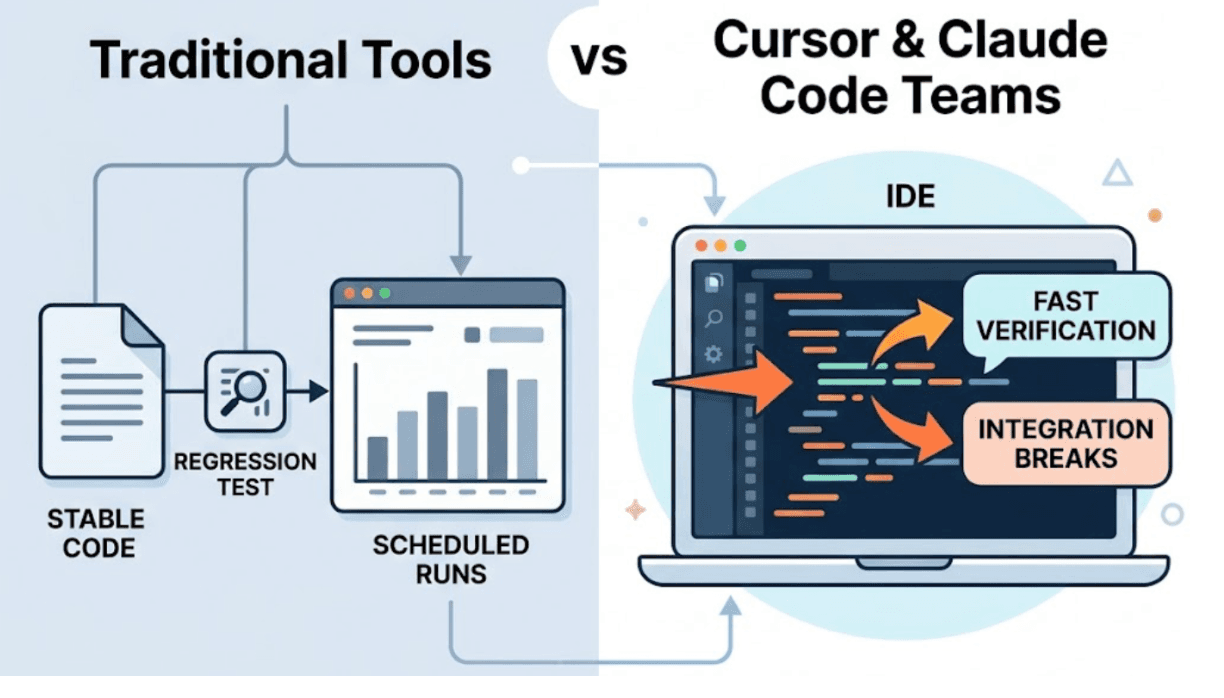
Teams using Cursor or Claude Code to build software have a testing requirement that most general-purpose AI testing tools weren't designed for.
It's not that those tools don't work. Some of them work well for the use cases they were built around: regression testing mature products, maintaining coverage on stable codebases, running scheduled suite runs on known user flows. The problem is that Cursor and Claude Code teams are building differently. The code changes faster. The verification needs to happen inside the IDE, not in a separate dashboard. And the failures that matter most, the integration breaks that live outside the diff, require a testing approach that goes beyond executing predefined specifications.
Finding the right alternative means understanding which of those requirements your team's current tooling doesn't meet, and what to look for instead.
The Specific Testing Requirements of AI Coding Teams
When a developer's primary workflow runs through Cursor or Claude Code, three requirements emerge that separate the right testing tool from a merely capable one.
The loop has to close inside the IDE. Claude Code operates in the terminal. Cursor operates in an IDE chat interface. A testing tool that requires opening a separate dashboard, reading results in a different context, and manually applying fixes breaks the cognitive continuity that makes AI-assisted development fast. The right tool returns results to the same interface where the code was written, in a format the coding agent can act on.
The coverage has to go beyond what's specified. The failures that matter most after a Claude Code or Cursor session are the ones nobody anticipated: the integration break in a shared dependency, the state propagation error that affects a flow two screens away from what was modified. Specification-based testing covers what engineers thought to specify. Exploration-based testing covers the rest.
Backend API testing has to be grounded in real behavior. AI coding agents frequently generate backend code where the running API behaves differently from what the source code appears to specify. A serialization layer applies field naming conventions. A refactor renames fields in some places but not all. Assertions derived from code inspection miss these discrepancies. Assertions derived from observing the real API response catch them.
TestSprite: Built for the Cursor and Claude Code Workflow
TestSprite is an autonomous AI testing agent built specifically for teams whose primary development environment is an AI IDE. Its architecture reflects each of the three requirements above.
The TestSprite MCP Server connects to Cursor, Claude Code, Windsurf, Trae, VS Code, and any MCP-compatible AI IDE through the Model Context Protocol. One instruction from the IDE chat starts the full pipeline:
"Help me test this project with TestSprite."
Other verification tools read your code and guess. TestSprite opens your app and uses it.
When that instruction runs, a fleet of parallel exploration agents visits the running application. They don't read the source files the coding session modified. They navigate the live product the way real users would: clicking through flows, filling in forms with real inputs, following multi-step journeys, observing what happens at each step. The coverage isn't bounded by what was specified. It's bounded by what the product does.
When tests fail, structured failure descriptions return to the IDE. The coding agent receives them and can propose a fix in the same session. The loop closes without a tool switch.
Why Enterprise-Oriented Testing Tools Don't Fit This Workflow
Testing tools designed for enterprise QA operations make a different set of tradeoffs. They optimize for team workflows with dedicated QA engineers, stable codebases with well-maintained test suites, and a development pace where verification can happen as a distinct phase after development.
For teams using AI coding agents, these tradeoffs create friction at every step. Configuration-heavy setup doesn't fit a team that's iterating fast. QA engineer-oriented workflows assume there's someone whose job is to maintain the test suite. Dashboard-first result delivery assumes the developer will leave the coding environment to read results.
These aren't criticisms of those tools. They're the right fit for the organizations they were built for. For teams using Cursor or Claude Code, they're the wrong fit, and the friction shows up in whether the testing actually gets done.
What the Right Alternative Looks Like
The right alternative for a Cursor or Claude Code team provides four things.
Native IDE integration through MCP. Not a plugin. Not a browser extension. The same communication layer the IDE uses for its own tools. TestSprite's MCP Server is how the testing pipeline lives inside the development session rather than alongside it.
Autonomous exploration without specification. The agents discover the product's flows by navigating the application, not by executing a test plan the engineer authored. For new features built in a Claude Code session, there may be no prior specification. The agents find what to test by using the product.
Observation-first backend testing. TestSprite's Backend Testing 2.0 calls each API endpoint and observes the real response before generating any assertion. Real field names. Real status codes. Real response shapes. When an AI coding session changes the backend, the next test run compares against the prior observed contract and surfaces deviations.
Feedback structured for the coding agent. The failure descriptions that return to the IDE are formatted for the AI coding agent to act on, not for a human to read and then translate into a fix. The coding agent receives a description of what user action was taken, what the product should have delivered, and what it actually delivered.
A Scenario: Coverage That Enterprise Tools Miss
A team uses Claude Code for most of their development. They've been evaluating testing tools and found that enterprise-oriented options require significant configuration, produce results in dashboards that require leaving the Claude Code terminal, and don't fit a workflow where one developer session might touch a dozen files.
They connect TestSprite to Claude Code through the MCP Server.
After a session that updates the project management API and the frontend components that display project data, they trigger TestSprite.
The exploration agents navigate the product across its full surface. They visit the project list, open project details, navigate to the team management section, and check the activity feed.
They find that the activity feed stopped showing recent project updates. The project management API refactor changed how activity events are recorded. The frontend component that displays the activity feed was updated for the new API response structure. But the API endpoint that records activity events still writes them in the old format, so no new events are appearing even though the API is accepting the requests correctly.
The failure lives between the activity recording endpoint and the activity display component. Neither was broken in isolation. The integration between them was broken by the refactor.
The failure description returns to the Claude Code terminal: which section was navigated, what it displayed, what it should have shown. The coding agent identifies the event recording format mismatch and applies the fix in the same session.
That's the failure enterprise-oriented tools miss. It lives outside the specification. It requires navigating the product, not executing a predefined test plan.
Conclusion
For teams using Cursor or Claude Code, the best alternatives to enterprise-oriented testing tools are the ones built for the AI IDE workflow: native MCP integration, autonomous exploration without specification, observation-first backend testing, and failure descriptions that return to the coding agent.
TestSprite provides all four. It connects to Cursor and Claude Code through the MCP Server, explores the live application like real users, grounds backend assertions in observed API behavior, and returns results to the IDE in a form the coding agent can act on directly.
For teams where the AI coding workflow is how software gets built, that's the testing tool that matches the workflow.
Connect TestSprite to Cursor or Claude Code and start testing AI-generated code today.