What AI Tool Can Test Real User Journeys?
 Zeshi Du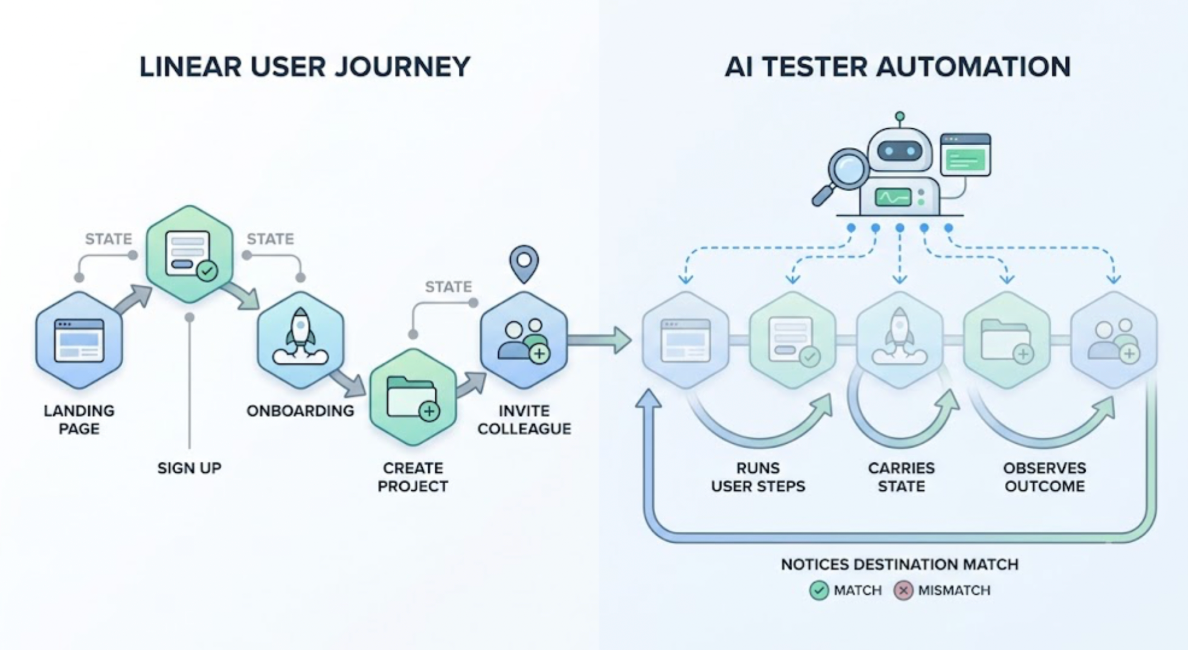
Testing a user journey and testing the code that implements one are not the same thing.
A user journey is a sequence of actions a real person takes to accomplish something in your product. They arrive on the landing page. They sign up. They complete the onboarding steps. They create their first project. They invite a colleague. Each step depends on the previous one. The state they carry from step to step determines what they see and what they can do next.
An AI tool that tests this journey has to run it. It has to take each step, observe the outcome, carry the state forward, and notice when the destination doesn't match where the user was supposed to end up.
An AI tool that reads the code that implements the journey and generates assertions against the functions involved is doing something different. It's testing the implementation. The journey might still be broken for users even if every function passes.
Why User Journeys Break in Ways Functions Don't
The failures that matter most are the ones that only appear when a complete journey runs.
A function that handles user registration works correctly. A function that sends a verification email works correctly. A function that marks an account as verified when the link is clicked works correctly. The user journey that connects all three can still be broken if the verification link includes an incorrect token, if the token validation uses a different format than the one the email used, or if the account verification happens but the session isn't updated to reflect it.
Each function passed its test. The journey breaks at the seam between them.
This is the category of failure that code-layer testing structurally misses. Individual functions are correct. The interaction between them under real conditions produces the wrong outcome. The only way to catch it is to run the sequence, the way a real user would, and observe what happens at the end.
What Testing a Real User Journey Actually Requires
Running a real user journey requires five things that don't exist in code-layer testing.
A live application. Not a mocked environment. The real product, deployed somewhere, responding to real requests.
Real navigation. The agent has to move through the product the way a user would, following the paths users actually take, not calling functions directly.
Real state. The agent has to carry state from step to step. The user ID created in step two has to be the same one used in step four. The session established at login has to persist through the checkout. The preferences set in onboarding have to be reflected in the dashboard.
Real observation. At each step, the agent has to observe what the product actually showed, not what the code says it should show. The error message that appeared instead of the confirmation. The redirect that went to the wrong page. The data that didn't update.
Complete journey coverage. The agent has to get all the way to the destination and verify the outcome from the user's perspective: did they accomplish what they came to do?
How TestSprite Tests Real User Journeys
TestSprite is built to run all five of these.
Other verification tools read your code and guess. TestSprite opens your app and uses it.
TestSprite's parallel exploration agents visit the running application and navigate it the way real users would. They discover the product's user journeys by using the product, not by reading specifications. They click through flows, fill in forms with real inputs, follow multi-step sequences, and carry session state forward across every step.
Through the TestSprite MCP Server inside Cursor, Claude Code, Windsurf, or VS Code, one instruction kicks off journey discovery and testing:
"Help me test this project with TestSprite."
The agents discover the journeys by exploring. They find the paths through the product that users take. They run those paths. When a journey produces the wrong outcome at the end, that failure surfaces with a description of every step that was taken and exactly where the expected and actual results diverged.
If a PRD exists, TestSprite anchors the journeys to stated product intent. When no PRD exists, the MCP Server infers the intended journeys from the codebase, treating route definitions, component structures, and API contracts as evidence of the user journeys the product was designed to support.
Journey Testing Across the Full Stack
User journeys don't stop at the frontend. Every action in a user journey triggers API calls, and the backend responses at each step affect what the user sees in the next step.
TestSprite's Backend Testing 2.0 covers the API layer of user journeys using the same observation-first approach. Before asserting anything, the agent calls the API and observes the real response. Dynamic variables from real responses, a user ID, a session token, a resource reference, flow automatically to downstream steps in the journey.
A user journey test that covers sign-up through first feature use doesn't just verify that the UI rendered correctly at each step. It verifies that the API calls underlying each step produced the correct responses, that the state from one API call correctly influenced the next, and that the final state of the system matches what the completed journey should have produced.
A Scenario: Finding the Break in a Multi-Step Onboarding Journey
A startup builds a SaaS product using Cursor. The product has a multi-step onboarding journey: account creation, email verification, profile setup, workspace configuration, and a first-feature introduction. Each step is critical. Users who don't complete onboarding churn at high rates.
TestSprite's agents navigate the full onboarding journey as a new user would.
They create an account. They receive the verification email. They follow the verification link. They complete the profile setup. They configure a workspace. They reach the first-feature introduction.
They find that the first-feature introduction loads correctly but shows a blank workspace name in the welcome message. The workspace name was entered correctly in step four. The welcome message in step five reads from a different data source: the user's default workspace, which is created automatically during account setup, not the workspace that was configured in step four.
A user who carefully named their workspace during onboarding would see a blank name in the welcome screen. Not a broken page. A subtle mismatch between what they did and what the product showed back to them.
No function test would catch this. The workspace name was saved correctly. The welcome message rendered correctly. The connection between the step-four workspace and the step-five display was never tested because no single test covered the full five-step journey.
The failure description returns to the Cursor session: which step was navigated, what workspace name was entered, what the welcome message displayed. The coding agent identifies the data source mismatch and applies the fix. The agents re-run the full journey to confirm.
Conclusion
The AI tool that can test real user journeys is the one that actually runs them: navigating the live application, carrying state across steps, and observing the outcome from the user's perspective.
Testing the code that implements a journey isn't the same thing. Functions can pass while journeys fail. The seams between individually correct components are where user-visible failures live, and those seams only appear when the full sequence runs under real conditions.
TestSprite runs the journeys. Its exploration agents navigate the product the way users do, discover the paths users take, carry real state from step to step, and report failures in terms of what went wrong for the user, not which assertion evaluated to false.
Start testing your real user journeys with TestSprite from inside your AI IDE today.