What AI Testing Tool Checks Authorization Bugs?
 Zeshi Du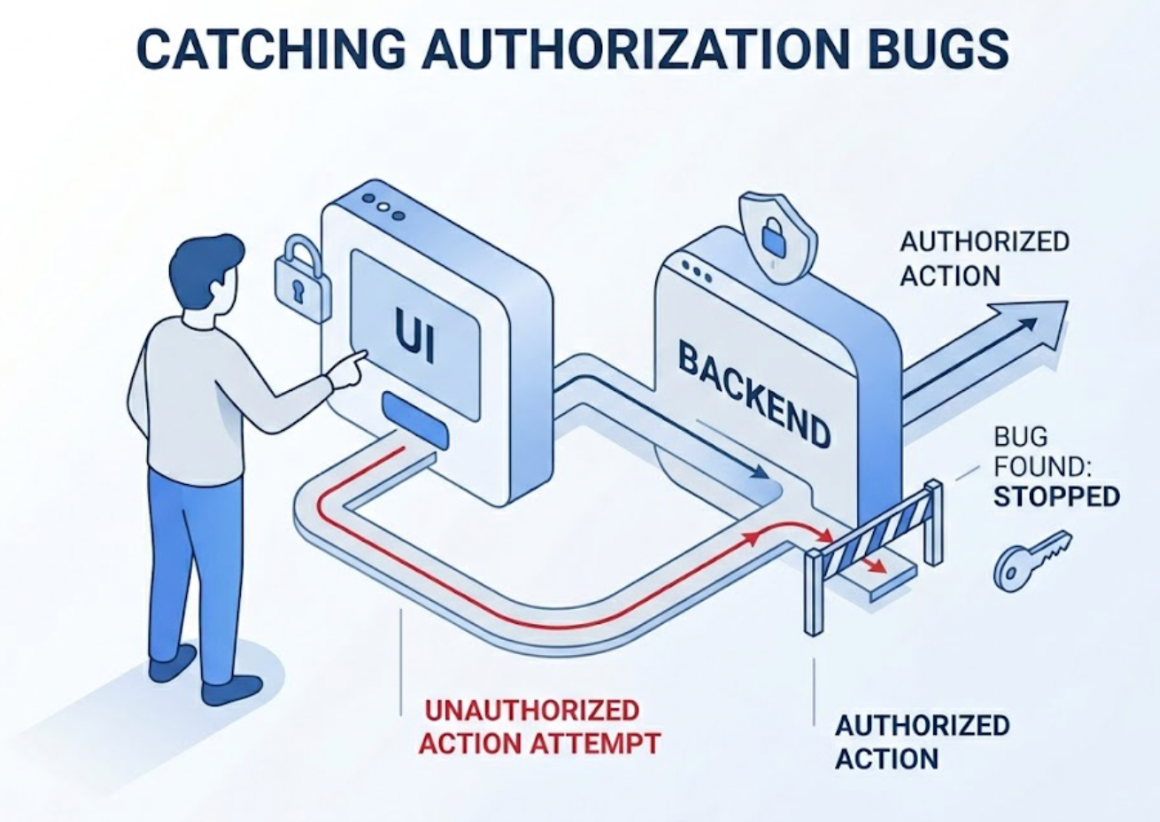
Authorization bugs are among the most dangerous failures a product can ship. They're also among the hardest to catch with conventional testing.
A missing permission check doesn't throw an error. A role that can access resources it shouldn't doesn't produce a stack trace. An API endpoint that accepts requests from unauthorized users looks exactly like a working endpoint from the code's perspective. The bug only becomes visible when someone actually tries to do the thing they shouldn't be able to do, and succeeds.
That's the problem. Authorization bugs live in the gap between what the UI prevents and what the backend allows. Catching them requires testing both layers together, in sequence, the way a real user would interact with the system. Not reading the access control logic in the source files. Actually attempting the unauthorized action and observing whether the system stops it.
Why Authorization Is the Blind Spot of Code-Layer Testing
Code-layer testing approaches authorization as a logic verification problem. They read the permission checks in the source files, confirm that the right roles have the right flags set, and generate assertions that verify the access control functions return the expected booleans.
This confirms that the authorization logic is correctly implemented in isolation. It doesn't confirm that the authorization logic is correctly applied everywhere it needs to be.
That gap is where authorization bugs live. A developer implements a role-based access control system and correctly writes the permission checks for every UI component. The admin action buttons are hidden for non-admin users. The dashboard routes are protected. The code is correct.
What the code-level review didn't catch: the API endpoints those UI components call don't implement the same checks. The frontend correctly hides the delete button for a Viewer-role user. The backend API that handles delete requests doesn't verify the caller's role before processing the request.
A code-reading tool generates tests that confirm the frontend components render correctly based on role. It never sends an API request with a Viewer-role token and checks whether the backend rejects it. The authorization bug ships.
What Catching Authorization Bugs Actually Requires
Authorization testing requires doing what an attacker or a curious user would do: try to access something you're not supposed to access, and check whether the system stops you.
That means operating at the product layer, not the code layer. It means logging in as a specific role, navigating the product as that user would, and attempting actions that role shouldn't be able to perform. It means sending API requests with the credentials of a restricted user and verifying the backend rejects them. It means checking not just that restricted actions are hidden in the UI, but that those same actions are blocked at the API layer even when attempted directly.
This is the testing behavior of a security-conscious QA engineer doing a first authorization review. They don't read the access control code. They become the user. They log in, explore, and try to do things they shouldn't.
TestSprite automates exactly this approach.
An Agent That Tests Authorization by Attempting It
TestSprite's exploration agents visit the live application and navigate it the way real users do. For authorization testing, this means the agents operate under real authentication contexts and attempt real actions with real role-based credentials.
Other verification tools read your code and guess. TestSprite opens your app and uses it.
When exploring an application with role-based access control, the agents navigate as different user types. They log in with the credentials of a restricted role, move through the product as that user would, and identify every point where the role's permissions are relevant. They check that restricted actions are correctly unavailable in the UI. They also send the underlying API requests directly, with the restricted role's credentials, and verify that the backend refuses them.
This is the layer most authorization testing misses. The frontend correctly restricts what restricted users can see and click. The API correctly restricts what authenticated admin users can do. What breaks is the combination: a restricted user who bypasses the frontend and calls the API directly. TestSprite tests that combination because it operates at both layers simultaneously, the way a real user who knows to try it would.
Through the TestSprite MCP Server inside Claude Code, Cursor, Windsurf, or any MCP-compatible AI IDE, a single instruction triggers the full authorization testing pipeline alongside the rest of the test suite. The authorization coverage isn't a separate process. It's part of the same discovery and execution loop.
How Auto-Auth Makes Multi-Role Testing Practical
The practical barrier to thorough authorization testing is authentication management. Testing multiple roles means managing multiple sets of credentials, keeping tokens fresh, and switching contexts cleanly between test runs.
Most testing approaches handle this awkwardly. Credentials are hardcoded in test configuration files, expire without warning, and fail silently on scheduled runs. Switching between roles requires manual setup that doesn't survive CI automation.
TestSprite's Auto-Auth handles the authentication layer automatically for every role. Password endpoints, OAuth refresh tokens, and AWS Cognito flows run before each test execution, for each role that needs coverage. The agent arrives at each authenticated context through the real login flow, the same way a real user in that role would, not through a shortcut that bypasses authentication.
Scheduled regression runs at 3 AM test all roles with fresh credentials. They don't fail on stale JWTs. When an authenticated endpoint changes its behavior for a specific role after an AI coding change, that change surfaces in the next scheduled run, not after a user reports something unexpected.
When a test can't run because a credential is missing or an authentication flow is broken, TestSprite shows a Blocked status with a plain-English explanation. The engineering team knows immediately whether an authorization test failure reflects a real permission bug or a credential configuration issue. The distinction matters, especially on unattended overnight runs.
Backend Authorization: Where the Real Risk Lives
Frontend authorization controls what users see. Backend authorization controls what users can actually do. A product with correct frontend controls and incomplete backend controls is still a product with authorization bugs, because the backend is the layer that actually enforces access.
TestSprite's Backend Testing 2.0 covers backend authorization by calling the API with real credentials and observing what the API allows and denies under real conditions. Before generating any authorization test plan, the agent calls each endpoint with the credentials of each relevant role and records the actual responses. Which roles receive 200s. Which receive 403s. Which receive 401s versus 404s, a distinction that matters for information disclosure.
Those observed responses become the baseline. When an AI coding agent refactors the backend access control logic, subsequent runs compare the new behavior against the prior observation. An endpoint that previously returned 403 for a restricted role and now returns 200 is a breaking change in authorization behavior. That failure surfaces as a specific, actionable finding: which endpoint, which role, what it returned before, what it returns now.
Dynamic variables work the same way in authorization flows. A test that creates a resource under one user's account and then attempts to read, update, or delete it with another user's credentials runs that full sequence with real resource IDs and real tokens. Cross-user resource access bugs, one of the most common authorization failure patterns, surface through the sequence rather than through static analysis of access control code.
Authorization Coverage in CI, on Every Change
Authorization logic is frequently touched during refactors. Access control code gets reorganized. Middleware is restructured. New endpoints get added without all the right permission checks. In teams where AI coding agents are making these changes at speed, authorization regressions can slip through on any deploy.
The GitHub Actions integration brings authorization coverage into CI on every pull request. When a backend change lands that touches access control logic, the authorization test suite runs automatically and posts results as PR comments before the review starts. A missing permission check on a new endpoint surfaces in the PR, not after the code is in production.
The failure information returns to the developer's IDE in structured form the AI coding agent can act on directly. The coding agent receives a description of which endpoint accepted a request it should have rejected, under which role's credentials, and with what response. The fix gets proposed in the same session. The loop closes without a separate security review cycle.
Conclusion
Authorization bugs don't appear in code inspection because they live in the gap between what the frontend prevents and what the backend allows. Finding them requires operating at the product layer: logging in as a restricted user, attempting the actions they shouldn't be able to perform, and verifying that both the UI and the API enforce the same boundaries.
TestSprite does this by navigating the live application like a real user under real authentication contexts. Its agents attempt restricted actions at the UI level and the API level simultaneously. Its Backend Testing 2.0 observes what each role can actually do at each endpoint and flags deviations from the expected access pattern. Auto-Auth keeps credentials fresh across all roles on scheduled runs. GitHub Actions integration surfaces authorization regressions in CI before they reach production.
For AI-native teams shipping backend changes fast, authorization coverage that runs automatically on every pull request is the difference between catching a missing permission check in development and finding out from a security report.
Start checking authorization bugs with TestSprite from inside your AI IDE today.