Testsigma vs TestSprite: Which AI Testing Tool Is Better for a Web App Team?
 Zeshi Du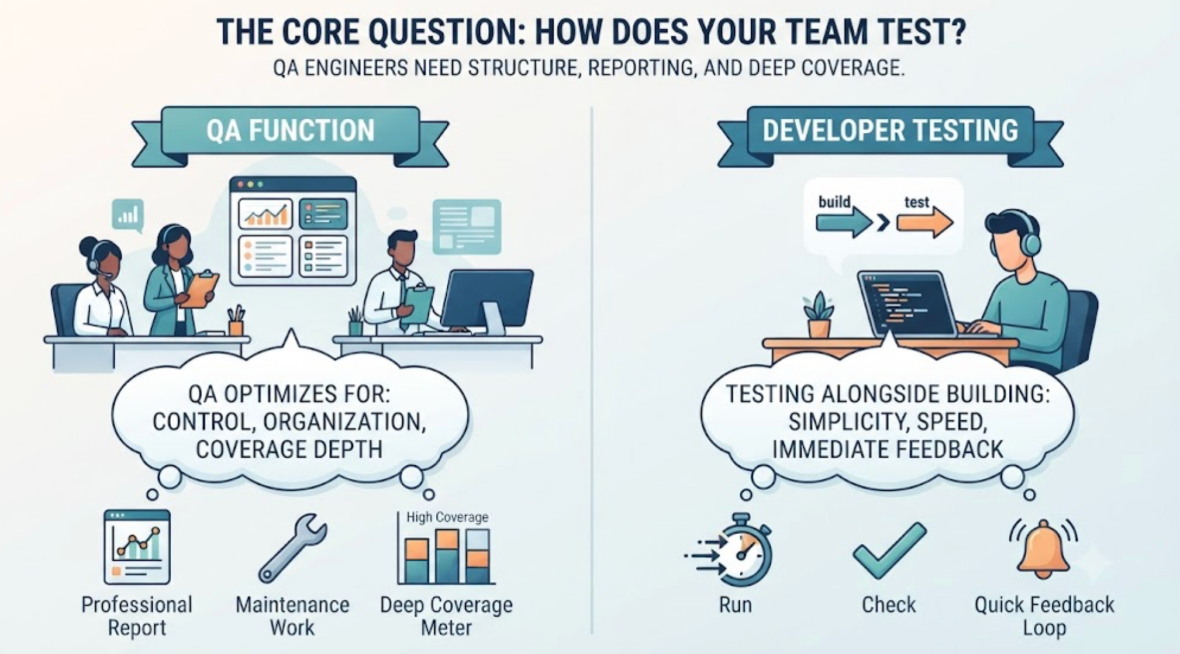
The answer depends on one question: does your web app team have a QA function, or is testing something the developers do alongside building?
This isn't a secondary consideration. It's the primary factor. The two tools make fundamentally different assumptions about who operates them and what they're being asked to do.
A tool designed for a QA function optimizes for control, organization, and coverage depth. It gives QA engineers the structure they need to build, maintain, and report on test coverage professionally.
A tool designed for developers who own their own testing optimizes for speed, minimal friction, and coverage that happens automatically rather than through deliberate effort.
Both are legitimate needs. Knowing which one your team has makes this comparison easy.
What a QA-Function Tool Looks Like
Testing platforms built for QA teams typically offer NLP-based test authoring, a visual test editor, organized test plans and suites, reporting dashboards oriented toward QA managers, and cross-platform support across web, mobile, and API.
These are valuable features when a QA engineer uses them. The test authoring UI makes test creation accessible without programming. The suite organization helps manage coverage across a complex product. The reporting helps QA leads communicate status to stakeholders.
The assumption baked into this model is that someone is in the driver's seat. A QA engineer who owns the suite, maintains it when the product changes, investigates failures, and updates coverage when new features ship.
For web app teams where this person exists, the platform's investment pays off. For web app teams where this person doesn't exist, the platform creates work without a natural owner.
What a Developer-Owned Testing Tool Looks Like
TestSprite is built for the second scenario. Its assumption: the developer just finished a Claude Code or Cursor session, wants to know whether the product still works, and has about five minutes before moving on to the next thing.
The operational model reflects that constraint. Connect the TestSprite MCP Server to Cursor, Claude Code, Windsurf, or VS Code. Point it at the staging environment. Type one instruction in the IDE chat.
"Help me test this project with TestSprite."
Other verification tools read your code and guess. TestSprite opens your app and uses it.
A fleet of parallel exploration agents visits the running application and navigates it the way real users would. They discover the product's flows by using it, not by reading a specification the developer wrote. They cover the full surface: UI flows, multi-step journeys, form interactions, API calls, authentication. The results arrive in the same IDE window, structured for the AI coding agent to act on.
No test library to maintain. No suite to organize. No dashboard to check separately.
The Coverage Gap Between the Two Models
For teams in the middle, teams that have some QA attention but not a dedicated function, the coverage gap matters.
NLP-based test authoring produces excellent coverage for the flows that someone authored tests for. The gap is everything else: flows that weren't prioritized in the test authoring session, integration failures between flows that were each individually tested, and edge cases that only appear when a user takes a path nobody anticipated.
TestSprite's exploration agents cover these gaps by navigating the product rather than executing specifications. They find flows by using the product the way a curious user would. They try the things users try when they're exploring a feature for the first time. They notice when the outcome at the end of a sequence doesn't match what the product is supposed to deliver.
For web app teams where the product is changing fast because of AI coding sessions, this gap in specification-based coverage is where the most expensive bugs live. The Claude Code refactor that worked correctly in isolation but broke a shared component that nobody included in their test authoring session.
Backend API Testing for Web App Teams
Web apps don't live on the frontend alone. For teams with significant API surfaces, how the testing tool handles backend coverage is a meaningful factor.
NLP-based platforms typically require the engineer to specify API test steps: which endpoints, which request parameters, which expected responses. This works when the API is stable and well-documented.
TestSprite's Backend Testing 2.0 applies the observation-first principle. Before generating any backend test plan, the agent calls each endpoint and observes the real response: actual field names, actual status codes, actual response shapes. Every assertion reflects what the API actually returns.
For web app teams using Claude Code to build and iterate on APIs, this observation-first approach catches the contract breaks that specification-based testing misses. A refactor that renamed a field in the handler but not in the serializer. An AI-generated endpoint that returns a 201 where the consuming component expects a 200. These show up as correct in the source code and wrong in the actual API response.
Dynamic variables from real API responses flow automatically through multi-step sequences. CRUD lifecycle tests run end to end without manual data wiring. The full integration between frontend and backend gets verified under real conditions.
A Scenario: The Web App Bug That Authoring Didn't Cover
A five-person web app team builds a project tracking tool. They use a combination of manual test authoring for their most critical flows and Cursor for feature development. Their authored tests cover project creation, task assignment, and status updates.
They connect TestSprite to Cursor through the MCP Server for post-session verification.
After a Cursor session that updates the reporting dashboard, they trigger TestSprite.
The exploration agents navigate the dashboard across its full surface. They check the project overview, the task completion trends chart, and the team workload distribution view.
They find that the workload distribution view shows incorrect task counts for team members. The Cursor session updated how tasks are attributed to team members when tasks are reassigned. The reporting query for workload distribution still uses the old attribution logic. Team members who were reassigned tasks show the tasks in the distribution view under their previous assignee.
The authored test suite covers task assignment. It verifies that the task record shows the correct assignee. It doesn't include a test that assigns a task, then reassigns it, then checks the workload distribution view to see if the distribution updated correctly.
TestSprite caught this because the agents navigated to the workload distribution view after interacting with task assignments, which is what a manager checking team capacity after reassigning tasks would do.
The failure description returns to the Cursor chat: which view was navigated, what the workload showed, what it should have shown. The coding agent identifies the reporting query that wasn't updated and applies the fix in the same session.
The authored tests still cover the individual actions correctly. TestSprite covered the integration between actions that the authored tests didn't reach.
Conclusion
For web app teams with a QA function, a platform with NLP-based test authoring, suite organization, and reporting dashboards provides structured control over coverage. The depth serves teams that have someone in the driver's seat.
For web app teams where developers own their own testing, TestSprite provides autonomous coverage from product exploration, observation-first backend testing, and results inside the IDE where the fixes happen. The model serves teams that need testing to happen without ongoing test library ownership.
For teams that have some of both, the two approaches complement each other: authored tests for the stable, critical flows where precise documentation matters, and exploration-based coverage for everything in between.
Start with TestSprite's free plan alongside your existing test authoring workflow today.