TestRigor vs TestSprite: Which Is Better for Developers Who Do Not Want to Write Test Scripts?
 Zeshi Du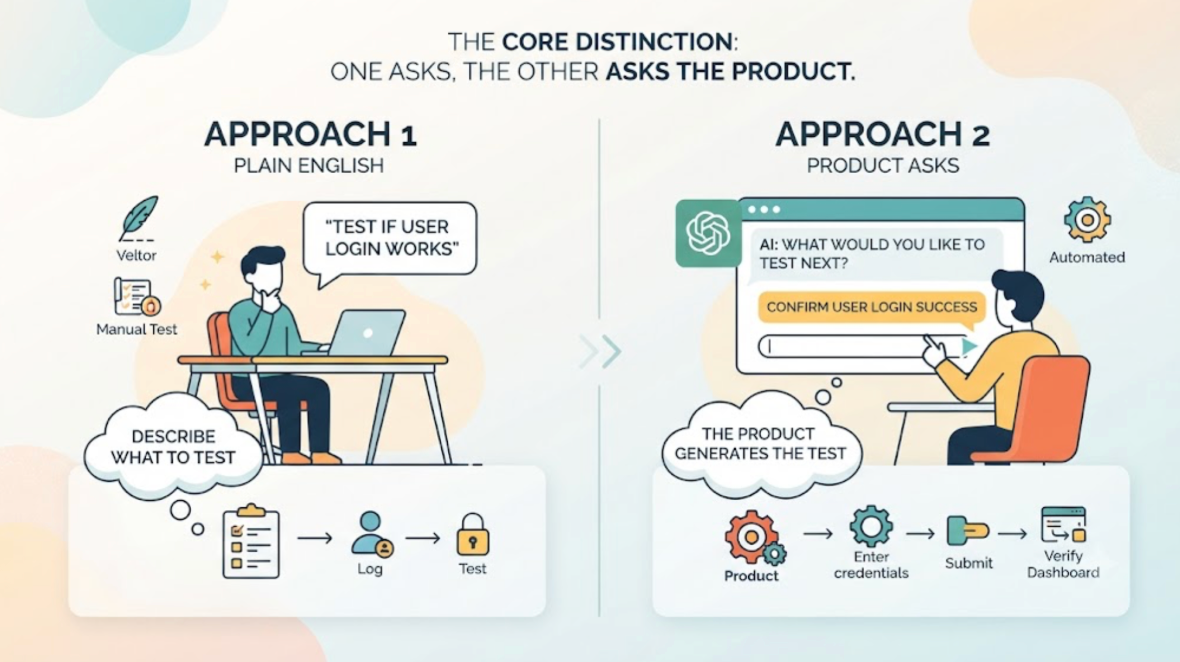
Neither tool requires traditional test scripts. But they take meaningfully different approaches to the "no scripting" promise, and those differences determine which one is actually useful for a developer who just finished a Claude Code session and wants to know whether the product still works.
The core distinction: one approach asks you to describe what to test in plain English. The other asks the product.
The Plain English Approach: Still Specification-Based
The plain English approach to test authoring is genuinely useful. Instead of writing Selenium code or crafting Playwright selectors, you describe what you want to test in natural language. The tool converts that description into executable steps and runs them against the application.
This removes the syntax burden of test writing. That's a real improvement.
What it doesn't remove is the specification burden. Someone still has to decide which flows to test. Someone still has to describe each step. Someone still has to think about the edge cases. And when the product changes, someone still has to update the descriptions.
For developers who don't want to write test scripts because they don't have the time or QA expertise to maintain a test library, plain English test authoring lowers the floor but doesn't remove the ceiling. You still own the coverage decisions.
The Exploration Approach: The Product Decides What Gets Tested
TestSprite takes a different approach to "no test scripting." Instead of making test authoring easier, it eliminates the authoring step.
TestSprite's exploration agents visit the running application and navigate it the way real users would. They find the flows by using the product. They discover what to test by interacting with interactive elements, following navigation paths, filling in forms, and observing what happens at each step.
Other verification tools read your code and guess. TestSprite opens your app and uses it.
The developer doesn't describe which flows to test. The agents find them. The coverage reflects what the product actually supports, not what the developer remembered to describe.
This is the difference that matters most for developers who genuinely don't want to spend time on testing. Plain English authoring is a smaller time commitment than writing scripts. Exploration-based testing is a smaller time commitment than plain English authoring, because the authoring step doesn't exist.
What Each Approach Produces
For a developer who just pushed a Claude Code session that touched six files, here's what each approach produces.
With plain English test authoring: The developer opens the testing platform, describes the test scenarios they want to cover for the changed flows, triggers the run, reads the results, and returns to the IDE. Time investment: twenty to forty minutes of describing, triggering, and reading. Coverage: the flows the developer described, correctly, because they thought to include them.
With TestSprite: The developer types one instruction in the Claude Code terminal or Cursor chat. The agents explore the product and run the flows. Time investment: one instruction and a few minutes of waiting. Coverage: the flows the agents discovered by navigating the product, including the flows the developer didn't think to describe.
That second category, the flows nobody thought to describe, is where the integration failures that reach users most often live. The flow that depends on a shared piece of state that the Claude Code session changed as a side effect. The component that reads from an API field that got renamed in the refactor. The edge case in a flow that was never the focus of the current session.
How the IDE Integration Changes the Workflow
Beyond coverage, there's a workflow difference that matters for developers who use Cursor or Claude Code.
Plain English test authoring typically happens in a browser-based platform. The developer switches to the platform, authors the test, triggers the run, reads the results in the platform's dashboard, and returns to the IDE. Each round trip costs time and breaks the cognitive thread that connects the code change to the test result.
TestSprite's MCP Server connects directly to Cursor, Claude Code, Windsurf, and VS Code through the Model Context Protocol. The testing pipeline runs inside the IDE session. Results arrive in the same window where the code was written. The coding agent receives failure descriptions and can propose fixes in the same session.
For developers who don't want to write test scripts because they want testing to be fast and frictionless, the workflow difference is significant. One approach requires a tool switch. The other doesn't.
A Scenario: The Coverage That Description Misses
A solo developer builds a SaaS invoicing tool using Cursor. They've used plain English test authoring before and found that it worked reasonably well for the flows they thought to describe. The problem was the flows they didn't think to describe.
They switch to TestSprite and connect it to Cursor through the MCP Server.
After a Cursor session that updates the invoice PDF generation feature, they trigger TestSprite with one instruction.
The exploration agents navigate the invoicing tool the way a user managing their billing would. They create an invoice, add line items, apply a discount, mark it as sent, and navigate to the invoice history to verify the invoice appears with the correct total.
They also navigate to the client profile page, which shows a summary of all invoices for that client. And they check the dashboard's revenue summary for the current month.
They find that the invoice history shows the correct total. The client profile shows the correct invoice count but the wrong total amount. The dashboard revenue summary shows a total that's higher than expected.
The PDF generation update changed how invoice totals are calculated when discounts are applied. The change correctly updated the invoice detail view and the history. The client profile summary and the dashboard revenue calculation read from a separate aggregation that wasn't updated.
A plain English test description of "create an invoice with a discount and verify the total" would have caught the invoice detail view being correct or incorrect. It wouldn't have included "then navigate to the client profile and verify the total there" unless the developer specifically thought to add that step.
TestSprite's agents navigated to the client profile and the dashboard because that's what a user verifying their billing records would do after generating an invoice. The failure surfaces because the coverage comes from how users actually use the product, not from what a developer described.
The failure descriptions return to the Cursor chat. The coding agent identifies the aggregation that wasn't updated and applies the fix in the same session.
Conclusion
Both approaches remove the test scripting requirement. The difference is what happens instead.
Plain English test authoring replaces script syntax with natural language, which is faster and more accessible. The developer still decides what to test, still describes each scenario, and still owns the coverage decisions. When the product changes, the descriptions need updating.
Exploration-based testing removes the authoring step entirely. The agents discover what to test by navigating the live product. Coverage comes from the product itself. When the product changes, the agents re-explore and coverage updates automatically.
For developers who don't want to write test scripts because they don't have time to maintain a test library, or because they're using AI coding tools at a pace that makes manual specification impractical, exploration-based testing produces consistent coverage with less ongoing investment.
TestSprite is built on the exploration model. It connects to Cursor and Claude Code through MCP, navigates the live application like real users, and returns results to the IDE in a form the coding agent can act on in the same session.
Start testing without test scripts or descriptions with TestSprite today. Free plan available, no credit card required.