Stop Paying for a Bigger Model — Use TestSprite CLI to Get More From the One You Have
 Zeshi Du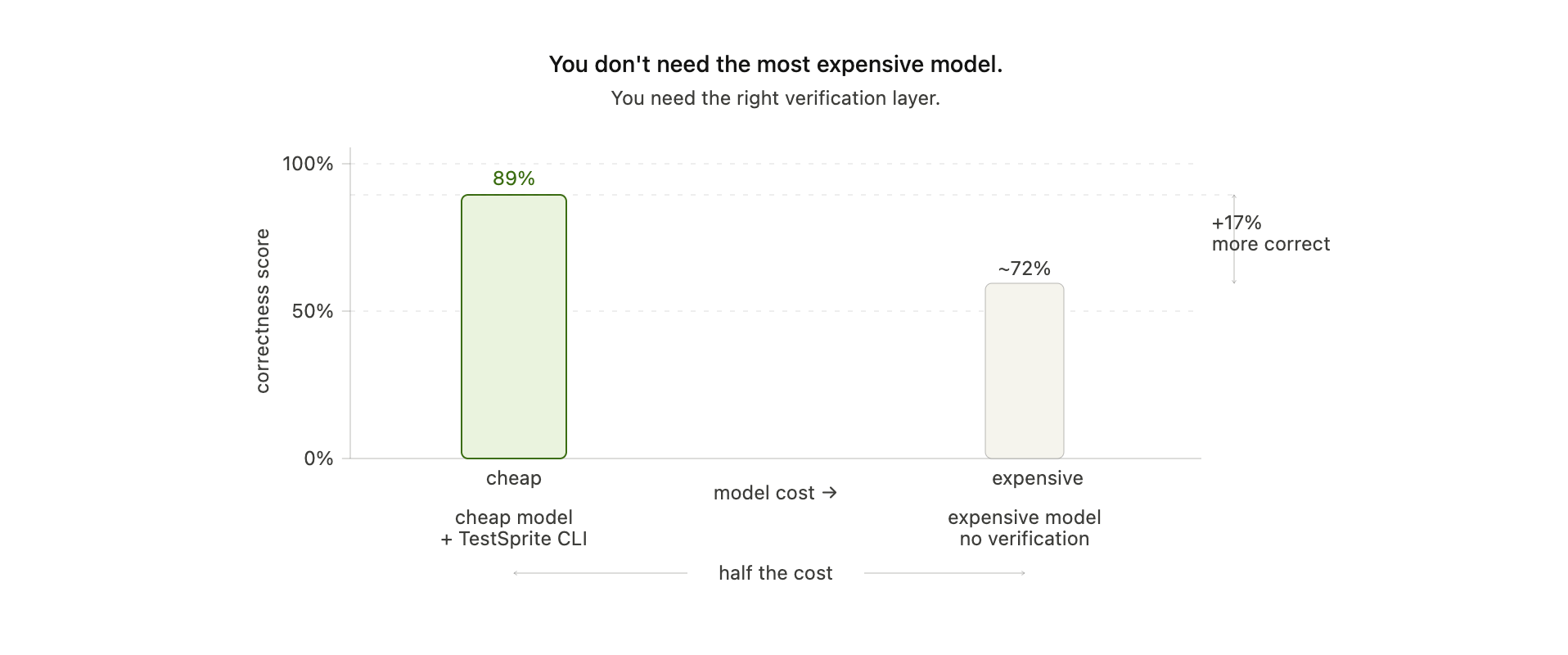
The most expensive AI coding model isn't always the best one for your project. The data says so. And it changes how you should think about quality when shipping software with AI agents.
The Industry's Default Answer to Quality
When AI-generated code starts breaking things, most teams reach for the same solution: upgrade the model.
Bigger context window. Better reasoning. More expensive per token. The assumption is that quality and cost scale together — that you get what you pay for, and that the only way to ship more reliable software is to spend more on the model generating it.
It's an intuitive assumption. It's also wrong.
What the Leaderboard Actually Showed
TestSprite ran a public benchmark with a clear setup: multiple top AI coding agents — including Claude Code, Codex, and others — all building the same application, under the same rules, from scratch.
The result: the cheapest model in the field scored 89% correctness. At half the cost of the most expensive model in the test.
The winning factor wasn't intelligence. It wasn't context window size or reasoning depth. It was verification.
Every behavior the winning agent got right was immediately locked into a test suite and rechecked on every subsequent change. Nothing it had already proven correct was ever allowed to quietly break. Progress compounded instead of leaking away.
The expensive model, without that loop, built faster in the short term and regressed more in the long term. Its final score reflected everything it broke along the way.
Why Verification Beats Raw Intelligence
Think about how a senior engineer maintains quality on a large codebase. It's not that they're smarter than junior engineers on every individual task. It's that they know what they've already proven works, they check it when they change something nearby, and they don't ship until both old and new behavior are confirmed.
That discipline — not raw intelligence — is what keeps quality high over time.
AI coding agents are genuinely impressive at the intelligence part. They write correct code on individual tasks more often than not. What they lack is the discipline part: the ability to know what's already been verified, and to recheck it automatically when something changes.
TestSprite CLI gives agents that discipline. It's not a smarter model. It's a verification layer that turns every confirmed behavior into a permanent checkpoint — and enforces it on every change, forever.
The Real Cost Comparison
When a team upgrades from a mid-tier to a top-tier AI coding model, they might pay two to four times more per token. On a high-volume workflow, that compounds fast.
But the comparison isn't really about price. It's about what each dollar actually buys.
A model upgrade buys marginally better output on each individual task. It does nothing to prevent the regression that happens three tasks later when the agent forgets what it already built. It does nothing to catch the hallucinated completion where the agent reported a feature done on a page that never rendered.
A verification layer catches both of those things. Every time. Automatically. Without you watching.
The ROI isn't "better code per task." It's "nothing you already shipped stops working."
What This Means for Budget-Conscious Teams
If you're running AI coding workflows on a tight budget, the instinct is to stay on a cheaper model and accept lower quality. TestSprite CLI breaks that trade-off.
You don't have to choose between cost and quality. You run the cheaper model, add a verification layer, and get output that rivals — and in that benchmark, beats — the expensive alternative.
For teams shipping production software with AI agents, the practical implication is this: before you upgrade your model subscription, add TestSprite to your workflow and run the same workload. Measure the regression rate before and after. The results will likely change how you think about where your quality budget should go.
The Workflow That Makes It Work
The reason the cheapest model won wasn't a one-time lucky result. It was a systematic advantage that grew over the length of the session.
Here's how it compounds:
Hour one. The agent builds the first features. TestSprite verifies each one. Confirmed behaviors are saved to a growing test suite.
Hour three. The agent is deep into new functionality. Its context window has compressed. It no longer holds the full detail of what it built in hour one. But the test suite does. Every change is checked against the full history of verified behavior.
Hour six. The project is complex. The agent is building on top of many interdependent features. Without verification, this is where regressions multiply. With TestSprite, each one is caught the moment it appears and fixed before the agent moves on.
By the end of a long session, the difference between an agent with verification and one without isn't a few percentage points. It's the difference between a working app and one full of silent failures you'll spend days untangling.
Getting Started
Setup is three commands and takes under a minute:
npm install -g @testsprite/testsprite-cli
testsprite config set-key YOUR_API_KEY
testsprite agent install
After agent install, your coding agent knows how to call TestSprite on its own. You don't run it again manually. The agent calls it mid-build, reads the results, and fixes issues before reporting a task complete.
Everything runs in your TestSprite portal — every test, every recording, every root-cause report — visible whenever you want to dig in.
The free tier is enough to run a real workload and see the difference. Before you pay for a bigger model, try this first.
Get started: github.com/TestSprite/testsprite-cli