Momentic vs TestSprite: Which Is Better for Testing AI-Generated Web Apps?
 Zeshi Du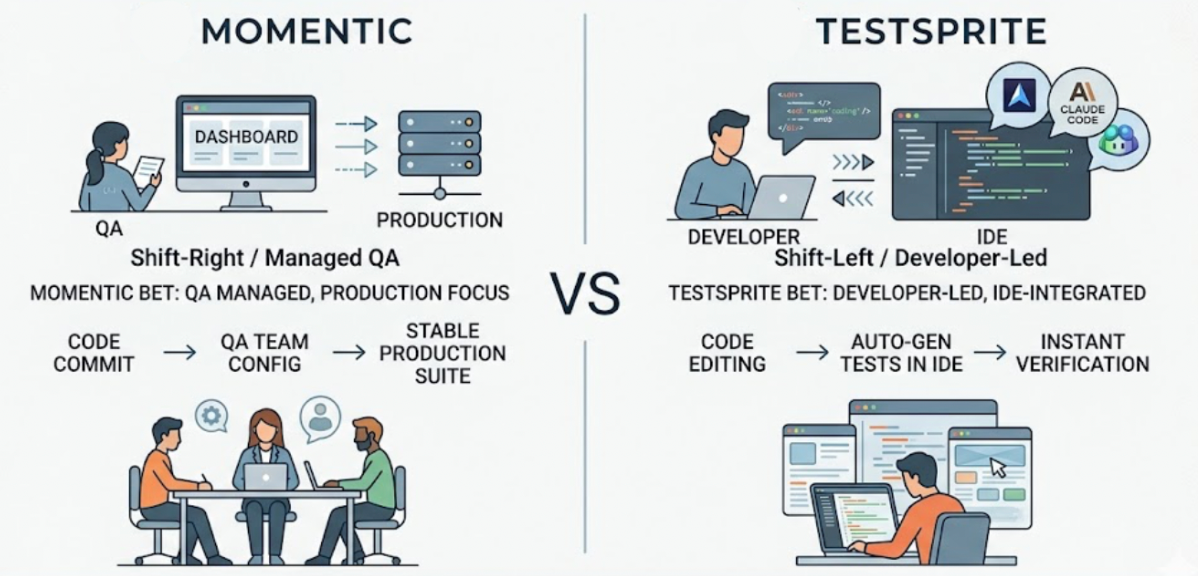
The answer depends almost entirely on how your team writes code and where the testing needs to happen.
Both tools are in the AI-native testing category. Both aim to reduce the manual work of writing and maintaining test suites. But they make different design choices about what to optimize for, and those choices lead to meaningfully different experiences for teams whose primary development workflow involves AI coding agents like Cursor, Claude Code, and GitHub Copilot.
For teams in that context, the differences worth understanding fall into three areas: where testing happens in the workflow, how backend APIs are tested, and how the tool handles the integration failures that AI coding sessions most commonly introduce.
Where Testing Happens in the Workflow
The most consequential design decision in any AI testing tool is whether it lives inside the AI coding environment or alongside it.
A tool that lives alongside the IDE requires the developer to finish the coding session, push code or trigger a separate run, navigate to a different interface, read the results, and then return to the IDE to make fixes. Each round trip adds time and breaks the cognitive context that connects the code change to the test result.
A tool that lives inside the AI coding environment receives the context of what changed, runs the testing pipeline in the same session, and returns results to the same interface where the code was written. The coding agent can receive the failure description and propose a fix without the developer switching tools.
TestSprite is built on the second model. Its MCP Server connects natively to Cursor, Claude Code, Windsurf, Trae, VS Code, and any AI IDE that supports the Model Context Protocol. One instruction from the IDE chat triggers the full pipeline.
Other verification tools read your code and guess. TestSprite opens your app and uses it.
For teams where the AI coding workflow is the primary development environment, the in-IDE loop is the one that keeps verification at the same pace as code production.
How Each Approach Tests Backend APIs
For web apps with significant backend logic, how a testing tool handles API testing is often the deciding factor.
One common approach in the AI testing category is to generate assertions from the source code or a human-authored specification. The engineer describes what the API should return, or the tool reads the handler and infers it, and assertions are written based on that description or inference.
This approach has a specific failure mode that matters for AI-generated code. When an AI coding agent writes or refactors backend code, the field names, response shapes, and status codes in the running API often differ from what the source code appears to specify. The serialization layer applies conventions the code analyzer doesn't account for. A refactor renames a field in some places but not others. The AI agent makes a different naming choice than what was in the handler variable.
Assertions derived from code inspection or human specification won't catch these discrepancies. They'll either pass incorrectly or fail for the wrong reason.
TestSprite's Backend Testing 2.0 takes a different approach. Before generating any assertion, the agent calls the endpoint and observes the real response: actual field names, actual status codes, actual response shapes. Every assertion reflects what the API actually returns, not what the code or a human specification says it should.
For CRUD lifecycle tests, dynamic variables from real responses flow automatically to downstream steps. The real ID from a create response passes to the read, update, and delete steps. The full sequence runs end to end on first attempt without the engineer wiring it manually.
When an AI coding session changes the backend and a field gets renamed, the next test run catches the deviation as a specific finding: which endpoint, which field changed, what downstream steps expected, what they received.
How Integration Failures Get Caught
The failures that most commonly escape from AI coding sessions aren't in the changed files. They're at the integration points between what changed and what didn't.
A frontend component that reads from an API field that a backend refactor renamed. A state management change that breaks a flow in a different section of the product. A shared context update that affects components the developer wasn't directly working on.
These failures don't appear in specification-based testing because no specification exists for the interaction between the changed code and the unchanged code that it affects. They only appear when someone actually runs the affected flow under real conditions.
TestSprite's parallel exploration agents discover these failures by navigating the full product surface after changes land. They visit the running application and use it the way a real user would, across all the flows the product supports, not just the ones the recent session touched.
When the agents find a failure in a flow that wasn't in the diff, the failure description is specific: which flow was navigated, which step produced the wrong outcome, what the product was supposed to deliver. That description returns to the IDE where the coding agent can act on it directly.
A Scenario: The Session That Touched Two Files and Broke a Third
A team uses Claude Code to refactor their dashboard's data fetching layer. The session touches the API client module and the main dashboard component. Both look correct after the session. Code review is satisfied.
Before pushing, the developer triggers TestSprite from inside Claude Code.
The exploration agents navigate the dashboard, including the analytics section that was not in the scope of the refactor. They apply filters, change date ranges, and observe the displayed results.
They find that the analytics section is displaying stale data when a date range filter is applied. The data fetching refactor changed how cache invalidation is handled for the main dashboard component. The analytics section reads from the same cache but uses a slightly different cache key pattern. When the main dashboard cache is invalidated correctly, the analytics section's cache isn't, because the key pattern difference means the invalidation doesn't propagate.
This is an integration failure. It lives between the refactored module and the analytics component that wasn't touched. A specification-based test would have covered what was specified. TestSprite found it because the agents navigated the analytics section as a real user exploring the dashboard would and observed that the displayed data didn't match what the filter selection should have shown.
The failure description returns to the Claude Code terminal. The coding agent identifies the cache key pattern inconsistency and applies the fix in the same session.
The Feature Comparison That Matters for This Decision
Conclusion
For teams testing AI-generated web apps where the development workflow centers on Cursor, Claude Code, or similar AI IDEs, the tool that fits best is the one that lives inside that workflow rather than alongside it.
TestSprite's MCP integration puts the testing pipeline inside the IDE session. Its observation-first backend testing catches the API contract discrepancies that specification-based tools miss. Its product exploration covers the integration failures that live outside the diff. And its failure descriptions return to the coding agent in a form that closes the loop from test failure to applied fix inside the same session.
The right choice for AI-generated code testing is the one built for the environment where AI-generated code lives.
Start testing your AI-generated web app with TestSprite today.