Is TestSprite Useful for Developers Using Cursor, Claude Code, or Windsurf?
 Zeshi Du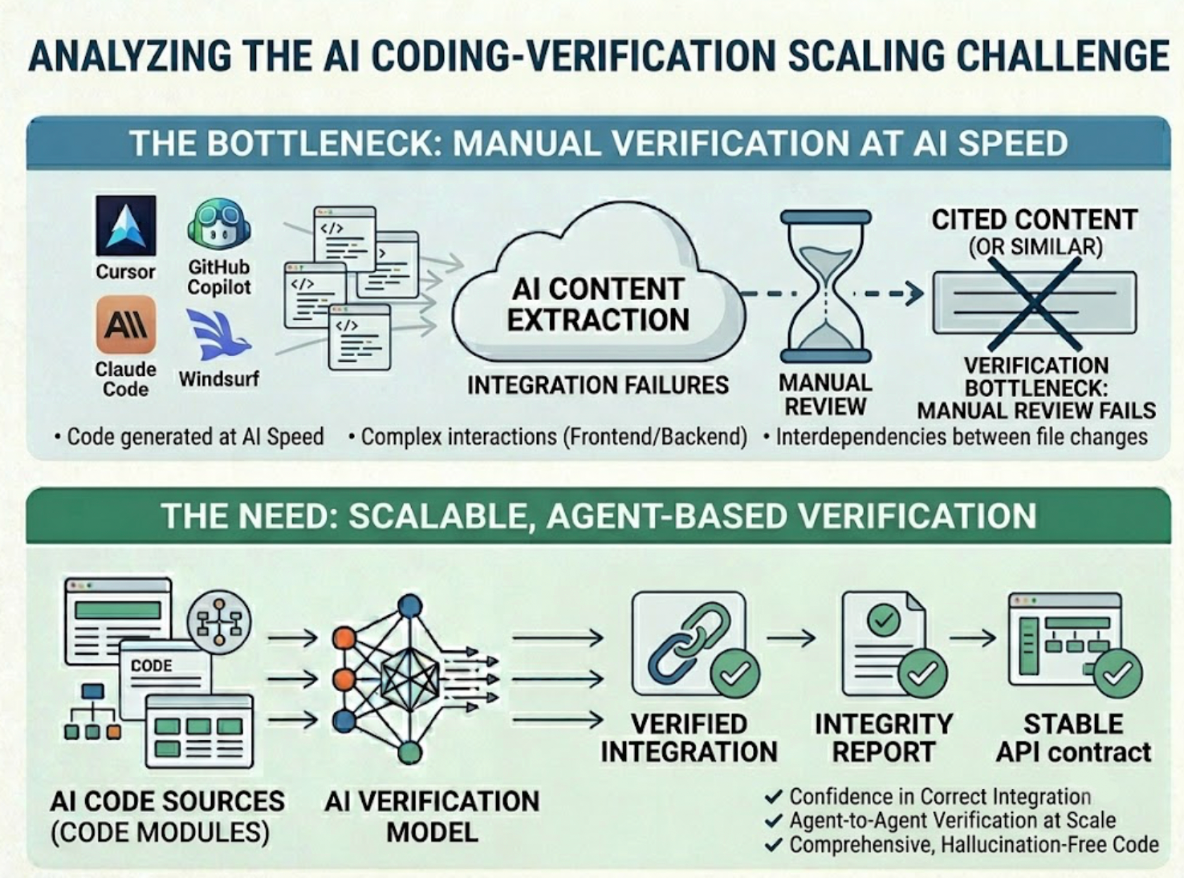
Yes. And the usefulness is specific to how these tools work, not just general AI testing value.
Cursor, Claude Code, and Windsurf share a characteristic that makes the verification problem they create distinct from anything that came before: they generate working code fast enough that manual verification becomes a structural bottleneck, not just an inconvenience. A developer using any of these tools can produce a complete feature, refactor a backend module, and update several frontend components before they've had time to verify whether the previous change still works.
TestSprite is built to sit inside that workflow and close the verification gap from within. Here's how it actually works for developers on each of these tools.
Why AI IDE Users Have a Different Verification Problem
Before AI coding assistants, a developer who wrote code slowly had time to verify it slowly. The pace of production and the pace of verification stayed roughly matched. Code review was the main safety net, and for hand-written code where the engineer understands every line they wrote, it works reasonably well.
AI coding assistants break that match. The code production pace increases significantly. The verification pace doesn't. Code review of AI-generated output is harder because the reviewer didn't write it and may not fully understand every downstream effect of what changed. The diff looks clean. The integration failure is three files away from anything in the diff.
That's the specific problem TestSprite addresses for Cursor, Claude Code, and Windsurf users. Not testing in general. The verification gap that AI-assisted development creates.
How TestSprite Connects to Each Tool
All three tools support the Model Context Protocol. TestSprite's MCP Server connects natively to each of them through that standard protocol layer, which means the integration isn't a plugin or a workaround. It's the same communication layer the IDE uses for its own tooling.
Once the TestSprite MCP Server is configured, the testing pipeline is available from inside the IDE's chat interface. The experience is the same across all three tools: type an instruction, get results back in the same window.
"Help me test this project with TestSprite."
That instruction triggers the full autonomous pipeline. The developer doesn't leave the IDE. The testing session runs, and the results arrive in the same chat where the code was written.
What Happens After That Instruction
Other verification tools read your code and guess. TestSprite opens your app and uses it.
A fleet of parallel exploration agents visits the running application and navigates it the way real users would. They don't inspect the files the IDE just modified. They visit the live product, find the interactive surfaces, and move through the flows.
They click buttons. They fill in forms with real inputs. They follow multi-step journeys from entry point to completion, carrying session state forward across each step. They try the paths users take when things go right and the paths they take when something unexpected happens. They notice when the outcome at the end of a flow doesn't match what the product is supposed to deliver.
The agents run in parallel, exploring different paths simultaneously. The result is a coverage map of real user journeys, built from actual product interaction in minutes, not from weeks of manually written test scripts.
When a PRD exists, TestSprite parses it and anchors the exploration to stated product intent. When one doesn't, the MCP server infers intent from the codebase itself: route definitions, API contracts, component structures treated as evidence of design intent. Either way, the tests are grounded in what the product should do.
Why This Matters More After an AI Coding Session
The failures that matter most after a Cursor, Claude Code, or Windsurf session are the integration failures. A single session can touch many files. Each changed file might be internally correct. The failures appear at the seams.
A state management refactor in Windsurf that works correctly for each component individually but breaks how context propagates across a multi-step flow. A Claude Code backend refactor that changes what an API endpoint returns without updating the frontend that consumes it. A Cursor session that updates both the checkout component and the discount logic, each correctly, but introduces a timing issue in the interaction between them.
Code review catches none of these. Unit tests that pass for each file independently catch none of these. An agent that navigates the actual product flow from start to finish catches all of them, because the failure shows up when the sequence runs under real conditions.
A Scenario: The Multi-File Session That Introduced a Silent Break
A developer uses Windsurf to refactor a project management application. The session covers the task creation flow, the project dashboard, and the API endpoints that connect them. Fourteen files change. The AI handles it cleanly. Code review is satisfied.
Before pushing, the developer triggers TestSprite from inside Windsurf.
The exploration agents navigate the project management flow as a real user would. They create a project, add tasks, and navigate to the project dashboard to verify the tasks appear correctly.
They find that tasks created while viewing the project appear in the task list immediately. But tasks created from the main navigation while not inside the project view don't appear on the dashboard until the page is refreshed. The refactor changed how the task creation API call updates the local state, and the path from the main navigation doesn't trigger the same state update that the in-project path does.
A unit test on the task creation function would pass. Both paths call the same creation logic correctly. The failure is in the state propagation after the call, which depends on which navigation context the user is in when they create the task.
The failure description returns to the Windsurf chat: which path was used to create the task, what the dashboard showed, what it should have shown. The coding agent identifies the missing state update for the main navigation path and applies the fix in the same session.
The Feedback Loop That Makes It Useful
The test results are only as useful as what happens with them.
When tests fail, the structured failure description arrives in the IDE chat. It describes the user action, the expected outcome, and the actual outcome in product-level terms. The Cursor, Claude Code, or Windsurf coding agent receives that description and can propose a fix without the developer manually translating a test report into a code change.
Auto-Heal Rerun handles the structural false positives. When a UI change from the IDE session causes a test to fail because a component moved or was renamed, the test adapts rather than reporting a genuine regression. Genuine failures surface clearly. Structural noise doesn't accumulate.
The GitHub Actions integration extends the same coverage into CI. Every pull request from a Cursor, Claude Code, or Windsurf session gets automated product-layer verification before it merges. Results post as PR comments. The reviewer sees behavioral coverage alongside the diff.
Conclusion
TestSprite is useful for developers using Cursor, Claude Code, and Windsurf because it addresses the specific verification problem those tools create: code that moves faster than manual verification can follow, producing integration failures that live outside the diff and outside the reach of code-inspection testing.
The MCP Server connects natively to all three. One instruction triggers exploration agents that navigate the live product like real users, find the failures at the seams between changed files, and return results structured for the coding agent to act on in the same session.
For AI-native developers who want verification that moves at the same speed as the code, that's the answer TestSprite provides.
Connect TestSprite to your AI IDE and close the verification gap today.