Is TestSprite Easy to Set Up for a Developer Who Is Not a QA Engineer?
 Zeshi Du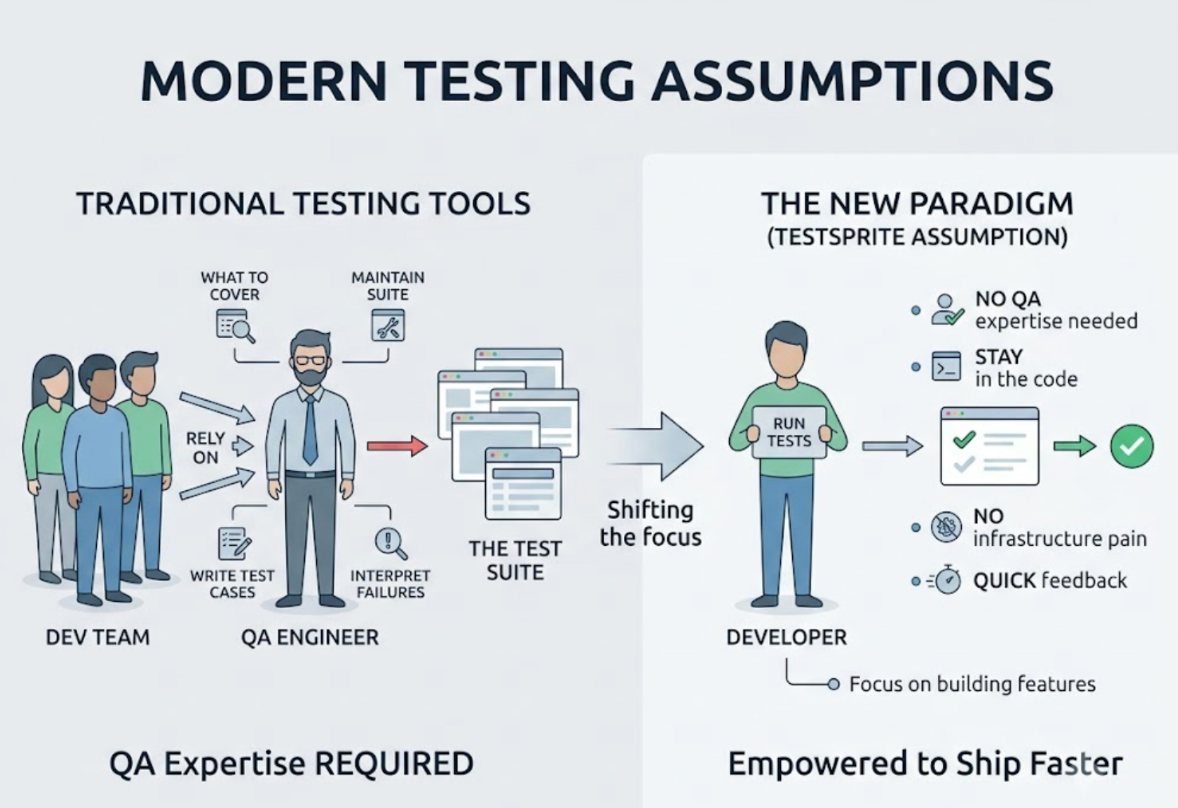
Yes. TestSprite was designed specifically for this person.
The assumption most testing tools make is that someone with QA expertise is involved. A QA engineer who knows what to cover, how to write test cases, how to maintain a suite as the product evolves, and how to interpret failures and trace them back to root causes. Without that person in the room, most testing tools become difficult to use correctly.
TestSprite makes a different assumption: the developer is writing code and needs to know whether it works, without having testing expertise and without wanting to spend engineering time on testing infrastructure.
That's the setup that TestSprite optimizes for.
What "Setup" Actually Involves
The practical setup steps for TestSprite are minimal.
If you're using an AI IDE like Cursor, Claude Code, Windsurf, or VS Code with GitHub Copilot, you install the TestSprite MCP Server through a configuration file. It requires Node.js, a TestSprite API key, and about two minutes. No test framework to configure. No test runner to install locally. No test environment to provision.
If you prefer a browser-based interface, the TestSprite Web Portal gets you started by creating a project and providing the URL of your running application. That's the full setup.
What you don't have to do is more relevant here: no test files to write, no test data to set up, no assertion syntax to learn, no test suite architecture to design.
You Don't Need to Know What to Test
For a developer without QA experience, the hardest part of testing isn't running tests. It's knowing what to test.
A QA engineer builds intuition for which flows break under which conditions, which edge cases to cover, and what the product should do in scenarios the developer didn't fully think through when building the feature. That intuition comes from experience, and most developers don't have it as a dedicated focus.
TestSprite's exploration agents do the discovery work. They visit the running application and navigate it the way real users would, without requiring the developer to specify what to cover. They find the interactive surfaces, map the user journeys, and build test coverage from direct observation of the product.
Other verification tools read your code and guess. TestSprite opens your app and uses it.
The developer doesn't need to know whether to test the dropdown before the form submit or the form submit before the dropdown, or whether to cover the case where a user navigates backward through a multi-step flow. The agents discover these paths by exploring the product, the same way a QA engineer would on their first walkthrough of a new feature.
One Instruction Replaces the Test Writing Step
Once setup is complete, triggering the full testing pipeline from inside Cursor, Claude Code, or any MCP-compatible IDE takes one instruction in the chat:
"Help me test this project with TestSprite."
That instruction replaces what would otherwise be hours or days of writing test cases, setting up test data, configuring assertions, and running a test suite. The agents navigate the product, generate tests from what they find, execute them in a cloud sandbox, and return results.
A non-QA developer receives the same kind of feedback a QA engineer would give after a first walkthrough: here's what I tried, here's what was supposed to happen, here's what actually happened.
The feedback doesn't require QA expertise to interpret. It describes product behavior in plain terms. When a flow fails, the description says which action was taken and what the product did wrong, not which assertion evaluated to false or which line number threw an exception.
No Test Maintenance Required
One of the ongoing costs of traditional test suites is maintenance. When the UI changes, tests break. When a component is renamed, tests break. When a flow is redesigned, tests break. Keeping a test suite current is engineering work that compounds over time.
For a developer who isn't a QA engineer, this ongoing cost is especially discouraging. Writing tests is already not their primary focus. Maintaining them after every UI change makes testing feel more like a burden than a benefit.
TestSprite's Auto-Heal Rerun handles this automatically. When a test fails after a UI change, the agent determines whether the failure reflects a genuine behavioral regression or a structural change that doesn't affect what users experience. A renamed button, a repositioned form field, a redesigned layout: the test adapts. The developer doesn't have to update anything.
Genuine product failures surface clearly. Structural noise doesn't create maintenance work.
A Scenario: A Developer Who Had Never Written a Test
A developer building a B2B SaaS product had been shipping without any test coverage for eight months. They'd tried to set up a test framework twice and abandoned it both times, once because the configuration was too complex and once because maintaining the tests after UI changes took more time than the tests were saving.
They tried TestSprite.
Setup took about ten minutes: create an account, get an API key, install the MCP Server in Cursor, point it at the staging environment. The first test session ran while they were making coffee.
The exploration agents navigated the product across its main flows: user onboarding, project creation, team invitation, and billing. The developer watched the three-column interface: live application previews on the left, the use-case flow graph in the middle, and per-agent detail on the right.
In the first session, the agents found three issues.
The onboarding flow had a step that asked users to set a display name. The field accepted the input and the form proceeded, but the display name wasn't saved. The API call that should have persisted it was missing from a recent refactor.
The team invitation flow sent invitation emails correctly, but the acceptance link expired after 24 hours with no way for the inviting user to resend it. The expiry existed by design, but the UI gave no indication it had happened or what to do next. Invited users were silently failing to join.
The billing section showed the correct plan on the main settings page but showed a different plan on the user profile page. Two different data sources, one updated and one not.
None of these required QA expertise to understand. They were described in plain terms: which flow, what happened, what should have happened. The developer fixed all three before the next release.
Eight months of building without tests. The first session with TestSprite surfaced three real issues that had been shipping to users.
What Happens Between Sessions
TestSprite isn't a one-time check. After the first session establishes a baseline, subsequent sessions compare the product's current behavior against that baseline and surface any divergences.
When a new feature ships, the agents explore it automatically and add it to the coverage. The developer doesn't decide what the new feature should cover. The agents discover it.
When a refactor touches existing flows, the agents re-run those flows and catch any behavioral changes. The developer doesn't manually update test cases to reflect the refactored implementation.
For scheduled regressions, the GitHub Actions integration runs the same pipeline on every pull request. Results post as PR comments without the developer configuring a separate QA step.
Conclusion
TestSprite is easy to set up for a developer who isn't a QA engineer because it was designed for exactly that person. Setup takes about ten minutes. You don't need to know what to test, how to write test cases, or how to maintain a suite over time.
The exploration agents discover the product's user journeys, generate tests from what they find, and return failure descriptions in plain terms the developer can act on directly. Auto-Heal keeps the coverage current as the product evolves. And one instruction from inside the IDE is all it takes to run the full pipeline.
For developers who have avoided testing because the setup cost was too high or the ongoing maintenance burden was too heavy, TestSprite removes both barriers.
Get started with TestSprite in minutes. No QA experience required.