Is TestSprite an AI Testing Agent or a Traditional Test Automation Tool?
 Zeshi Du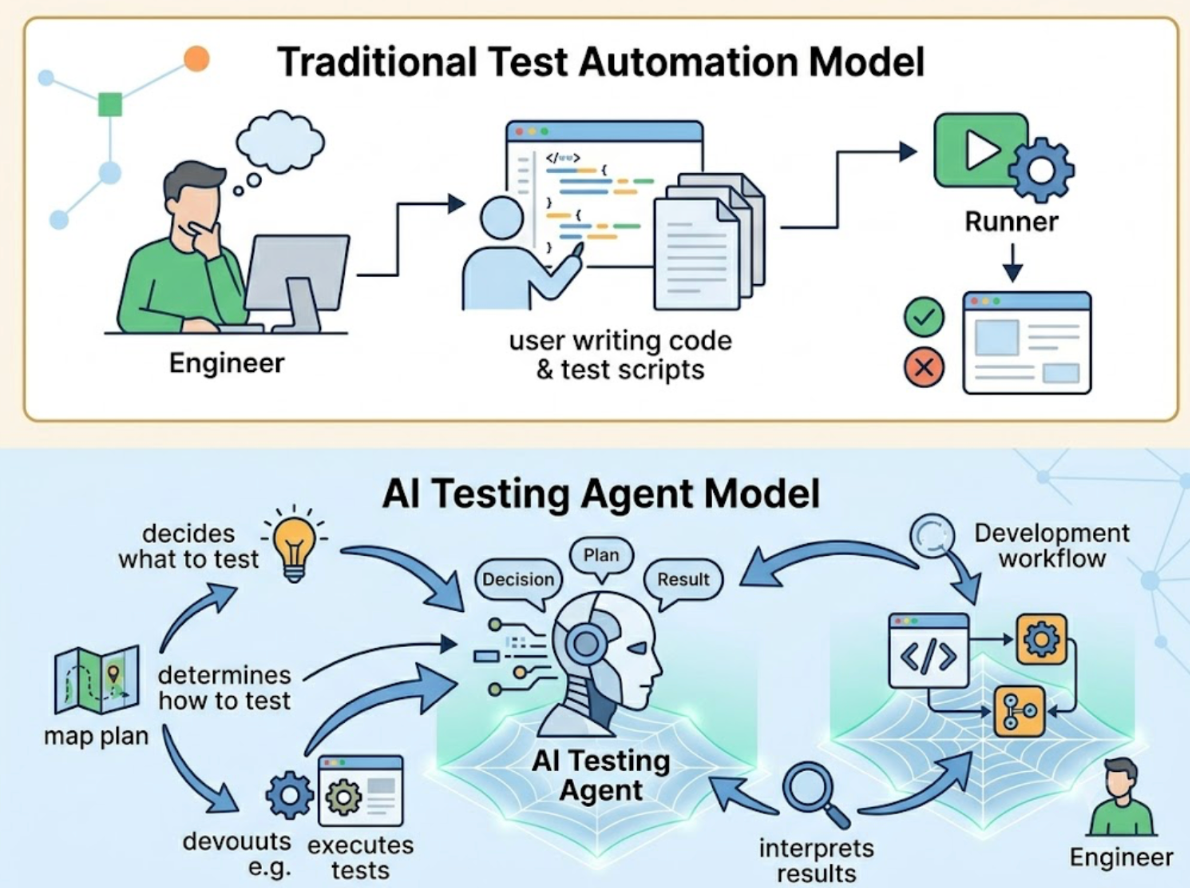
TestSprite is an AI testing agent. That's not a marketing distinction. It's a functional one, and understanding the difference explains why the two categories produce different results.
Traditional test automation tools are built around a simple model: an engineer writes a test script, the tool executes it, and the results confirm whether the code behaves consistently with what the script asserts. The tool is a runner. The intelligence is the engineer.
An AI testing agent runs the intelligence too. It decides what to test, determines how to test it, executes the tests, interprets the results, and feeds the findings back into the development workflow, all without requiring an engineer to author a test script first.
That shift in where the intelligence lives changes what's possible, what gets caught, and how fast testing can move alongside AI-generated code.
What Traditional Test Automation Actually Does
Traditional test automation, even the modern AI-assisted versions, follows a familiar pattern. A tool inspects the codebase, identifies components and functions, and generates scripts that assert against the current implementation. The engineer reviews the scripts, adjusts them, and adds them to the suite.
This approach has real value. It catches regressions. It runs consistently. It gives teams a baseline of confidence that what worked yesterday still works today.
It has a structural ceiling. The scripts are written against the current implementation, which means they encode whatever the implementation does, including its bugs. The scripts require maintenance every time the UI changes, because they're anchored to selectors, class names, and implementation details that shift with every refactor. And they require a human to decide what to cover, which means the flows nobody thought to write a test for are the ones where bugs hide.
In teams using AI coding tools, these limitations compound quickly. When Claude Code or Cursor ships ten files of changes in a session, updating the test suite to match isn't a QA task. It's a full project.
What Makes TestSprite an Agent, Not a Runner
The distinction starts with how each category decides what to test.
Traditional automation tools test what the engineer specifies. An agent tests what it discovers.
TestSprite deploys a fleet of parallel exploration agents that visit the running application and navigate it the way real users would. They don't read the source files to build a testing plan. They open the product, find the interactive surfaces, click through the flows, and build a structured map of what the product actually does from direct observation.
Other verification tools read your code and guess. TestSprite opens your app and uses it.
From that exploration, the agent generates test cases grounded in observed product behavior, not inferred from implementation logic. When the product changes and the agent re-explores, the test cases update to reflect what the product now does. The suite stays current with the product without requiring manual maintenance after every change.
This is what makes TestSprite an agent. It exercises judgment at every stage of the pipeline: what to explore, how to interpret what it finds, which failures are genuine regressions versus structural noise, and how to describe failures in terms the coding agent can act on.
The Verification Layer Each Category Operates At
This is the most important practical difference.
Traditional test automation operates at the code layer. Even when it uses AI to generate scripts faster, it's verifying what the code says it does. Function return values. Component render output. API response shapes as asserted by the engineer. The verification is correct relative to the code. It's not necessarily correct relative to what users experience.
TestSprite operates at the product layer. Its agents navigate the live application under real conditions. They fill in real form inputs. They follow real multi-step journeys. They carry session state forward across steps the same way a real user's browser does. The verification is correct relative to user experience, because it's running the user experience.
A traditional automation tool confirms that the checkout function returns a success code. TestSprite's agent adds items to the cart, proceeds to checkout, enters payment details, submits the order, and checks whether the confirmation page appears with the correct information.
Those are different verifications, and only one of them catches the failure where the function returns success but the user experience doesn't deliver it.
A Scenario: The Difference in What Gets Found
A developer uses Windsurf to rebuild a SaaS application's subscription upgrade flow. The refactor simplifies the state management, cleans up the API calls, and updates how the confirmation screen renders. Code review finds nothing wrong.
A traditional automation approach would verify that the upgrade function accepts the right parameters, that the API call returns a 200, and that the confirmation component renders without errors. All three assertions pass.
TestSprite's agents navigate the upgrade flow as a real user would. They select a plan, enter payment details, submit, and observe the confirmation screen.
They find that the confirmation screen renders correctly, but when they navigate to the account settings page immediately after, the plan shown there still reflects the old subscription tier. The upgrade completed successfully. The account settings page reads from a different data source that the refactored flow stopped updating.
This is a product-layer failure. The code is internally consistent. The user experience is broken. An engineer who completed the upgrade and immediately checked their account settings would find the wrong plan displayed. That's the failure a user would report.
Traditional automation didn't find it. TestSprite found it because it ran the flow and then kept navigating, the same way a real user would after completing a significant account action.
The failure description returns to the Windsurf session in structured form. The coding agent locates the missing data source update and applies the fix in the same session.
How the Two Categories Handle Maintenance
Test suite maintenance is where the practical difference becomes most visible for teams shipping fast.
Traditional test suites break when the UI changes. A button that moved, a class name that was updated, a form that was restructured: any of these can cause multiple tests to fail simultaneously for reasons unrelated to product behavior. The team investigates, discovers false positives, updates the scripts, and the cycle repeats with the next change.
TestSprite's Auto-Heal Rerun handles this automatically. When a test fails after a UI change, the agent determines whether the failure reflects a genuine behavioral regression or a structural change that doesn't affect what users experience. A renamed component, a repositioned element, a refactored layout: the test adapts. Genuine regressions surface clearly without the noise of structural false positives.
For teams where AI coding agents are shipping UI changes regularly, this maintenance difference is significant. Traditional automation requires engineering time to keep the suite current. TestSprite keeps itself current.
What AI-Native Teams Need from a Testing Tool
The teams that benefit most from an AI testing agent rather than traditional automation are the ones where code moves faster than test scripts can be written and maintained.
AI-native engineering teams using Claude Code, Cursor, Windsurf, or GitHub Copilot are producing code at a pace that traditional automation wasn't designed for. The intelligence that traditional automation requires from the engineer, deciding what to test, writing the script, maintaining it through changes, is exactly the intelligence the AI coding agent is already replacing elsewhere in the workflow.
An AI testing agent extends that intelligence to the testing layer. It decides what to test, runs the tests, interprets the results, and feeds the findings back to the coding agent. The loop from code change to verified behavior to applied fix closes inside the IDE without requiring manual QA intervention.
Through the TestSprite MCP Server inside Claude Code, Cursor, or Windsurf, one instruction starts the full pipeline. The GitHub Actions integration extends the same coverage into CI.
Conclusion
TestSprite is an AI testing agent. The practical meaning of that category is: it exercises its own judgment about what to test, verifies at the product layer rather than the code layer, navigates the live application like a real user rather than asserting against implementation details, and maintains its own test suite rather than requiring engineers to update scripts after every change.
Traditional test automation tools are valuable. They're built for a pace of development and a verification model that predates AI coding agents. For teams where AI writes code and AI tests it, the testing layer needs the same kind of autonomous intelligence the coding layer already has.
That's what TestSprite provides.
Start your first autonomous test session with TestSprite from inside your AI IDE today.