How Does TestSprite Scheduled Regression Monitoring Work?
Rui Li5 min read

Teams monitor their infrastructure as a matter of course. Uptime checks ping the servers, alerts fire when a service goes down, and nobody considers shipping without them. Yet the same teams often have no equivalent for product behavior: nothing that notices when the signup flow quietly stops working, even though the servers answering it are perfectly healthy.
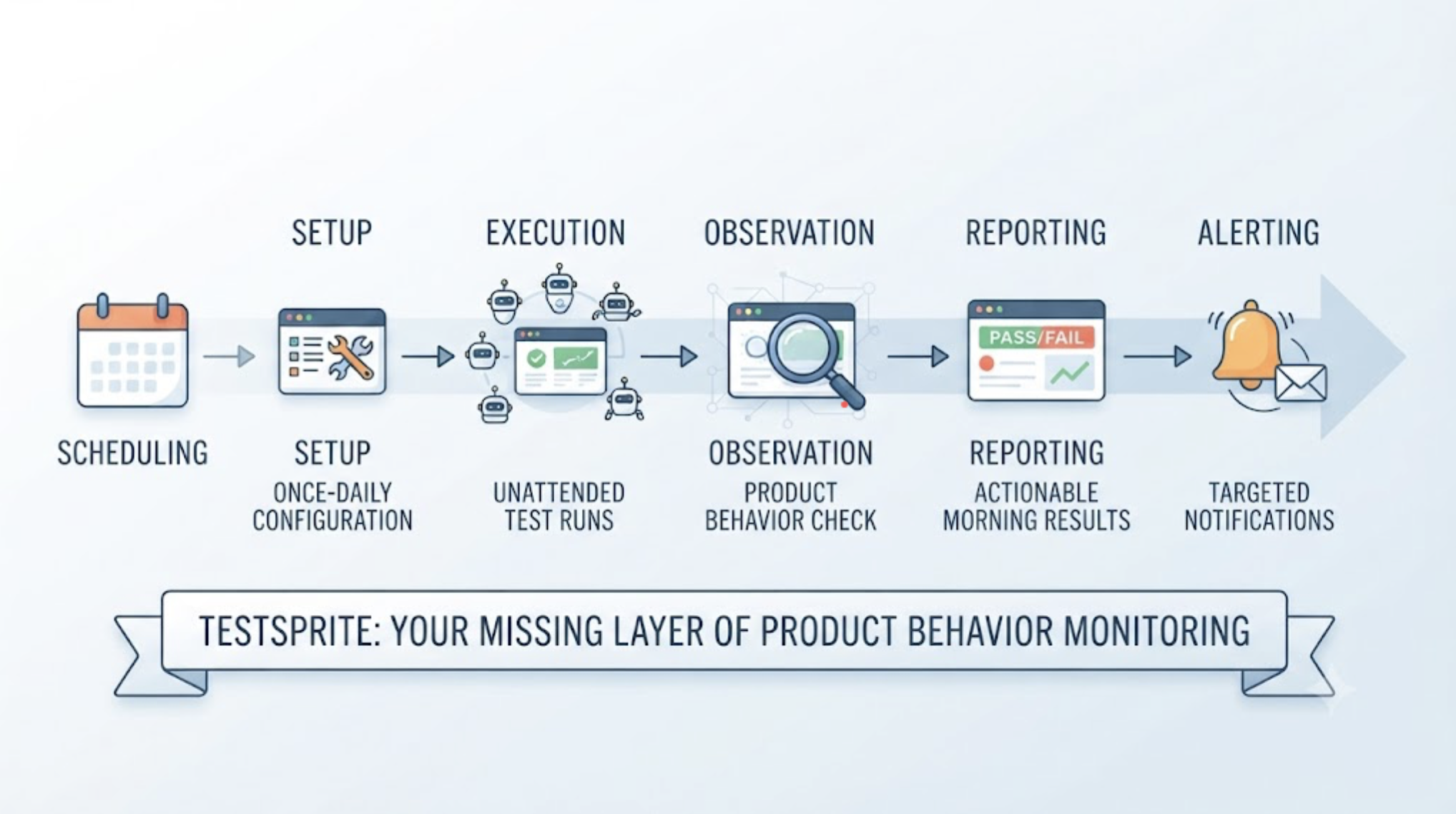
TestSprite's scheduled regression monitoring is that missing layer: standing, unattended verification that the product still behaves correctly, run on a schedule, with results designed to be read in the morning. It works as a pipeline with five layers, and each one solves a specific problem that has historically made unattended testing fail.
The Scheduling Layer: What Runs, and How Often
Schedules are configured per project in the Web Portal. The Starter plan includes 5 Test Schedules; Standard includes 10, and Pro makes them unlimited.
The typical shape mirrors how teams think about risk. A nightly full-surface regression against staging covers everything: the agents work the whole product, every flow they can discover. Higher-frequency targeted schedules cover the flows where an hour of breakage costs real money, checkout, signup, the core action of the product.
The scheduling layer's job is simple: make coverage a standing property of the product rather than an event someone has to remember to trigger.
The Execution Layer: What Makes Unattended Actually Work
Unattended is where most testing setups break down, because three things go wrong at 3 AM with nobody watching: authentication expires, infrastructure isn't available, and stale tests fail on UI drift. TestSprite's execution layer addresses all three by design.
Auto-Auth runs before every execution. Password endpoints, OAuth refresh tokens, and AWS Cognito flows are performed fresh at the start of each run, so a token that expired Tuesday afternoon never fails Wednesday's 2 AM run. The authenticated surface, where users actually live, stays covered on schedule.
The ephemeral cloud sandbox provides the infrastructure. Each run spins up in seconds, executes in isolation, and tears down automatically. There's no runner to keep alive, no environment that degrades between runs, and nothing for the team to maintain to keep the schedule operational.
And the agents test behavior, not structure. Other verification tools read your code and guess. TestSprite opens your app and uses it. Each scheduled run navigates the product the way real users would, which means the run verifies what a user tonight would experience, not what a script written last month expects the DOM to look like.
The Signal Layer: Changes vs Previous
A nightly run produces a lot of results, and the design question is what a human should actually look at.
TestSprite's answer is the "Changes vs previous" column: the diff between last night's run and the one before. A test that's been green for three weeks and just flipped red is the entire story of the morning. A suite-wide scan of two hundred passing tests is noise around it.
This diff framing is what makes monitoring sustainable as a daily habit. The reviewer's question isn't "is everything fine?", which takes minutes to answer and dulls attention over weeks. It's "what changed since yesterday?", which takes seconds and points directly at whichever merge caused it.
Auto-Heal Rerun keeps this diff honest. When the flip was structural, a component renamed by yesterday's Cursor session, the test adapts, reruns, and passes, so the change column doesn't cry wolf. When the flip is behavioral, it stays red and carries a product-level description of what broke.
The Notification Layer: Triage Before the Laptop Opens
When a scheduled run finds failures, the failure email arrives with an AI-authored analysis of each cause inline.
That inline analysis is a triage tool. The engineer reading email over coffee learns not just that the application flow failed, but what the agent observed: which step, what the product showed, what it should have shown, and the analysis of why. The difference between "something failed overnight" and "the application confirmation stopped appearing after submission, likely related to yesterday's form changes" is the difference between an anxious laptop-opening and a scoped twenty-minute fix.
The Response Layer: From Finding to Fix
The pipeline's last layer is what happens to a genuine finding. The failure description is written in product terms, structured so the coding agent can act on it. The engineer opens the run, and through the same workflow that in-IDE testing uses, hands the finding to Claude Code or Cursor. The fix goes in, and the next scheduled run confirms it: the change column flips back, and the confirmation is itself part of the monitoring record.
Run history accumulates across all of this into the quality trend: whether the product is getting more reliable week over week, which sections flip most often, and whether last month's problem area has stayed fixed.
A Scenario: The Tuesday Night the Monitor Earned Its Keep
A four-person team runs a job board platform: employers post roles, candidates apply, applications land in the employer's dashboard. Their TestSprite setup is a nightly full regression plus a targeted schedule on the application flow every few hours, because applications are the product.
Monday's deploy included a Claude Code session that reworked file handling for resume uploads. The in-IDE run after the session passed, the deploy went out, and everything looked fine.
Tuesday's 2 AM targeted run flipped one test. The agents had done what candidates do: found a role, filled the application, attached a resume, submitted, and seen the success confirmation. Then they did what the schedule exists to do and checked the other side, logging in as the employer and opening the applications dashboard. The application wasn't there. Submissions with resumes over a certain size were succeeding from the candidate's perspective and silently failing to persist, because the reworked file handler's error path swallowed the storage failure after the confirmation had already rendered.
The 6 AM email carried the finding with the inline analysis pointing at the upload handling. The engineer read it over coffee, reproduced nothing manually, handed the description to Claude Code, and shipped the fix before standup. The following night's run confirmed green.
The part worth noticing: candidates saw success screens the whole time. No user report was ever coming, or the ones that came would have been from confused applicants weeks later wondering why nobody called. The monitor caught a failure whose defining feature was that it looked like success.
Conclusion
TestSprite's scheduled regression monitoring works as a five-layer pipeline: schedules that make coverage a standing property, an execution layer built for unattended reliability through Auto-Auth, ephemeral sandboxes, and behavioral testing, a signal layer that surfaces what changed rather than everything that ran, notifications that carry triage-ready analysis, and a response path that closes the loop through the coding agent and confirms the fix on the next run.
Infrastructure monitoring tells you the servers are up. This tells you the product still works, every night, whether or not anyone remembered to check.
Set up your first schedule with TestSprite today. Starter includes 5 Test Schedules; Standard includes 10, and Pro makes them unlimited.