How Does TestSprite Generate and Run Tests from a Project?
 Zeshi Du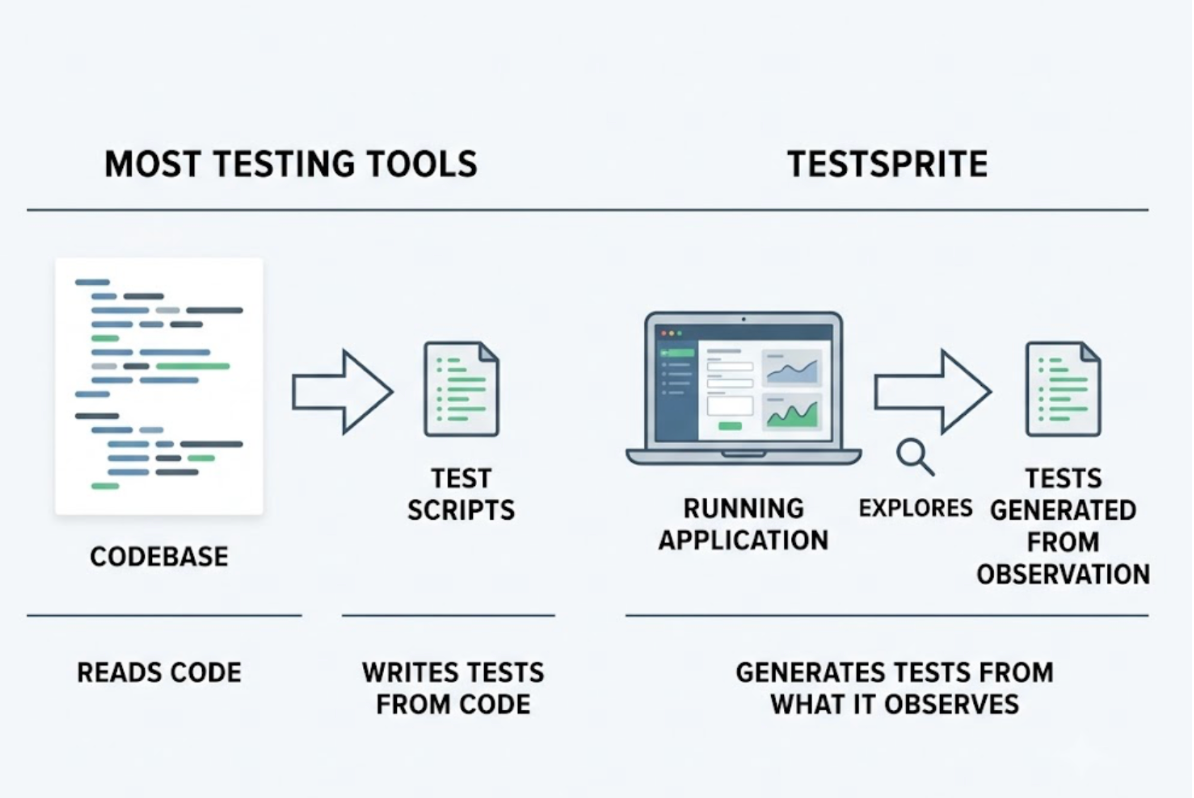
Most developers who discover TestSprite ask some version of the same question: what actually happens after I give it access to my project?
The answer is worth understanding in detail, because it's different from how most testing tools work. TestSprite doesn't read your codebase and write test scripts from what it finds. It visits your running application, explores it, and generates tests from what it observes. The starting point isn't the code. It's the product.
That difference determines what gets tested, what gets caught, and how much manual work the team has to do to keep coverage current.
Step One: Connecting TestSprite to Your Project
TestSprite connects to a project through two primary surfaces.
The first is the TestSprite MCP Server, which integrates natively with AI IDEs that support the Model Context Protocol: Cursor, Claude Code, Windsurf, Trae, VS Code, and others. Once configured, the testing pipeline is available from inside the IDE's chat interface. No separate tool to open, no dashboard to navigate to.
The second is the TestSprite Web Portal, the browser-based dashboard where teams configure projects, manage test plans, set up authentication, schedule regressions, and track quality trends over time.
In either case, the project configuration is minimal. TestSprite needs the URL of the running application, staging or preview environment, and the authentication credentials if the project requires login. That's the starting point.
Step Two: Discovery, the Part That's Different
This is where TestSprite's approach diverges from code-inspection testing.
Other verification tools read your code and guess. TestSprite opens your app and uses it.
When a test session starts, a fleet of parallel exploration agents visits the live application. They don't open the source files. They open the product. They navigate it the way a real user would: finding interactive elements, clicking through flows, filling in forms with real inputs, following multi-step journeys from entry to completion.
The agents run in parallel. One follows the primary user journey. Others explore alternative paths, restricted-role experiences, and error states. Each agent builds a log of what it found: which flows exist, what actions produce which outcomes, where the product behaves as expected and where it doesn't.
The output of discovery isn't a list of functions to test. It's a structured map of real user journeys, built from actual product interaction.
Engineers can watch this process live through the three-column interface: live application previews on the left, the use-case flow graph in the middle, and per-agent interaction detail on the right. Sessions are resumable. If the discovery run is interrupted, the agents pick up where they stopped.
Step Three: Building the Test Plan from Intent, Not Implementation
Once discovery is complete, TestSprite builds a test plan. The source material for that plan matters.
If a PRD or specification document exists, TestSprite parses it and anchors test goals to stated product intent. The tests are grounded in what the product is supposed to do for users, not in what the current code happens to produce.
When no PRD exists, which is common in AI-native teams shipping fast, the MCP server reverse-engineers intent from the codebase itself. Route definitions reveal what user actions the product supports. API contracts reveal what data flows it manages. Component structures and naming conventions reveal what the product presents to users. These signals are treated as evidence of design intent, not as a blueprint for implementation assertions.
This distinction prevents the well-known failure mode where tests derived from implementation encode bugs as correct behavior. TestSprite's tests are anchored to intent. When the implementation diverges from intent, the test fails. That's the failure worth finding.
Before test generation begins, a Plan-Closure Preview shows which test plans depend on which others, letting engineers review and deselect freely. Coverage decisions stay with the team.
Step Four: Test Generation Grounded in Observed Behavior
Test cases are generated from the combination of the discovery map and the intent model.
For frontend flows, each test case describes a sequence of real user interactions and an expected product outcome. Not a function assertion. Not a component render check. A description of what a user does and what the product should deliver at the end of that sequence.
For backend APIs, TestSprite's Backend Testing 2.0 calls each endpoint and observes the real response before writing a single assertion. Real status codes. Real field names. Real response shapes. The resulting assertions reflect the API's actual contract, not a prediction of it based on source code inspection.
Dynamic variables captured from real API responses flow automatically through multi-step sequences. A resource created in one step passes its actual ID to the steps that follow. CRUD lifecycle tests run end to end on the first attempt without the developer wiring the data manually.
Step Five: Execution in the Cloud Sandbox
All tests run in TestSprite's secure ephemeral cloud sandbox. It spins up in seconds, executes in isolation, and tears down automatically after the run completes.
No local environment setup required. No test database to maintain. No infrastructure to provision or manage. The developer points TestSprite at the staging URL. The sandbox handles the rest.
Scheduled regressions run the same way. Auto-Auth handles the authentication layer: password endpoints, OAuth refresh tokens, and AWS Cognito flows run automatically before every scheduled execution. Overnight runs don't fail on expired credentials.
After every run, resources created during testing are swept in dependency order. The environment is clean for the next run.
Step Six: Results Back to the IDE
When tests pass, the developer has confirmation that the flows the agents explored work correctly in the running product.
When tests fail, the structured failure description returns to the IDE. It describes what the agent was doing, what it expected to happen, and what the product actually produced. The framing is product-level throughout: which user action, which expected outcome, which actual outcome.
In Claude Code, Cursor, or Windsurf, the AI coding agent receives that failure description and can propose a fix in the same session. The loop from code change to test failure to applied fix closes inside the IDE.
A Scenario: Discovery Finds What Nobody Specified
A developer uses Cursor to build an e-commerce product's order management section. The AI generates the order list, the order detail view, and the order cancellation flow in a single session. No test cases were written. No PRD exists for this section.
The developer connects TestSprite and starts a session from inside Cursor.
The discovery agents navigate the order management section as a real customer would. They view the order list, open a detail view, and attempt to cancel an order. They find the cancellation flow: a confirmation modal, a reason selector, and a submit button.
They also find something nobody specified: when they cancel an order and navigate back to the order list, the cancelled order still appears with its original status. The cancellation API call succeeds. The order list doesn't refresh to reflect the cancellation. The UI is stale.
This wasn't in any test plan because there was no test plan. TestSprite found it by exploring the product the way a user would: complete an action, navigate to the logical next screen, check whether the state is consistent.
The failure description returns to the Cursor session. The coding agent identifies the missing list refresh after the cancellation confirmation and applies the fix. The developer runs TestSprite again to confirm the order list updates correctly after cancellation.
Conclusion
TestSprite generates and runs tests from a project by exploring the live application first, building an intent model from that exploration and any available specifications, generating tests from observed behavior rather than implementation inspection, and executing those tests in a cloud sandbox with results returned to the IDE.
The approach is different from code-inspection testing at every stage. The starting point is the product, not the code. The test cases describe user interactions, not function assertions. The execution is isolated and infrastructure-free. The results are structured for the coding agent to act on.
For teams where AI writes code and needs autonomous verification to match, this is how that verification works.
Start your first TestSprite session from inside your IDE or Web Portal today.