How Do I Run E2E Tests After Claude Code Changes My App?
 Zeshi Du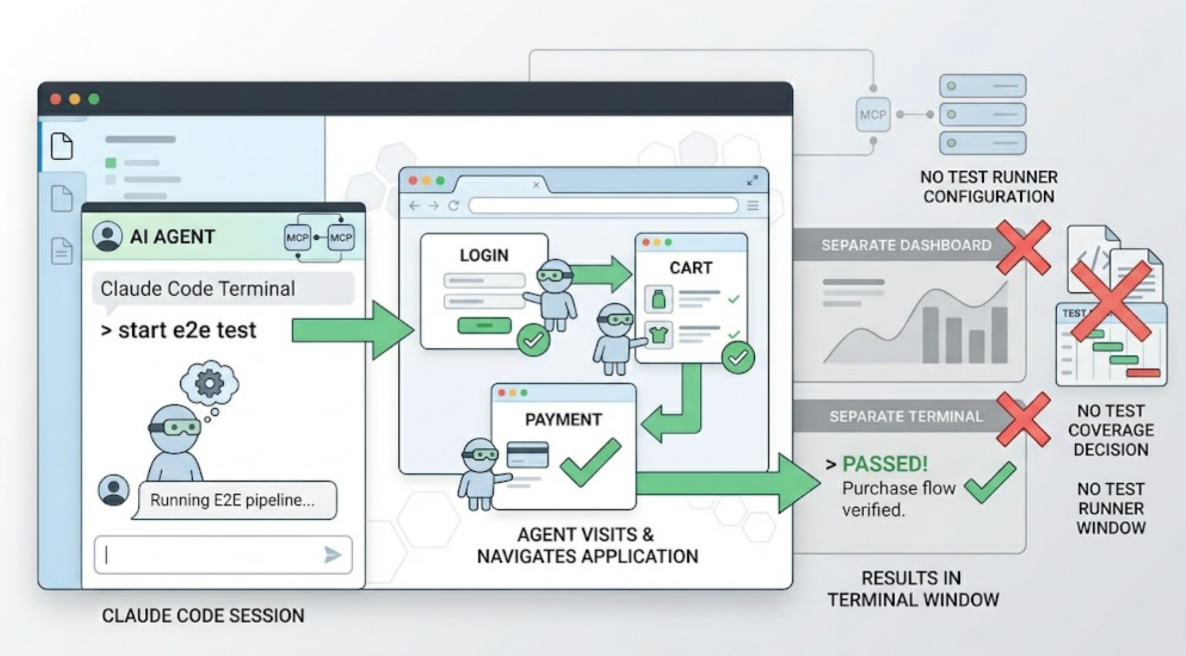
One instruction. That's the entire answer if you have TestSprite connected.
"Help me test this project with TestSprite."
After a Claude Code session that modified your application, that instruction inside the Claude Code terminal kicks off a full E2E testing pipeline. The agents visit the running application, navigate it, run the flows, and return results to the same terminal window. You don't leave the IDE. You don't configure a test runner. You don't decide what to cover.
The longer answer is why this approach produces E2E results worth trusting, and what happens during those few minutes between the instruction and the results.
What Claude Code Changes Actually Introduce
Claude Code sessions tend to be broad. A single session might touch the checkout component, the discount logic it calls, the API endpoint that processes the order, and the state management that updates the UI after submission. Each piece looks correct. The session produces working code at every individual layer.
The E2E failures that follow Claude Code sessions live at the integration points. Not in the files that were changed, but in the interactions between those files and the rest of the application. A state update that stopped propagating correctly to a component three screens away. An API response format that changed in a way the consuming component didn't expect. A user flow that worked at step two and step four individually but broke at the transition between them.
These aren't in the diff. Running the tests that check individual functions doesn't find them. The only thing that finds them is actually running the full user flow, end to end, after the changes landed.
Setting Up for E2E Testing After Claude Code Sessions
If you don't have TestSprite connected to Claude Code yet, the setup takes about two minutes.
Create a TestSprite account and generate an API key from your account settings. Make sure Node.js is installed (node --version in terminal). Then add the following to Claude Code's MCP configuration via Manage MCP Servers → View raw config:
Save, start the server from the configuration view, and confirm the tools load. That's the full setup.
If TestSprite is already connected, skip ahead.
What Happens When You Trigger the E2E Pipeline
After a Claude Code session, trigger TestSprite from the terminal:
"Help me test this project with TestSprite."
Other verification tools read your code and guess. TestSprite opens your app and uses it.
A fleet of parallel exploration agents visits the running application. Not the files Claude Code modified. The live product, at its staging or preview URL. They navigate it the way a real user would.
They click through UI flows. They fill in forms with real inputs. They follow multi-step journeys from entry to completion, carrying session state forward across steps. They explore the full product surface, not just the flows that touched the recently changed files.
That last part is the important one. Claude Code might have changed the checkout component, but the agents will also navigate the order history page, the account settings, and the dashboard. The E2E failure that a Claude Code session introduced often appears in a flow that wasn't directly touched by the session, because a shared piece of state or a common API endpoint changed behavior in a way that affects multiple parts of the product.
If a PRD exists, the agents anchor their exploration to stated product intent. If one doesn't, the MCP Server infers intent from the codebase. Either way, the flows the agents run are grounded in what the product is supposed to do, not in what the new implementation happens to produce.
Reading the Results Back in Claude Code
When the E2E run completes, the results return to the Claude Code terminal.
Flows that pass confirm that the product behavior the agents verified is working correctly. Flows that fail produce structured failure descriptions: which action was taken, what the expected product outcome was, what actually happened.
The failure description is formatted for Claude Code's coding agent to act on directly. It doesn't require the developer to translate a test report into a code change. The coding agent receives the description of what broke and can propose the fix in the same session.
That's the closed loop. Claude Code changes the app. TestSprite tests the app. Claude Code fixes what broke. All inside one IDE session.
Auto-Heal Rerun handles the cases where the Claude Code session made structural UI changes that cause tests to fail for reasons unrelated to product behavior. A renamed component, a repositioned element, a refactored layout: the test adapts. Genuine E2E failures, where the product behavior actually changed in a way users would experience, surface clearly.
Backend E2E Coverage in the Same Run
The same instruction covers backend API flows.
TestSprite's Backend Testing 2.0 calls the endpoints and observes how they actually respond after the Claude Code session's changes landed. Real status codes, real field names, real response shapes. Assertions are grounded in observed behavior, not in what the new code says the API should return.
For multi-step backend flows, dynamic variables from real responses flow automatically to downstream steps. A CRUD lifecycle test captures the actual ID from a create response and passes it to the read, update, and delete steps. The full sequence runs end to end.
When a Claude Code session changes a backend API and introduces a contract break, the next E2E run compares the new response against the prior established baseline and surfaces the deviation as a specific finding.
A Scenario: After the Session, Before the Push
A developer finishes a Claude Code session that rebuilt the notification settings page. The session covered the settings form, the API call that saves preferences, and how the saved preferences are used elsewhere in the application. Eight files changed.
Before pushing, the developer types one instruction in the Claude Code terminal.
The exploration agents navigate the notification settings page as a real user managing their account would. They change the notification preferences, save them, and navigate to the account overview to verify the preferences are reflected there.
They find that the preferences update correctly on the settings page. The account overview still shows the old preferences. The API call saves the preferences correctly. The account overview reads from a cache that the Claude Code session stopped updating when it reorganized the preferences persistence logic.
The failure description returns to the Claude Code terminal: which pages were navigated, what was changed, where the inconsistency appeared. The coding agent locates the missing cache invalidation in the reorganized logic and applies the fix. The developer triggers TestSprite again. The account overview now shows the updated preferences.
The E2E test ran after the session, found the failure before it reached users, and closed the loop inside Claude Code. The push goes out with the regression fixed.
Running E2E Tests in CI for Every Push
The in-IDE loop handles E2E verification after each Claude Code session. For teams that want automated coverage on every pull request, the GitHub Actions integration extends the same pipeline into CI.
Every PR that includes Claude Code changes triggers an automated E2E run against the preview environment. Results post as PR comments. Reviewers see E2E coverage alongside the diff. Changes that break a user flow surface before the code merges, not after users hit it.
The full setup guide is at docs.testsprite.com.
Conclusion
Running E2E tests after Claude Code changes your app takes one instruction if TestSprite is connected. The agents navigate the live application like real users, cover the full product surface rather than just the changed files, and return structured failure descriptions Claude Code can act on directly.
The setup takes two minutes. The first session takes a few minutes. The failures it surfaces are the ones that would have reached users.
Connect TestSprite to Claude Code and run E2E tests after every session today.