How Do I Add TestSprite MCP Server to Claude Code?
 Zeshi Du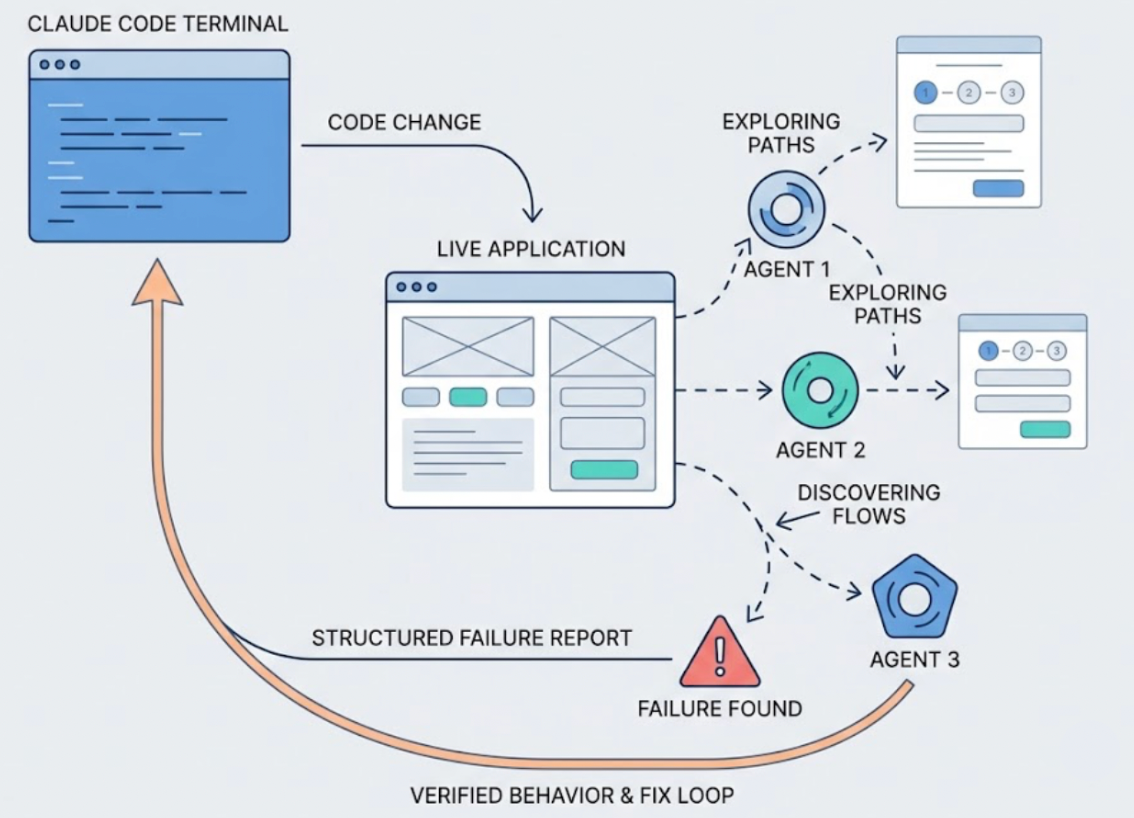
Adding the TestSprite MCP Server to Claude Code takes about two minutes. Once it's in place, one instruction from the Claude Code terminal starts a full autonomous testing pipeline against your running application.
Before you start, two things need to be ready: a TestSprite account with an API key, and Node.js installed on your machine.
What You Need Before Starting
A TestSprite account and API key. Sign up at testsprite.com. The free plan doesn't require a credit card. After signing in, navigate to your account settings and generate an API key. The MCP Server uses this to authenticate with TestSprite's backend.
Node.js. Run node --version in your terminal. If it returns a version number, you're set. If not, install Node.js from nodejs.org. The TestSprite MCP Server runs as an npm package and requires Node.js to function.
Method One: Using the MCP Store in Claude Code
Claude Code has a built-in MCP management interface that makes adding servers straightforward.
Open the dropdown menu at the top of Claude Code's agent panel and select Manage MCP Servers. From there, click View raw config to open the mcp_config.json file directly.
Add the following configuration to the file:
{
"mcpServers": {
"TestSprite": {
"command": "npx",
"args": ["@testsprite/testsprite-mcp@latest"],
"env": {
"API_KEY": "your-api-key"
}
}
}
}
Replace your-api-key with the API key from your TestSprite account. Save the file. Click the start button above the TestSprite MCP entry in the configuration view. If the server starts without errors and the tools load successfully, the installation is complete.
Method Two: Manual JSON Configuration
If you prefer editing configuration files directly, you can add the TestSprite MCP Server to Claude Code's configuration JSON manually.
For Claude Code, the configuration uses this format in your servers block:
{
"servers": {
"testsprite": {
"command": "npx",
"args": ["-y", "@testsprite/testsprite-mcp@latest"],
"env": {
"API_KEY": "your-api-key"
}
}
}
}
Note the -y flag in the args: this tells npx to automatically confirm the package installation without waiting for interactive input. Omitting it can cause the process to hang silently.
One Scope Detail Worth Knowing
Installing the TestSprite MCP Server through Claude Code adds it scoped to the current project directory. If you work across multiple projects and want TestSprite available in each one, you'll need to add it per project, or configure it at the user scope to make it available globally.
This is standard Claude Code MCP behavior, not specific to TestSprite. For most developers using Claude Code for a primary project, the default project-scoped installation is the right starting point.
Running Your First Test
With the MCP Server installed and confirmed running, open Claude Code and type:
"Help me test this project with TestSprite."
That instruction kicks off the full autonomous pipeline. No further configuration needed.
Other verification tools read your code and guess. TestSprite opens your app and uses it.
A fleet of parallel exploration agents visits the running application and navigates it the way real users would. They don't read the files Claude Code just modified. They visit the live product, discover its interactive surfaces, and move through the flows. They click buttons, fill in forms with real inputs, follow multi-step journeys from entry to completion, and carry session state forward across steps.
The agents run in parallel, each following different paths through the product. When they find a failure, the description returns to the Claude Code terminal in a structured format the coding agent can act on directly. The loop from code change to verified behavior to applied fix closes inside the same session.
What Happens on the First Run
The first session does the most work. The exploration agents visit your staging or preview environment and build a structural map of the product's user journeys from direct interaction, not from reading source files.
If you have a PRD or specification document, TestSprite parses it and anchors test goals to stated product intent. If not, the MCP Server infers product intent from the codebase: route definitions, API contracts, and component structures treated as evidence of what the product was designed to do.
From that foundation, test cases are generated and executed in TestSprite's secure ephemeral cloud sandbox. Spins up in seconds, runs in isolation, tears down automatically. No local environment configuration required.
A Scenario: Claude Code + TestSprite in One Session
A developer has just finished a Claude Code session that rebuilt their application's user settings flow. The session covered eight files: the settings form components, the API endpoints for saving preferences, and how the changes propagate to the rest of the application. The diff looks clean. The session produced code that reads correctly.
Before pushing, the developer triggers TestSprite from the Claude Code terminal.
The exploration agents navigate to the settings page and work through it the way a real user managing their account would. They update the notification preferences, save the changes, and navigate to the account overview page to verify the settings appear correctly there.
They find that the notification preferences update correctly on the settings page but the account overview still shows the old settings. The settings API call succeeds. The account overview reads from a separate cache that the refactored settings flow stopped updating.
No unit test would find this. Code review would not find this. The failure only appears when you navigate to the settings page, make a change, save it, and then check another page that displays the same information, exactly what a real user checking their own account settings would do.
The failure description arrives in Claude Code's terminal: which page was navigated, what was changed, where the inconsistency appeared. The coding agent identifies the missing cache invalidation and applies the fix in the same session. The developer runs TestSprite again to confirm. The loop closes inside Claude Code.
Conclusion
Adding the TestSprite MCP Server to Claude Code takes two minutes. Get your API key, add the JSON configuration through the MCP Store or directly in the config file, and confirm the server starts correctly.
After that, one instruction from the Claude Code terminal triggers exploration agents that navigate your live application like real users, cover frontend flows and backend APIs in a single run, and return structured failure descriptions the coding agent can act on immediately.
For developers using Claude Code to write code fast, TestSprite is the verification layer that ensures what gets built actually works.
Set up the TestSprite MCP Server in Claude Code today.