How Can Scheduled Regression Tests Recover Silently from Known Flaky Failures?
 Zeshi Du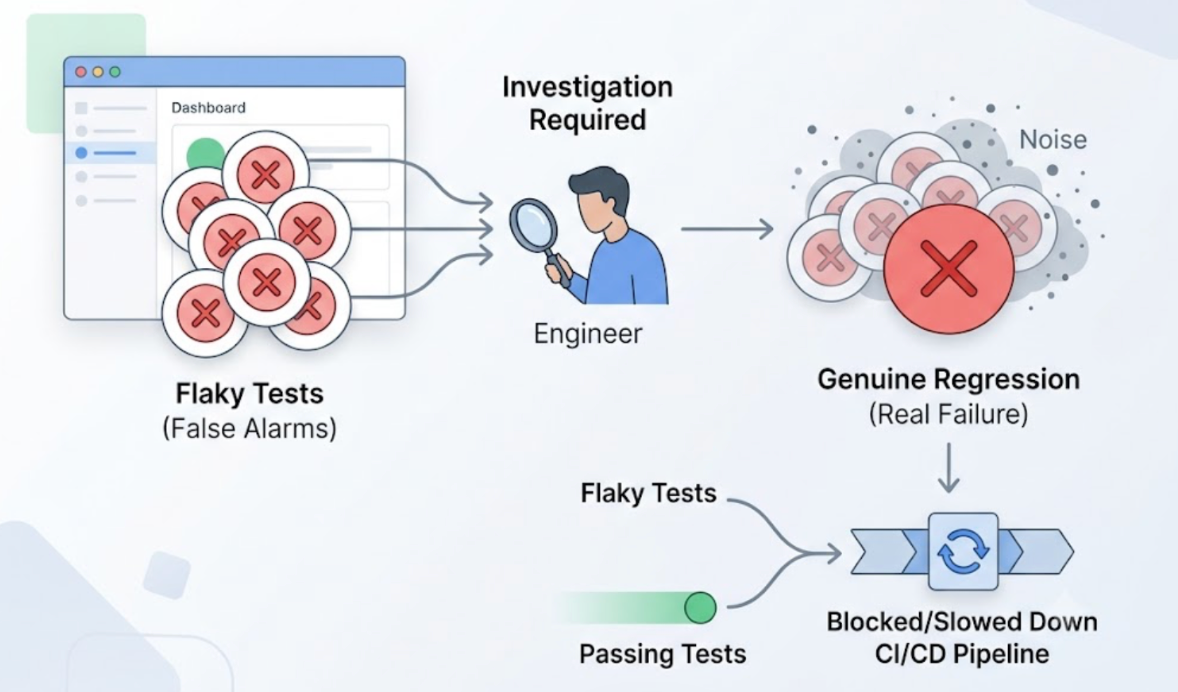
Every team with a scheduled test suite knows the feeling. The overnight run finishes. The morning dashboard shows red. The engineer investigates and finds that the same three tests that always fail when a token expires, a UI element moves, or a network call takes a fraction of a second too long have failed again.
They're not real failures. Everyone knows they're not real failures. But they have to be investigated anyway, because the suite doesn't distinguish them from real failures, and the one time they're ignored is the one time a genuine regression was buried underneath the noise.
Flaky failures in scheduled regressions aren't a minor inconvenience. They erode the team's trust in the suite, and a test suite that produces noise faster than the team can process it eventually gets ignored entirely. At that point, the suite offers the appearance of coverage without the reality.
Silent recovery is the answer: a mechanism that handles known flaky failure categories automatically, surfaces only real regressions, and doesn't require an engineer to make that determination every morning.
What Makes a Failure Genuinely Flaky
Flaky failures fall into a few distinct categories, and understanding them is necessary for understanding how recovery works.
UI drift. A component gets renamed, an element moves, a layout shifts. The test was written against the old structure. The product still works the way it's supposed to. The test fails because it was anchored to an implementation detail rather than a behavioral outcome.
Credential expiration. Scheduled tests run at 3 AM. OAuth tokens issued earlier expire. The authentication step fails, not because the product's auth flow is broken, but because the test environment's credentials went stale.
Dependency unavailability. A third-party API the test depends on had a brief outage during the overnight window. The test failed. The product didn't.
First-run initialization. A freshly generated test exercises a flow for the first time. The flow works correctly, but some initial state configuration wasn't quite right for the test's assumptions. The test fails on the first attempt and would pass on the second.
Genuine failures look different: the product behavior that was correct yesterday is wrong today. That's worth investigating. The others are worth handling automatically.
What Silent Recovery Requires
Silent recovery isn't about ignoring failures. It's about classifying them correctly at the time they occur, handling the classifiable ones automatically, and surfacing only the genuinely unclear cases for human review.
This requires the testing system to do what an experienced QA engineer does when they look at an overnight failure: distinguish between "the product broke" and "the test needs to adapt" and "the environment had a transient issue."
Most testing tools can't make that distinction because they don't know the difference between a behavioral outcome and an implementation detail. They generate tests anchored to code structure, so any change to code structure looks like a failure to them.
A testing agent that operates at the product layer, verifying what users experience rather than what functions return, has a much cleaner foundation for making this classification.
How TestSprite Handles Flaky Failures in Scheduled Regressions
TestSprite addresses flaky failures in scheduled regressions through two mechanisms that handle the most common categories automatically.
Auto-Heal Rerun handles UI drift. When a scheduled regression test fails, TestSprite determines whether the failure reflects a genuine behavioral regression or a structural change to the UI that doesn't affect what users experience. A renamed button that still does the same thing. A repositioned form field that users can still interact with. A restyled layout that presents the same content differently.
When the failure is structural, the test adapts. It doesn't report a false failure. It doesn't require an engineer to update a selector. The suite continues to run correctly, and the morning dashboard shows only the failures worth acting on.
This is possible because TestSprite tests at the product layer. Other verification tools read your code and guess. TestSprite opens your app and uses it.
When an agent navigates a UI flow and interacts with it as a real user would, it isn't tied to a specific CSS class name or a specific element position. It's looking for the button that submits the form, the field that accepts an email address, the component that displays the confirmation. When those exist in their expected functional positions, the test passes. When they don't, the test fails for the right reason.
Auto-Auth handles credential expiration. Password endpoints, OAuth refresh tokens, and AWS Cognito flows run automatically before every scheduled test execution. The agents arrive at authenticated states through the real login flow with fresh credentials every time. Scheduled runs at 3 AM don't fail because a JWT issued the previous afternoon expired.
When a test can't run because a dependency is unavailable or a required value is missing, TestSprite shows a Blocked status with a plain-English explanation rather than a misleading red failure. The engineer who reviews the morning results knows immediately whether the issue is worth investigating or whether the environment had a transient gap.
A Scenario: The Suite That Stopped Producing Noise
A team runs nightly regression tests on their SaaS product. Before configuring TestSprite, their scheduled suite produced an average of four to six failures per overnight run. Two or three were always the same token expiry failures. One or two were typically UI structure failures after the previous day's frontend work. The remaining one or two were genuine regressions worth investigating.
The problem: the team had to investigate all of them to find the genuine ones. That took between thirty and ninety minutes every morning before real work could start.
After switching to TestSprite for scheduled regressions:
Auto-Auth eliminated the token expiry failures entirely. The suite now arrives at authenticated states with fresh credentials every time it runs.
Auto-Heal eliminated the UI structure failures after frontend changes. When the product team redesigned several dashboard components, the suite adapted without manual updates. The components still functioned correctly, and the tests recognized that.
The Blocked status correctly identified two occasions when a third-party analytics service was unavailable during the overnight window. Those weren't product failures and were handled without investigation.
What remained in the morning dashboard were the genuine regressions: twice in the first month, the suite identified real behavioral changes that would have reached users. Both were caught and fixed before the next business day.
Morning investigation time dropped from an average of forty-five minutes to under ten. The suite became something the team trusted rather than something they had to verify.
The Smarter Schedule Features That Support This
Beyond the recovery mechanisms, TestSprite's scheduled regression runs include reporting features that make the results easier to act on when something does require human review.
The "Changes vs previous" column shows at a glance which tests flipped between the last run and the current one. A test that's been passing for two weeks and suddenly failed is immediately visible as distinct from a test that's been intermittently flaky.
Failure emails include an AI-authored explanation of the cause for each failed test inline, so the engineer who reviews the overnight results doesn't have to log into a dashboard to understand what broke. The explanation comes to them.
For teams running the GitHub Actions integration, the same recovery mechanisms apply to CI runs on pull requests. A structural UI change in a PR doesn't produce a cascade of false failures that obscures the genuine ones.
Conclusion
Scheduled regression tests recover silently from known flaky failures when the testing system can distinguish between "the product broke" and "the test needs to adapt" and "the environment had a transient issue."
TestSprite's Auto-Heal handles UI drift by testing at the product layer rather than the code layer. Its Auto-Auth eliminates credential expiration failures by refreshing authentication before every run. Its Blocked status correctly classifies environment dependency gaps without mislabeling them as product failures.
The morning dashboard shows what's worth investigating. The rest is handled automatically.
For teams where investigation overhead has been eating into productive time, and where the test suite has accumulated enough noise that it's stopped being trusted, that's the restoration of what a scheduled regression suite is supposed to do.
Set up scheduled regressions with TestSprite and stop investigating failures that aren't worth investigating.