How Can I Connect an AI Testing Agent to Cursor or Claude Code?
 Zeshi Du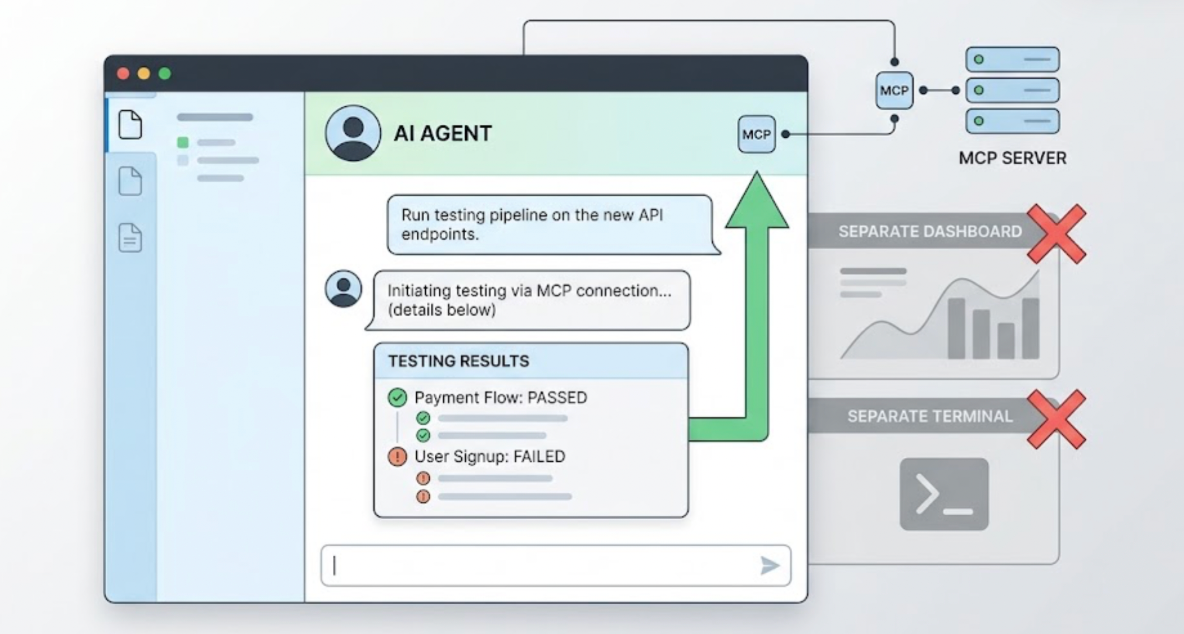
The Model Context Protocol is how you do it, and the setup takes about two minutes.
Both Cursor and Claude Code support MCP natively. When an AI testing agent ships an MCP server, it becomes available inside the IDE's chat interface as a native tool. The developer types an instruction, the agent runs the testing pipeline, and the results come back to the same window. No context switching, no separate dashboard, no separate terminal.
Here's how to connect TestSprite's autonomous AI testing agent to each tool, and why the connection is worth more than just convenience.
What MCP Means for the Testing Workflow
MCP, the Model Context Protocol, is the open standard that AI IDEs use to communicate with external tools natively. It's the same layer Cursor and Claude Code use for their own tool integrations.
When a testing tool connects through MCP, it participates in the coding session rather than sitting outside it. The coding agent that wrote the code and the testing agent that verifies it share the same interface. Failure information from the testing agent goes directly to the coding agent, which can propose a fix in the same session.
That's the closed loop that matters. AI writes code. AI tests it. AI fixes it. All inside the IDE.
Connecting TestSprite to Cursor
Cursor stores its MCP configuration in ~/.cursor/mcp.json for a global installation or .cursor/mcp.json inside a project directory for a project-scoped one.
Add the following to the mcpServers section:
Replace your-testsprite-api-key with the API key from your TestSprite account. Save the file and restart Cursor if it was running. Verify that the green dot appears on the TestSprite MCP entry in Cursor's settings.
One Cursor-specific setting to change: go to Settings → Chat → Auto-Run → Auto-Run Mode and set it to either "Ask Every Time" or "Run Everything." The default Sandbox Mode restricts MCP tool functionality in a way that prevents TestSprite from running correctly.
Connecting TestSprite to Claude Code
Claude Code's MCP configuration lives in mcp_config.json, which you can access through Manage MCP Servers → View raw config in the Claude Code dropdown menu.
Add the following:
Save and start the server from the MCP configuration view. Note that Claude Code scopes MCP installations to the current project directory by default. If you want TestSprite available across projects, you'll need to add it per project or configure it at the user scope.
Node.js is required for both installations. Run node --version to check. Install from nodejs.org if it's not present.
What Happens After You Connect
Once the MCP Server is configured and confirmed running, the testing pipeline is one instruction away from inside the IDE:
"Help me test this project with TestSprite."
Other verification tools read your code and guess. TestSprite opens your app and uses it.
A fleet of parallel exploration agents visits the running application and navigates it the way real users would. They don't read the files you just modified in Cursor or Claude Code. They visit the live product, discover its interactive surfaces, and move through the flows.
They click buttons. They fill in forms with real inputs. They follow multi-step journeys from entry to completion. They carry session state forward the way a real browser session does. When they find a failure, the structured description of what happened arrives in the IDE's chat window, where the coding agent can act on it directly.
The agents cover the full product surface, not just what the last coding session touched. That's what catches the regression three flows away from anything in the recent diff.
What TestSprite Needs from Your Project
Before running the first session, point TestSprite at a live environment. Staging, preview, or local development server all work. The agents need a running URL to navigate.
If your application requires authentication, configure the credentials in the TestSprite Web Portal. Password endpoints, OAuth refresh tokens, and AWS Cognito flows are supported. Auto-Auth handles the authentication automatically before every test run, so the agents arrive at authenticated states through the real login flow.
If a PRD or specification document exists, TestSprite parses it and anchors test goals to stated product intent. If one doesn't, the MCP Server infers intent from the codebase: route definitions, API contracts, and component structures used as evidence of what the product was designed to do.
A Scenario: The Integration That Changed in Both Tools
A developer alternates between Cursor for frontend work and Claude Code for backend work. Both tools are connected to the TestSprite MCP Server.
After a Claude Code session that updated the project's API response structure and a Cursor session that updated the frontend component consuming that API, the developer triggers TestSprite from inside Cursor.
The exploration agents navigate the product. They find that the main data table on the dashboard loads correctly. But when they apply a sort to the table and reload the page, the sort preference isn't preserved. The Cursor session updated the component's state management, and the Claude Code session updated the API response format. The combination introduced a mismatch: the sort state is stored correctly, but the API's new response format doesn't include the field the component uses to restore the sort on page load.
Neither session's diff reveals this. The API change looks correct. The component change looks correct. The integration between them, in the context of a real user who applied a sort and then reloaded, broke.
The failure description returns to the Cursor chat: which table was navigated, what sort was applied, what the page showed after reload. The coding agent identifies the missing field in the API response that the component expects. The fix applies in the same Cursor session.
Extending Coverage to CI
The in-IDE loop handles verification after each coding session. The GitHub Actions integration extends the same coverage into CI.
Every pull request from Cursor or Claude Code triggers an automated test run. Results post as PR comments before review. Reviewers see product-layer validation alongside the diff.
The full documentation for the MCP Server setup is at docs.testsprite.com.
Conclusion
Connecting an AI testing agent to Cursor or Claude Code uses the Model Context Protocol. TestSprite's MCP Server adds two JSON configuration entries, one per IDE, and the testing pipeline becomes available from inside the chat interface with one instruction.
The value goes beyond the convenience of staying in the editor. When the testing agent lives inside the coding session, failure information flows directly to the coding agent that produced the failure. The loop from code change to test failure to applied fix closes inside the IDE without translation, context switching, or manual investigation.
For developers using Cursor and Claude Code to ship fast, that closed loop is what makes verification keep pace with production.
Install the TestSprite MCP Server in Cursor or Claude Code today.