How Can I Automatically Test Form Validation?
 Zeshi Du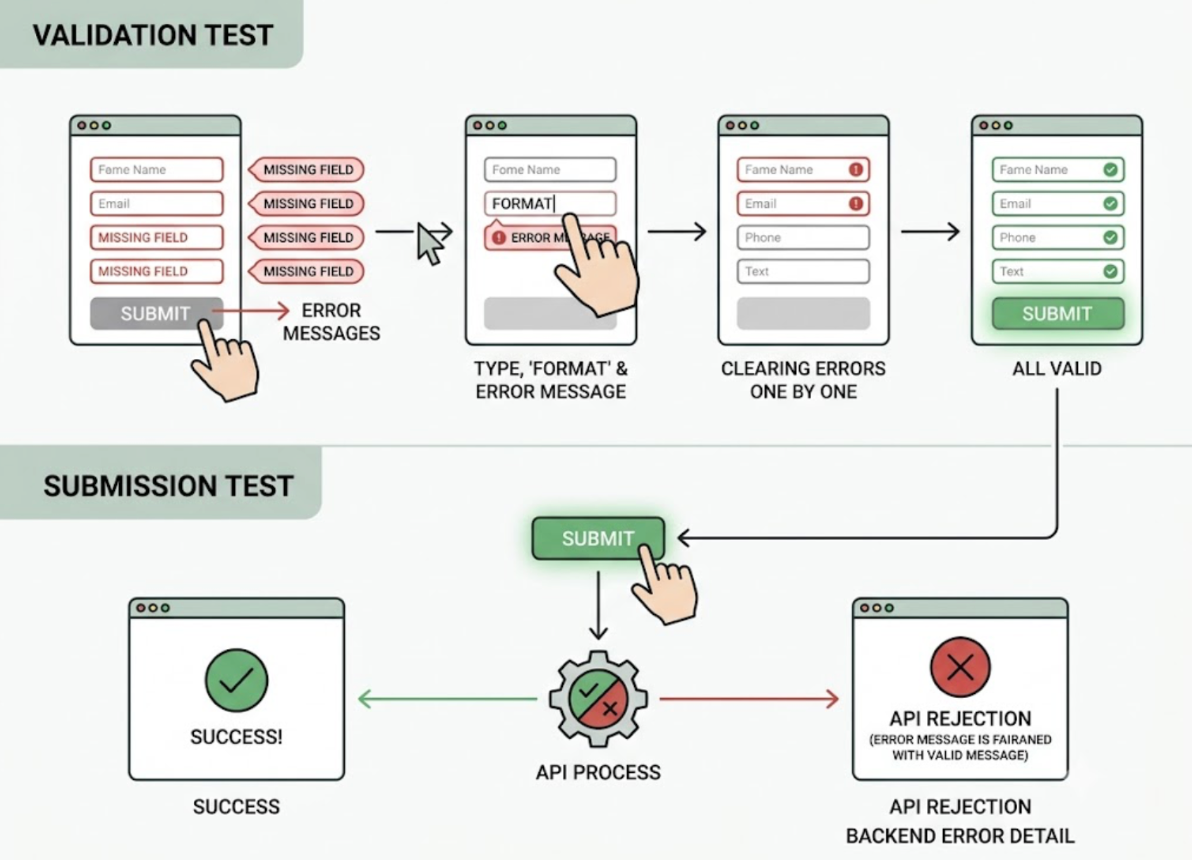
Form validation is one of those things that feels simple until you actually try to test it comprehensively.
A single form field can fail in a dozen different ways. Empty submission. Invalid format. Value that's too long. Value that's technically valid but semantically wrong. Input that passes individual field validation but conflicts with another field on the same form. Submission that succeeds on the client side but gets rejected by the API with an error the UI doesn't handle gracefully.
Most automated testing approaches catch one or two of these. The rest surface when a real user hits them.
The reason is straightforward. Testing form validation well requires doing what a real user does: filling things in, leaving things blank, typing unexpected values, submitting too early, correcting errors, and trying again. That's not a code inspection task. It's an interaction task.
Why Code-Layer Tools Miss Most Validation Failures
A code-layer testing tool approaches form validation by reading the validation logic in your source files. It identifies the rules: required fields, format constraints, length limits, custom validators. It generates assertions that verify each rule returns the correct result for a given input.
This catches whether the validation logic is correctly implemented in isolation. It doesn't catch whether the validation experience works correctly for a real user moving through the form.
Here's the thing: form validation failures in production are almost never about the validation logic returning the wrong result for a single input. They're about the interaction between inputs, the timing of when validation fires, the way error messages appear and disappear, and the behavior of the form when a user corrects an error and tries to submit again.
A field that validates correctly on blur but fails to clear its error state after correction. A form that disables the submit button based on validation state but never re-enables it after the user fixes all the errors. A multi-field validation rule that triggers correctly but displays the error message on the wrong field. An API-level rejection that comes back as a 422 and renders a blank error state because the frontend only handles 400s.
None of these appear in code-level assertions against the validation logic. All of them appear when someone actually uses the form.
Form Validation Is a Sequence, Not a Rule Check
The insight that changes how you think about form validation testing is this: validation isn't a property of individual fields. It's a property of the interaction sequence.
A real user doesn't submit a form once and read the result. They fill in some fields, skip others, try to submit, read the error messages, go back and correct some errors, accidentally clear a field they'd already filled, submit again, and eventually either succeed or give up.
Each step in that sequence is a test. Each correction is a test. Each resubmission is a test. The question isn't just "does the validation rule fire correctly" but "does the form behave correctly at every point in the real interaction sequence a user would run."
Testing that sequence requires running it. Which requires an agent that interacts with the form the way a user would.
An Agent That Fills Forms the Way a Real User Does
TestSprite deploys parallel exploration agents that visit the live application and interact with it the way real users do. For form validation specifically, this means the agents don't inspect the validation logic. They use the form.
Other verification tools read your code and guess. TestSprite opens your app and uses it.
The agents submit forms with missing required fields and check that the right error messages appear in the right places. They enter values that violate format constraints and verify that the validation fires correctly and that the error is understandable. They correct errors one by one and check that each error clears correctly as the input becomes valid. They fill in all required fields and verify that the submit button or action becomes available. They submit and check the outcome, including what happens when the API rejects the submission with a backend validation error.
They also test the edge cases that hand-crafted test suites routinely miss. Values at the boundary of length constraints. Inputs that are valid individually but trigger cross-field validation rules. Whitespace-only inputs in fields that require non-empty strings. Inputs that contain special characters the frontend handles but the backend doesn't.
Each of these is a real user behavior. Each requires actually interacting with the form to verify.
What Gets Discovered That Wouldn't Be Written Manually
The value of an exploration-based approach to form validation testing isn't just automation speed. It's coverage.
When a QA engineer writes form validation test cases manually, they cover the scenarios they think of. The happy path. The obvious invalid inputs. Maybe a few edge cases based on experience.
TestSprite's agents explore systematically. They try the inputs a developer would think to test and the ones they wouldn't. They notice when an error message appears for the wrong field. They catch when a corrected input doesn't clear its error state. They find the form that resets completely when one field validation fails, losing all the user's other inputs.
These are the failures that reach users. They're also the failures that never appear in a code-layer test suite, because they require interaction to surface.
Through the TestSprite MCP Server inside Claude Code, Cursor, or Windsurf, this exploration runs automatically from a single instruction. The agents discover the forms in the application, run interaction sequences against them, and return structured results to the IDE. Engineers don't write form validation test cases. They review what the agents found.
When an AI coding agent changes form validation logic, which happens frequently in AI-native teams, the exploration runs again and catches any regressions in the interaction behavior, not just in the underlying validation rules.
Backend Validation Is Part of the Flow Too
Form validation doesn't end when the frontend accepts the input. It ends when the backend confirms the submission is valid and processes it correctly.
A form that validates perfectly on the client side can still fail in ways users experience if the backend applies different validation rules, returns error responses the frontend doesn't handle, or accepts the submission but processes it incorrectly.
TestSprite's Backend Testing 2.0 extends the same observation-first approach to the API layer. Before generating any test plan for a form submission flow, the agent calls the endpoint and observes how it actually responds to valid and invalid inputs. Real status codes. Real error response shapes. Real field-level error messages in the response body.
Assertions are grounded in observed behavior. When the backend returns a 422 with a specific error structure, the test verifies that structure. When the frontend is supposed to display those backend errors to the user, the agent checks that the display happens correctly.
The full form submission flow, from the user filling in the first field to the backend confirming the record was created, gets verified as a connected sequence. Not as isolated layers that each pass their own tests while failing together.
Staying Current After Every Form Change
Forms change. Required fields get added or removed. Validation rules get tightened or loosened. Error messages get rewritten. The UI layout shifts after a design review.
Each change is a potential regression in the validation experience. And in teams where AI coding agents are regularly updating form components, these changes happen faster than any manual test maintenance process can keep up with.
TestSprite's Auto-Heal Rerun handles the maintenance layer. When a form changes and a previously passing test fails, the agent determines whether the failure reflects a genuine regression in validation behavior or a UI change that doesn't affect the underlying flow. A relabeled field, a moved error message, a restyled submit button: the test adapts rather than failing falsely.
Genuine validation regressions surface clearly. Cosmetic changes don't create noise.
The GitHub Actions integration brings the same coverage into CI. Every pull request that touches a form gets form validation coverage before it merges. Results post as PR comments. The team sees what passed, what failed, and which interaction sequences produced the failures.
Conclusion
Automatically testing form validation well requires more than running assertions against validation logic. It requires interacting with forms the way real users do: filling fields, leaving things blank, correcting errors, resubmitting, and following the full sequence through to the backend response.
Code-layer tools verify that validation rules are correctly implemented. They don't verify that the validation experience works correctly across the real interaction sequences users run. Those are different things, and the gap between them is where most form validation failures reach production.
TestSprite's exploration agents use forms like real users do. They discover the interaction failures that code inspection misses, cover the edge cases that manual test writing routinely skips, and stay current as forms evolve through Auto-Heal.
Start automatically testing your form validation with TestSprite
from inside your AI IDE today.