How Can AI Test Dropdowns and Modals?
 Zeshi Du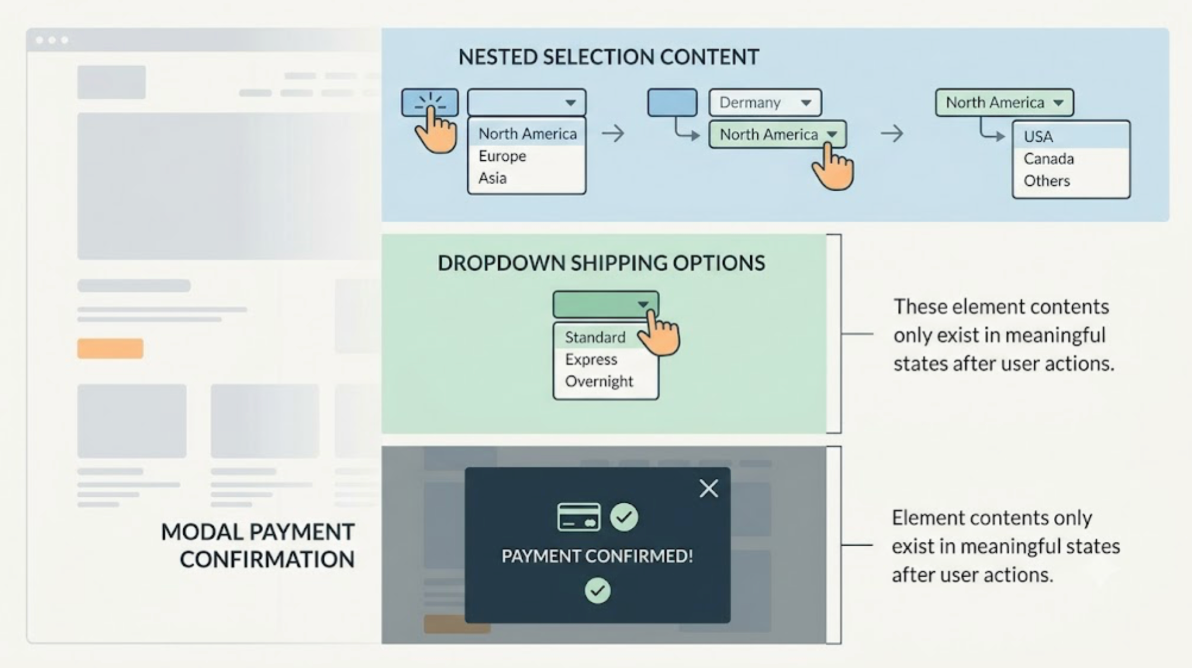
Dropdowns and modals are where automated testing quietly gives up.
Not because they're hard to find in the DOM. They're hard to test correctly because they only exist in meaningful states after a user has done something. A dropdown that contains shipping options doesn't show those options until someone clicks it. A modal that collects payment confirmation doesn't appear until someone reaches the end of a checkout flow. A nested dropdown that changes its contents based on the selection in a parent dropdown never shows its meaningful state unless both interactions happen in sequence.
Testing these elements correctly requires doing what a real user does: taking the action that opens them, interacting with what's inside, and verifying that the product responds correctly to the full interaction, not just to the presence of the element in the source code.
Why Code-Layer Tools Struggle with Dynamic Elements
The challenge with dropdowns and modals isn't locating them. A code-layer tool can find every dropdown and modal component in the source tree without difficulty.
The challenge is that finding them in the source doesn't tell you anything useful about whether they work.
A dropdown component exists in the code in its initial, closed state. Testing whether it displays the correct options requires opening it first, which requires simulating the user action that triggers the open. Testing whether selecting an option produces the correct downstream effect requires selecting an option, which requires the dropdown to be open in a live environment, which requires the triggering action to have run first.
A modal has the same structure. The component exists in the source. The meaningful state only appears after the triggering condition is met in the running application. And the interaction with the modal's contents, filling a form, clicking a confirm button, selecting from a list inside the modal, only matters in the context of having reached the modal through the correct user flow.
Code-layer tools assert against the component definition. Product-layer testing runs the flow that puts the component into a meaningful state and then interacts with it.
What Testing Dropdowns and Modals Actually Requires
Effective testing of dropdowns and modals requires four things that only make sense when you're interacting with a live application.
Opening the element. Clicking the dropdown trigger, reaching the condition that causes the modal to appear. The test has to get there first before it can verify anything useful.
Observing the contents. What options does the dropdown present? What does the modal contain? Is it what it's supposed to contain given the current application state?
Making a selection or taking an action. Choosing an option from the dropdown, clicking a button in the modal, submitting a form inside the modal. The interaction itself is what matters.
Verifying the downstream effect. What happened after the interaction? Did the dropdown selection update the form it was part of? Did the modal confirmation trigger the expected result? Did dismissing the modal preserve or discard the state correctly?
Only the fourth step is what most testing frameworks even attempt to verify. The first three require actually running the application and interacting with it.
How TestSprite Tests Dropdowns and Modals
TestSprite tests dropdowns and modals by doing what a real user does: opening them, interacting with their contents, and observing what happens.
Other verification tools read your code and guess. TestSprite opens your app and uses it.
TestSprite's parallel exploration agents navigate the live application the way real users would. When an agent encounters a dropdown, it opens it. It reads the options the dropdown presents. It selects options and observes how the form, page, or flow responds. It tries the options that should work and checks whether the product handles the selection correctly.
When an agent encounters a modal trigger, it triggers the modal. It interacts with the modal's contents. If the modal contains a form, the agent fills it. If the modal contains a confirmation prompt, the agent confirms. If the modal can be dismissed, the agent dismisses it and checks whether the dismissed state is correct.
The agents also test the edge cases that developers rarely write specific tests for. A modal that opens correctly but can't be closed with the escape key. A dropdown that shows the right options but doesn't update the dependent fields when an option is selected. A nested dropdown whose second tier shows the wrong options because the parent selection wasn't correctly propagated. A confirmation modal that shows when it shouldn't, or doesn't show when it should.
These aren't exotic failure modes. They're the kind of interaction detail that breaks when an AI coding session refactors state management or reorganizes component logic, and nobody thought to check the dropdowns and modals because they're not in the diff.
A Scenario: The Dropdown That Updated the Wrong Field
A developer uses Cursor to build a project configuration form. The form includes a dropdown for selecting a project category, which should update the available subcategory options in a dependent dropdown below it. An AI coding session implements both dropdowns, the dependency logic between them, and the form submission handler.
TestSprite's exploration agents navigate to the project configuration form and interact with it.
They open the category dropdown and select an option. The subcategory dropdown updates to show the options appropriate for that category. The agents make a subcategory selection and submit the form.
The form submits successfully. The agents then navigate to the project list to verify the new project appears with the correct category and subcategory values.
The category is correct. The subcategory is wrong. The project was created with the subcategory from the initial default state of the dependent dropdown, not from the selection the agent made. The dropdown displayed the correct subcategory options. The form submission didn't capture the selected value correctly. The dependency logic updated the display. It didn't update the value that the form submission read.
A code-layer test would confirm that the subcategory dropdown showed the right options when the category selection changed. Only an agent that opened both dropdowns, made selections in sequence, submitted the form, and then checked the created record could catch this failure.
The failure description returns to the Cursor session: which form was submitted, which category and subcategory were selected, what the created project record shows instead. The coding agent locates the form submission handler, finds that it's reading the initial value rather than the selected value for the dependent dropdown, and applies the fix in the same session.
Modals in Multi-Step Flows
Modals that appear mid-flow are particularly prone to failures that only appear in context.
A delete confirmation modal that appears when a user tries to delete a record. A warning modal that appears when a user navigates away from an unsaved form. A permission grant modal that appears the first time a user tries to access a restricted feature.
Each of these requires reaching the triggering condition through normal product navigation. TestSprite's agents reach those conditions by navigating the product flows that lead to them, not by forcing the modal open through direct DOM manipulation.
When the agents reach a confirmation modal, they confirm. They observe whether the confirmation produced the expected outcome. When they reach a warning modal, they test both paths: proceeding despite the warning and canceling. They observe whether the state is correctly preserved or discarded in each case.
Auto-Heal Rerun handles the cases where modal behavior changes after an AI coding refactor for structural rather than behavioral reasons. A modal that was triggered by one interaction and is now triggered by a slightly different one: the test adapts. Genuine behavioral regressions, a modal that no longer confirms correctly or no longer dismisses correctly, surface clearly.
Conclusion
AI can test dropdowns and modals, but only if it's built to open them, interact with their contents, and observe the downstream effects. That requires operating at the product layer, not the code layer.
TestSprite's exploration agents navigate the live application and interact with dropdowns and modals the way real users do. They open dropdowns, make selections, and verify that the product responds correctly. They reach modal triggers through normal flow navigation, interact with modal contents, and check whether the outcomes match expectations.
The failures they find aren't visible in the source code or in a code-layer test. They appear when someone actually uses the element in the context of a real user flow, which is exactly how TestSprite's agents test them.
Start testing your dropdowns and modals with TestSprite from inside your AI IDE today.