How Can AI Simulate Real User Behavior for QA?
 Zeshi Du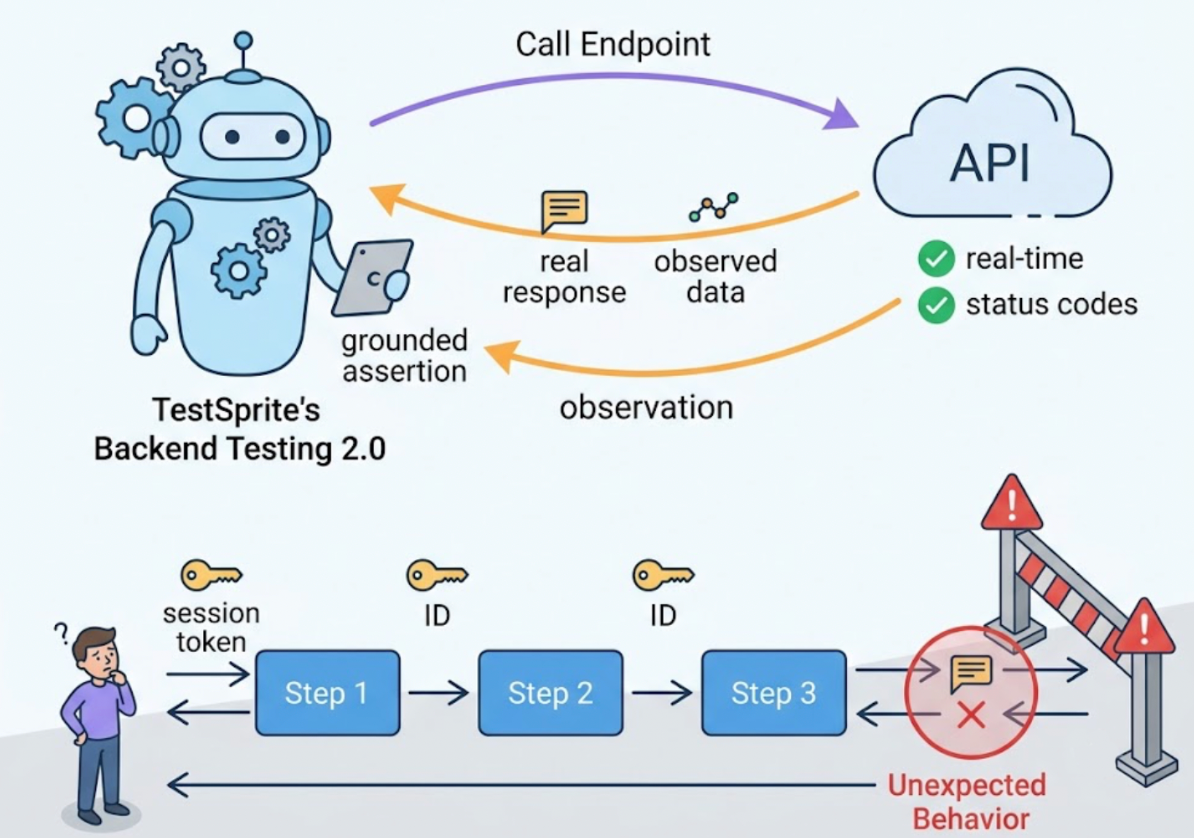
Running basic test cases isn't the same as knowing your product works.
Basic cases cover the happy path. The form submits with valid inputs. The login succeeds with correct credentials. The dashboard loads when the user is authenticated. These pass reliably, and they should. But real users don't only take the happy path. They fill in forms in unexpected orders. They navigate backward mid-flow. They use features in combinations the developer didn't anticipate. They hit the edge cases nobody wrote a test for.
The gap between "basic cases passing" and "product working for real users" is exactly where production bugs live. Closing that gap requires AI that simulates actual user behavior, not just scripted test cases dressed up with an AI label.
This is how to get there.
Understand What "Simulating User Behavior" Actually Requires
A lot of testing tools use the phrase "simulate user behavior." What they usually mean is: the tool generates test scripts that call your application's functions or click through a predefined flow that an engineer specified in advance.
That's automation. It's not simulation.
Real user behavior has properties that scripted automation doesn't replicate. It's exploratory. A real user doesn't follow a flowchart. They discover the product as they use it, take paths that weren't explicitly designed, and encounter states the developer never thought to test against.
It's also stateful in a non-linear way. A real user backtracks. They change their mind mid-flow. They leave and come back. They use the product in one context, switch context, and return. The state they leave behind matters for what they experience next.
And it's judgment-driven. A real user notices when something looks wrong. When a confirmation message doesn't appear. When a button doesn't respond. When the screen they expected to see after a submission isn't the screen they got. They don't just execute steps and exit. They observe outcomes and form expectations.
Simulating this requires an agent that explores, carries state, and observes. Not a script that executes.
Start with the Running Product, Not the Source Code
The first practical step toward real user behavior simulation is pointing the testing agent at the live application, not the codebase.
Code-layer tools start from source files. They read what the code says the product should do and generate tests from that reading. The resulting tests reflect the developer's model of the product, not how the product actually behaves when someone uses it.
TestSprite starts from the running application. When connected through the TestSprite MCP Server inside Claude Code, Cursor, Windsurf, or any MCP-compatible AI IDE, a single instruction launches the exploration:
"Help me test this project with TestSprite."
A fleet of parallel exploration agents visits the live product and begins navigating it. They don't follow a script. They discover the product the way a new user would: landing on pages, finding interactive elements, trying flows, observing what happens, and moving to what comes next.
Other verification tools read your code and guess. TestSprite opens your app and uses it.
How the Agents Navigate Like Real Users
The behavior of TestSprite's exploration agents is worth understanding in detail, because it's where the simulation of real user behavior actually happens.
Each agent visits the live application and interacts with it at the UI level. It finds buttons and clicks them. It finds form fields and fills them with real inputs, not placeholder values. It navigates through multi-step flows from entry to completion. When a flow branches, agents explore the branches. When an action produces an unexpected result, the agent observes and records it.
The agents run in parallel. Multiple agents explore different paths simultaneously, the way a group of real users with different intentions would use the product at the same time. The result is a structured map of real user journeys across the entire discoverable surface of the application, built from actual interaction rather than from reading a specification.
This map isn't just documentation. It's the basis for test generation. The tests that come out of this exploration describe real user interactions with real observed outcomes. A test for a checkout flow doesn't assert that a payment function returns a success code. It describes the sequence: add item, proceed to checkout, enter payment details, submit, confirm that the order confirmation page appears with the correct order information.
That's the difference between testing what the code does and testing what the user experiences.
Cover the Interactions That Basic Cases Miss
Once the exploration is complete, the test suite covers the surface that basic cases routinely leave untested.
Multi-step flows with mid-flow changes. A user who starts a checkout, goes back to change their shipping address, and then completes the purchase is running a flow most basic test suites don't cover. TestSprite's agents explore these variations naturally, because they navigate backward, make changes, and continue forward the same way a real user would.
Error states and recovery paths. A real user who hits an error doesn't stop. They read the message, correct the input, and try again. The error recovery path is a flow in its own right, and it fails in ways the happy path never would. The agent fills in invalid inputs, observes the error state, corrects the input, and verifies that the form recovers and accepts the corrected submission.
Edge cases at input boundaries. Values at the edge of what the product accepts: the maximum length string, the minimum valid amount, the email address with unusual but valid formatting. These are the inputs real users occasionally submit and that developers rarely think to include in basic test coverage.
Cross-feature interactions. A user who applies a discount code after selecting a shipping method, who changes a subscription tier while a pending order is in progress, who edits a shared document while another session has it open. These are the combinations that produce the bugs nobody anticipated, and they only surface when an agent explores the product the way real users do rather than running isolated feature tests.
Extend Simulation to the API Layer
Real user behavior doesn't stop at the frontend. Every user action that reaches the backend is a real API call with real inputs, and the backend's response to unexpected inputs is part of what users experience.
TestSprite's Backend Testing 2.0 extends the same observation-first approach to APIs. Before generating any test plan, the agent calls the endpoint and observes how it actually responds: real status codes, real field names, real response shapes. The resulting assertions are grounded in observed behavior, not inferred from source code.
For multi-step backend flows, dynamic variables captured from real responses, a created resource's ID, a returned session token, are passed automatically to downstream steps. The full sequence runs end to end under real conditions. When a user action produces a backend response the frontend wasn't designed to handle, that gap surfaces as a concrete failure with a specific request, a specific response, and a clear description of where the behavior diverged from expectation.
Keep the Simulation Current After Every Change
User behavior simulation only stays useful if the test suite stays current with the product.
AI coding agents ship changes fast. A session in Cursor or Claude Code might touch multiple UI components, refactor backend logic, and update API contracts before it's done. A test suite generated against last week's product needs to adapt or it starts producing false failures that erode trust and get ignored.
TestSprite's Auto-Heal Rerun handles this automatically. When a test fails on rerun, the agent determines whether the failure reflects a genuine product regression or a UI change that doesn't affect the underlying user flow. A renamed button, a restructured form, a redesigned layout: the test adapts rather than failing falsely. The simulation stays grounded in current product behavior.
Auto-Auth handles authentication automatically across all runs. Password endpoints, OAuth refresh tokens, and AWS Cognito flows run before every execution. The agents always arrive at authenticated states through the real login flow, the same way real users do, not through a shortcut that bypasses authentication entirely.
For continuous integration, the GitHub Actions integration runs the full simulation pipeline on every pull request. Results post as PR comments. Changes that break a user flow surface before they merge.
Conclusion
AI can simulate real user behavior for QA, but only if it's built to explore rather than execute, observe rather than infer, and navigate the live product rather than read the source files.
The practical steps are: start from the running application, deploy exploration agents that navigate it the way real users do, cover the multi-step flows and error recovery paths and edge cases that basic test cases miss, extend the same observation-first approach to backend APIs, and keep the simulation current through automatic test maintenance.
TestSprite is built to do exactly this. Its parallel exploration agents navigate the live product, discover the flows real users run, generate tests grounded in observed behavior, and return structured failure information to the IDE where the fix can be applied immediately.
The gap between "basic cases passing" and "product working for real users" is a coverage problem. The right AI closes it by simulating what users actually do, not by automating what developers thought to specify.
Start simulating real user behavior with TestSprite from inside your AI IDE today.