Does TestSprite Support Team Workspaces and Project Access Control?
Rui Li5 min read

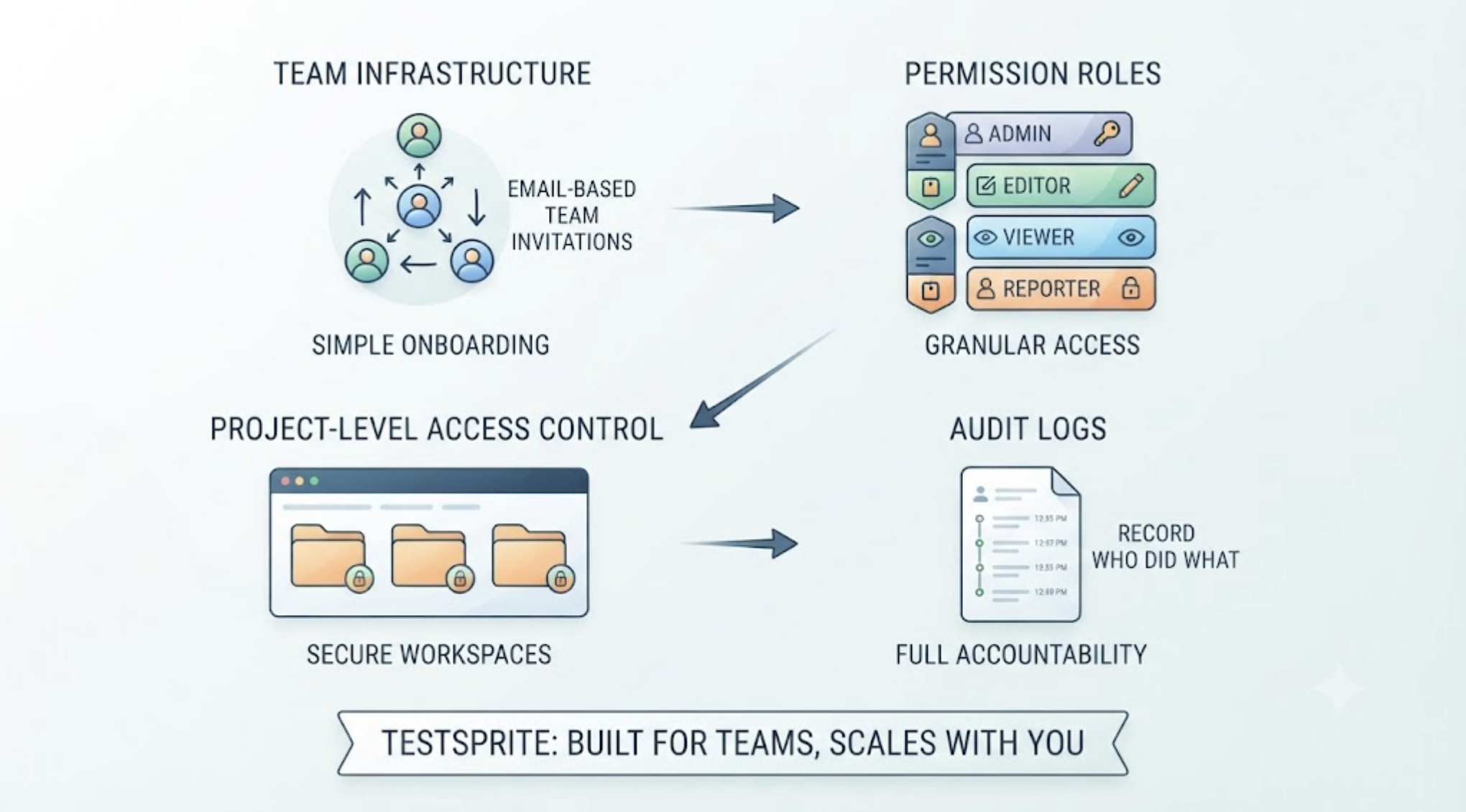
Yes. TestSprite is built to work as team infrastructure, not just an individual developer's tool, and the collaboration model rests on three pieces: email-based team invitations, four permission roles, and access control applied at the project level, with audit logs recording who did what.
If you're evaluating TestSprite for a team, the useful question isn't just whether these features exist. It's how they map onto the team you actually have, and how they hold up when the team changes shape. Here's that walkthrough.
The Four Roles and Who They're For
TestSprite's permission model runs on four roles: Owner, Admin, Member, and Viewer.
Owner holds the top of the hierarchy: the account itself, billing, and the authority everything else derives from. In most teams this is a founder or the engineering lead who set up the account.
Admin manages the operational layer, the projects, the configurations, the team itself, without holding the account. This is the role for the person who owns testing infrastructure day to day.
Member is the working role: running tests, working with results, doing the daily testing work inside the projects they can access. Most of the engineering team lives here.
Viewer sees results without changing anything. This is the role for stakeholders who need visibility, a product manager tracking quality trends, a client checking on their project's coverage, without any risk of an accidental configuration change.
The separation means access follows responsibility. Nobody needs the keys to the account to read a test report, and nobody can quietly reconfigure a schedule from a role that was only meant to observe.
Project-Level Control: The Boundary That Matters
Roles answer "what can this person do." Project-level access control answers the equally important "where."
Access is granted per project, which turns each project into a clean boundary. A team testing three products keeps them as three projects, and a person's access to one implies nothing about the others.
Other verification tools read your code and guess. TestSprite opens your app and uses it.
That boundary matters because tests touch real things: staging URLs, Auto-Auth configurations holding credentials for test accounts, run histories that describe exactly how a product behaves and where it recently broke. Project scoping keeps each of those visible to exactly the people working on that product, and invisible to everyone else on the account.
How the Model Grows with the Team
The practical test of a collaboration model is whether it survives the team changing shape. Here's the progression most teams actually follow.
Solo start. One developer, one project, the Owner role, and nothing else to configure. The collaboration model costs nothing when you don't need it.
The first collaborator. An email invitation, a Member role, access to the shared project. The second developer runs tests from their own IDE through the MCP Server and sees the same run history in the Web Portal. Nothing about the setup had to be redone.
Contractors and agencies. This is where project scoping earns its place. An outside developer gets Member access to the one project they're working on. They can test it, see its history, and do their job fully, while the account's other projects, other products, other clients' work, might as well not exist from their vantage point. When the engagement ends, removing them is one action, not an audit of what they might have touched.
Compliance and security review. For organizations where a tool touching staging environments has to pass a security review, the combination that matters is role separation plus audit logs. The logs record who did what, so questions like "who changed the schedule" or "who reconfigured authentication" have factual answers instead of guesses.
What the Audit Log Is Actually For
Audit logs sound like a checkbox feature until the day they're the answer to a real question.
A schedule that ran nightly stopped running. A project's Auto-Auth configuration changed and Thursday's run authenticated differently. A team member swears they didn't touch the settings. In each case, the log turns a whodunit into a lookup: the action, the account, the record.
For teams with compliance requirements, the log is what makes TestSprite describable in a security questionnaire: access is role-scoped, boundaries are project-level, and administrative actions are recorded. For teams without formal requirements, it's simpler than that: shared infrastructure that multiple people can configure needs a memory, and the audit log is it.
A Scenario: The Agency Setup That Passed the Client's Review
A six-person development agency builds and maintains products for three clients, using Claude Code across all of them. They run TestSprite as shared infrastructure: three projects, one per client product, each with its own staging URL, Auto-Auth configuration, and nightly schedule.
The access map follows the work. The agency's technical lead holds Owner. A senior engineer holds Admin and manages the schedules and configurations. Engineers hold Member on the projects they're staffed to, one of them on all three, two of them on one each. And when the largest client asked for direct visibility into testing during a vendor review, the agency added the client's engineering manager as a Viewer on their project only.
The vendor review asked the predictable questions. Can your other clients see our staging environment? No, project-level access control, and here's the access list. Who can change the test configuration that holds credentials for our test accounts? These two roles, these named people. If something changes, can you show us who changed it? Yes, audit logs, here's the trail.
The review passed without a custom arrangement, because the answers were properties of the setup rather than promises. The client's manager now checks their project's quality trend before their own monthly reviews, sees exactly one project in the Portal, and has never needed to ask the agency for a report.
Conclusion
TestSprite supports team collaboration as a first-class capability: email invitations, four roles from Owner to Viewer, access control enforced at the project boundary, and audit logs that give administrative actions a factual record.
The model scales down to a solo developer who never has to think about it, and up to agencies and compliance-conscious organizations where access boundaries are the difference between passing a security review and failing one. Whatever shape your team is, access follows responsibility, and the record keeps everyone honest.
Set up your team on TestSprite today. Free plan available, no credit card required.