Does TestSprite Have a Public Status Page?
Rui Li4 min read

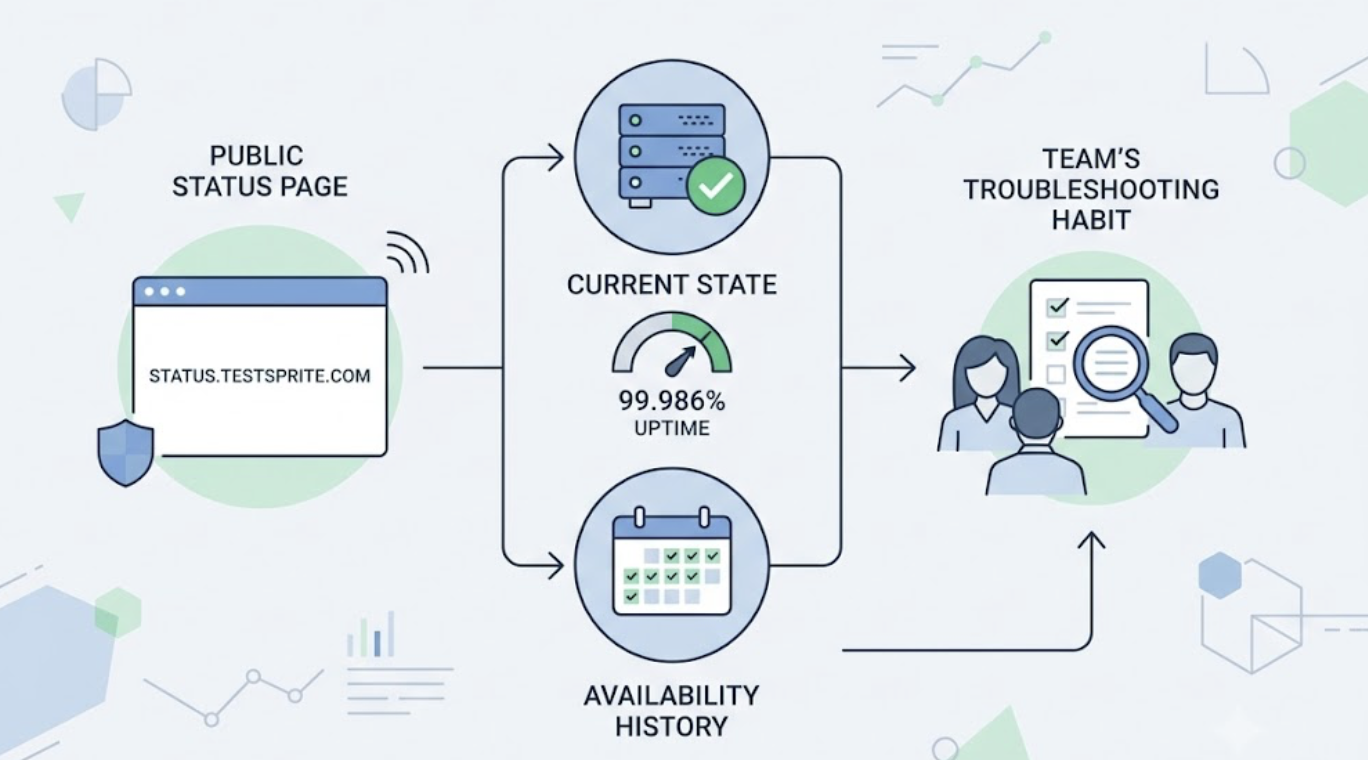
Yes. TestSprite publishes a public status page at status.testsprite.com, showing the platform's current operational state and a day-by-day history of service availability, with uptime running at 99.986% as of this writing.
That's the direct answer. The more useful part is understanding why a status page matters more for a testing platform than for most tools you depend on, and how to fold it into your team's troubleshooting habits.
What the Status Page Shows
The page reports whether TestSprite is operational right now and tracks the recent history day by day, alongside the aggregate uptime figure. It's public: no account, no login, just the URL.
For a platform evaluation, that transparency is worth something on its own. A vendor that publishes its availability record, including the days that weren't perfect, is making a verifiable claim rather than a marketing one. Uptime near four nines is a strong record for any cloud service, and the day-by-day history means you don't have to take the summary number on faith.
Why Availability Matters More for a Testing Platform
Most SaaS tools, when they go down, are unavailable in an obvious way. A testing platform's unavailability is sneakier, because TestSprite sits inside your delivery pipeline in places where its absence can masquerade as something else.
Other verification tools read your code and guess. TestSprite opens your app and uses it. That work happens at specific, load-bearing moments: the run you trigger from Claude Code before pushing, the GitHub Actions check gating a pull request, the 2 AM scheduled regression watching staging. If the platform is unreachable during any of those, the symptom you see isn't "TestSprite is down." It's a CI check that won't resolve, a nightly run that didn't happen, or an instruction from the IDE that isn't coming back.
Each of those symptoms has a more common local cause, your preview deployment, your MCP configuration, your credentials, which is exactly why a definitive external answer is valuable. The status page is the ten-second check that either rules the platform out or rules it in.
Where It Fits in Your Troubleshooting Order
A sensible habit for any team running TestSprite as standing infrastructure: when testing behaves unexpectedly at the platform level, check status first, before spelunking through your own configuration.
A pull request's TestSprite check hanging longer than usual? Status page. Ten seconds later you know whether to wait or to look at your workflow file. The nightly schedule produced no results and no failure email? Status page, then your schedule configuration. The MCP Server not responding from inside Cursor? Status page, then your local setup, your API key, your network.
The point isn't that the platform is a likely culprit. At 99.986%, it rarely is. The point is that it's the fastest hypothesis to eliminate, and eliminating it converts an open-ended mystery into a bounded local debug.
What This Signals About Running TestSprite as Infrastructure
Teams adopting TestSprite for scheduled regressions and CI gates are making it part of their delivery path, and tools on the delivery path get held to an infrastructure standard: you need to know their state independently of their behavior.
A public status page is the baseline artifact of that standard. It means the platform's availability is a fact you can check rather than infer, during an incident and across history. Paired with the operational design choices inside the product, the ephemeral cloud sandbox that removes your own test infrastructure from the failure surface, Auto-Auth removing expired credentials as a 3 AM failure mode, the status page completes the picture: the parts you'd otherwise have to maintain are handled, and the part you're trusting is observable.
A Scenario: The Check That Wouldn't Finish
A three-person team runs TestSprite on every pull request. On a Thursday afternoon, a developer's PR sits with the TestSprite check pending well past its usual completion time. The deadline pressure suggests skipping the check and merging. The developer's instinct says their preview deployment broke again, which last time cost an hour of digging.
Instead: status page, ten seconds. Everything operational. That answer is genuinely useful, because it eliminates the platform and points the investigation home, where the actual cause turns out to be a preview environment that failed to deploy, so the agents had nothing to open. Fifteen minutes, fixed, check green, merged.
The counterfactual habit, assuming the platform and waiting, would have burned the afternoon. The other counterfactual, skipping the gate under pressure, would have merged unverified. A ten-second external fact kept the process honest in both directions.
Conclusion
TestSprite has a public status page at status.testsprite.com, showing current operational state, day-by-day availability history, and an uptime record of 99.986% as of this writing. No login required.
For teams running TestSprite as delivery infrastructure, in CI gates, nightly schedules, and the IDE loop, the status page is the ten-second check that separates platform issues from local ones, and the published history is the availability record that justifies putting a testing platform on the delivery path in the first place.
Bookmark status.testsprite.com alongside your TestSprite setup, and start testing with the free plan today.