Can VS Code Use an MCP Testing Agent?
 Zeshi Du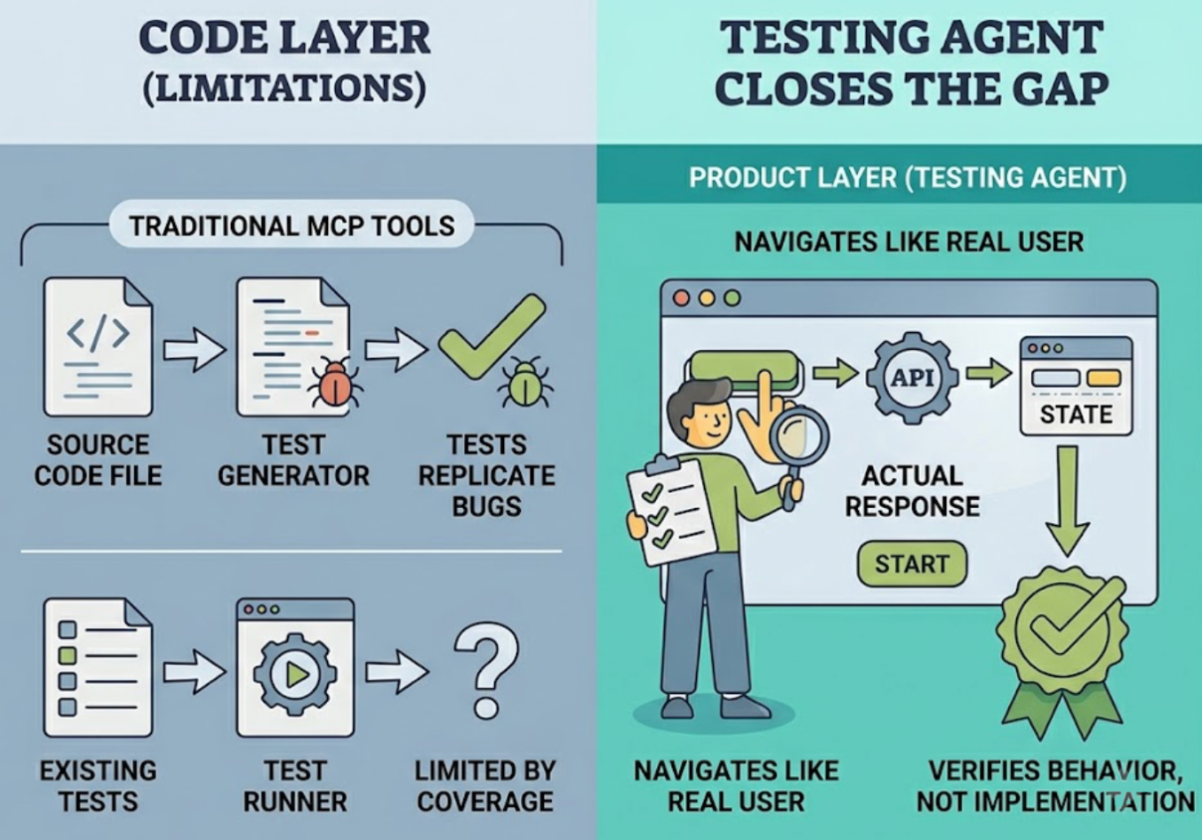
Yes. And understanding why the answer is yes tells you a lot about where software testing is heading.
VS Code has supported the Model Context Protocol since Microsoft added MCP to GitHub Copilot's agent mode in early 2025. That means any MCP server, including testing agents built on the protocol, can plug directly into VS Code's AI-assisted coding environment. The developer doesn't leave the editor. The testing pipeline runs inside the same interface where the code was written.
For teams who have spent years switching between VS Code and separate testing dashboards, this changes the workflow in a meaningful way. For teams who never built formal test coverage at all, it removes most of the friction that kept testing from happening in the first place.
Here's what it means in practice, and why the testing agent you connect to VS Code matters as much as the connection itself.
What MCP Actually Is and Why It Matters for Testing
MCP stands for Model Context Protocol. It's an open standard, originally developed by Anthropic, that defines how AI models and AI IDEs communicate with external tools. Think of it as a common language that lets a coding assistant inside an editor call out to specialized services, receive structured responses, and incorporate those results into the ongoing development session.
Before MCP, integrations between IDEs and external tools required custom plugins, proprietary APIs, and one-off implementations for each combination of tools. MCP standardizes that layer. An MCP server built once connects to any IDE that supports the protocol: VS Code, Cursor, Claude Code, Windsurf, Trae, GitHub Copilot, and others.
For testing specifically, MCP changes the integration model from "test results displayed in a panel" to "testing agent operating inside the development session." That's not a cosmetic difference. A panel shows you output. An agent participates in the workflow, receives context about what changed, runs verification against the live product, and returns structured results the coding assistant can act on.
The testing agent doesn't just sit next to your development environment. It runs inside it.
What a Testing Agent in VS Code Needs to Do
Connecting a testing agent to VS Code via MCP is the easy part. What the agent does once it's connected is what determines whether it's useful.
Most testing tools that support MCP connections do one of two things: they generate test code from the source files visible to the IDE, or they trigger an existing test runner and surface the results. Both are improvements over switching to a separate tool. Neither of them is the same as actually verifying that the product works.
Generating tests from source files produces assertions about what the code does today. If the code has a bug, the generated test encodes that bug as correct behavior. The test passes. The bug stays. The tool ran, the results look good, and the developer merges code that doesn't work the way it should.
Triggering an existing test runner is only as useful as the tests already exist to run. For teams without test coverage, there's nothing to trigger.
The testing agent that actually closes the verification gap is one that operates at the product layer, not the code layer. It doesn't read the source files to understand what to test. It opens the running application and navigates it the way a real user would. It verifies behavior, not implementation.
That's the standard a useful MCP testing agent in VS Code has to meet.
How TestSprite Connects to VS Code
TestSprite ships a production-grade MCP server that connects natively to VS Code through GitHub Copilot's agent mode, as well as to Cursor, Claude Code, Windsurf, Trae, and any other AI IDE that supports MCP.
Setup follows the standard MCP configuration process. Once the TestSprite MCP Server is configured, the testing pipeline is available inside VS Code's agent interface. A single instruction starts everything:
"Help me test this project with TestSprite."
What follows is a fully autonomous discover → plan → generate → execute → analyze → heal → report loop. The developer doesn't configure a test runner, write a test file, or set up a local test environment. The agent handles all of it.
Other verification tools read your code and guess. TestSprite opens your app and uses it.
What the Agent Does Inside the Loop
When that instruction fires, a fleet of parallel exploration agents visits the running application. Not the source files. The live product.
The agents navigate the application the way real users do. They find interactive elements and interact with them. They click buttons, fill in forms with real inputs, follow multi-step flows from start to finish, and observe what happens at each step. They notice when the outcome at the end of a flow doesn't match what the product is supposed to deliver.
This is the verification behavior of an experienced QA engineer doing a first walkthrough, not a parser tracing function calls. The agents are using the product. The tests they generate describe user interactions and observed outcomes, not implementation details.
For a VS Code developer who just used GitHub Copilot to build a new feature, this means the feature gets tested by an agent that actually uses it. The agent clicks through the feature's UI flows. It tries the happy path and the edge cases. It fills forms with boundary inputs. It navigates backward and forward through multi-step processes. It checks that every part of the feature the user can interact with produces the right outcome.
If the feature involves a backend API, TestSprite's Backend Testing 2.0 covers that layer the same way. Before generating any API test plan, the agent calls the endpoint and observes the real response. Real status codes, real field names, real response shapes. Every assertion is grounded in that observation. CRUD lifecycle tests pass real IDs from real create responses to downstream steps automatically.
Results Back in the VS Code Session
The output of the testing loop returns to the VS Code agent interface in structured form. Not a link to a dashboard. Not a test report file to open separately. Structured failure information in the same chat session where the instruction was given.
When tests pass, the developer has verified that the product behavior matches what was expected. When tests fail, the failure description tells the developer what the agent was doing, what it expected to happen, and what actually happened. The framing is user-perspective throughout, because the agent was operating at the product layer throughout.
GitHub Copilot, which is the AI coding assistant most VS Code users are working with, can receive that structured failure description and propose a fix in the same session. The cycle from code change to product verification to applied fix runs without the developer leaving VS Code.
For teams that want CI coverage alongside the in-IDE loop, TestSprite's GitHub Actions integration brings the same pipeline into pull requests. Every PR triggers an automated test run. Results post as PR comments. The reviewer sees product-layer verification alongside the diff.
The Teams Who Benefit Most
Three types of teams in VS Code get the most out of an MCP testing agent.
Teams using GitHub Copilot for AI-assisted development are the primary audience. Copilot accelerates code generation inside VS Code. The verification gap it creates, the disconnect between code that looks right and a product that behaves correctly for users, is exactly what TestSprite's MCP integration addresses. The two tools work together inside the same IDE session: Copilot writes, TestSprite verifies.
Solo developers and early-stage startups without dedicated QA are the second. For a developer who has never built formal test coverage because the tooling felt too heavy, an MCP testing agent that requires one instruction and no configuration removes the barrier entirely. TestSprite becomes the QA function: test plan, test execution, analysis, and structured failure reporting, all from inside VS Code.
Backend and API-first teams are the third. Teams shipping API-heavy products inside VS Code benefit specifically from Backend Testing 2.0's evidence-grounded approach. Real API observation before assertion generation means tests that reflect how the API actually behaves, not how the code says it should behave. Contract breaks after refactors surface in the CI pipeline before they reach downstream callers.
What "MCP-Native" Means for Long-Term Workflow
An MCP testing agent isn't a one-time run. It's part of the ongoing development loop.
Every time a significant change lands in VS Code, the instruction goes in and the agent verifies the product. The test suite updates as the product evolves. Auto-Heal Rerun handles the cases where a UI change causes a test to fail for reasons unrelated to product behavior: the agent distinguishes between a genuine regression and a layout change that doesn't affect the underlying flow. The suite stays accurate without manual maintenance.
Auto-Auth handles authentication across all runs. Password endpoints, OAuth refresh tokens, and AWS Cognito flows run automatically before every test execution. Tests that cover authenticated flows don't fail on stale credentials in scheduled runs.
The TestSprite Web Portal provides the broader view: quality trends over time, test plan management across projects, scheduled regression history. The MCP connection handles the moment-to-moment verification. The two surfaces complement each other without requiring the developer to manage them separately.
Conclusion
VS Code can use an MCP testing agent, and the MCP standard makes the connection straightforward. What determines the value of that connection is what the agent does once it's inside the development session.
A testing agent that reads source files and generates assertions produces faster test creation. A testing agent that visits the live application and navigates it like a real user produces verified product behavior.
TestSprite is built on the second approach. Its MCP server connects natively to VS Code, Cursor, Claude Code, Windsurf, and any other MCP-compatible IDE. Its exploration agents navigate the running application, cover multi-step flows, stateful interactions, and backend API contracts, and return structured failure information to the IDE where the coding agent can act on it directly.
For VS Code developers who want more than test files in a folder, that's what an MCP testing agent should actually do.
Connect TestSprite to VS Code through MCP and run your first autonomous testing session today.