Can TestSprite Test AI-Generated Code from Cursor or GitHub Copilot?
 Zeshi Du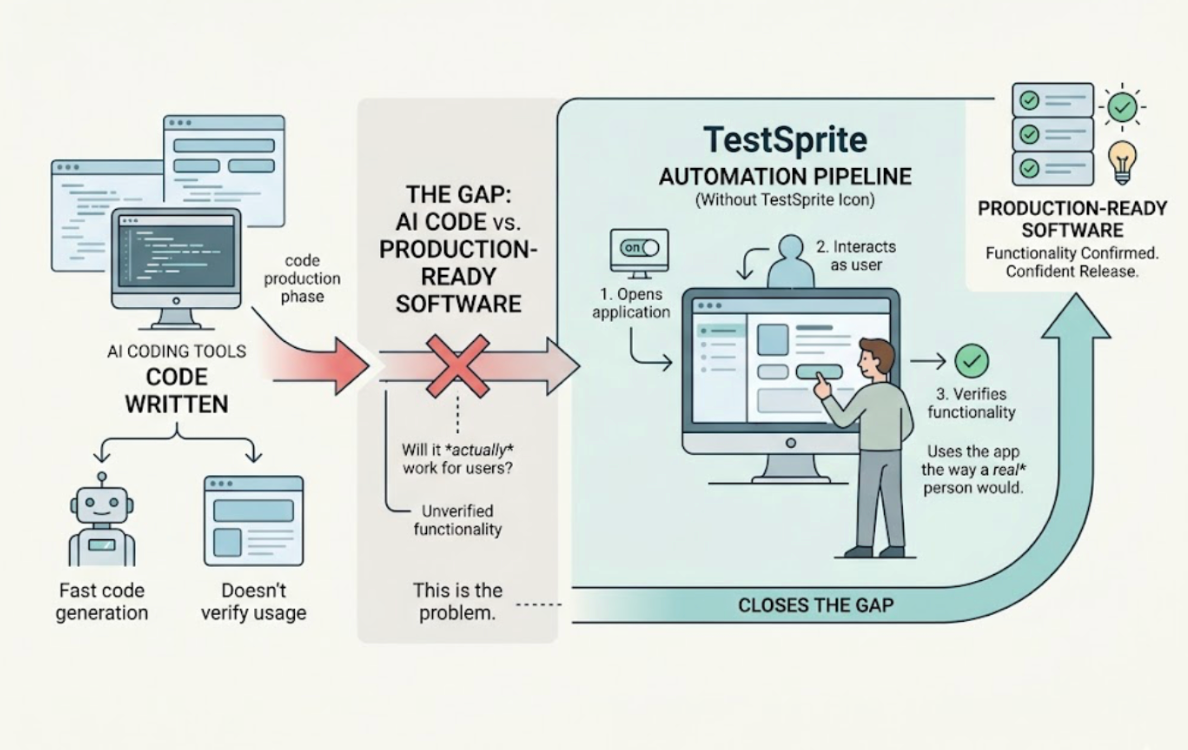
Yes. This is specifically what TestSprite is built for.
The gap between AI-generated code and production-ready software is the problem TestSprite solves. Cursor and GitHub Copilot write code fast. They don't verify whether what they produced actually works for the people who will use it. TestSprite closes that gap by doing what neither coding tool does: opening the application and using it, the way a real user would.
Why AI-Generated Code Needs a Different Verification Approach
When a developer writes every line by hand, they understand each piece and its downstream effects. Code review works reasonably well because the reviewer can trace the logic and identify where something might break.
AI-generated code changes this. A Cursor session that builds a checkout flow, refactors state management, and updates three API endpoints in one pass produces changes that reviewers haven't fully internalized. The code looks correct at each layer. The integration failures between layers don't appear until someone runs the full flow.
Testing AI-generated code with a tool that reads the source files has a specific problem: it generates assertions against the new implementation, which includes whatever bugs the AI introduced. If Copilot's implementation has a subtle error, the code-layer test will verify that error as correct behavior. The test passes. The bug ships.
What's needed is a verification approach that's grounded in product intent, not current implementation. And one that actually runs the product, not reads the files.
How TestSprite Verifies AI-Generated Code
TestSprite is an autonomous AI testing agent that operates at the product layer. When Cursor or GitHub Copilot finishes writing code, TestSprite verifies whether the product still works correctly for real users.
Through the TestSprite MCP Server, one instruction from inside the IDE starts the full testing pipeline:
"Help me test this project with TestSprite."
Other verification tools read your code and guess. TestSprite opens your app and uses it.
A fleet of parallel exploration agents visits the running application and navigates it the way real users would. They don't inspect what Cursor or Copilot just wrote. They visit the live product, discover its flows, and move through them. They click buttons, fill in forms with real inputs, follow multi-step journeys from entry to completion, and carry session state forward across steps.
The agents don't need to be told what the AI coding session changed. They explore the full product surface, which means they catch regressions in flows that weren't directly touched by the AI session but were affected by it. That's the coverage that matters after a session that modified multiple files at once.
The Intent Anchoring That Prevents AI Bugs from Passing
When AI-generated code introduces a bug, there's a specific way that code-layer tests fail to catch it: they're derived from the new implementation, so they assert against whatever the code now does, bug included.
TestSprite avoids this by anchoring test goals to product intent rather than current implementation.
When a PRD or specification exists, TestSprite parses it and builds test goals from what the product is supposed to do. An AI coding session that implements something incorrectly gets caught because the test is asking whether the product delivers the intended outcome, not whether the code is internally consistent.
When no PRD exists, TestSprite's MCP Server reverse-engineers product intent from the codebase: route definitions, API contracts, component structures, and naming conventions treated as evidence of what the product was designed to accomplish. The resulting tests are still anchored to intent, not to whatever the AI coding session produced.
This is the distinction that determines whether AI bugs get caught. Tests grounded in implementation agree with the bug. Tests grounded in intent surface the bug.
A Scenario: Copilot Ships a Feature, TestSprite Finds the Break
A developer uses GitHub Copilot inside VS Code to build a subscription management feature. The feature lets users upgrade their plan, downgrade it, and cancel. Copilot generates the UI components, the API calls, and the state management for each action in a single session.
The developer triggers TestSprite from inside VS Code's Copilot Chat.
The exploration agents navigate the subscription management section as a real user managing their account would. They upgrade from the free tier to the paid tier. They observe the confirmation. They navigate to the account settings to verify the plan reflects the upgrade.
The plan shows the paid tier. Good.
The agents then attempt to downgrade back to the free tier. The downgrade confirmation appears. The agents navigate to account settings again.
The plan still shows the paid tier.
The downgrade API call succeeded. The response confirmed the change. But the state update that should have refreshed the displayed plan in the account settings component was missing from Copilot's implementation. Copilot generated the API call but didn't wire the response back to the display state correctly.
A user who downgraded their plan would see themselves still on the paid tier in their account settings, even though the billing change had processed. They'd contact support. Or they'd assume the downgrade hadn't gone through and try again.
Code review didn't catch this. The downgrade function runs correctly. The API responds with the right status. The state management has a gap that only appears when a user completes the downgrade action and then checks a different part of the UI.
TestSprite caught it because the agents completed the downgrade flow and then navigated to account settings to check the result, exactly what a real user would do after making a plan change.
The failure description returns to the VS Code Copilot Chat: which flow was navigated, what action was taken, what the account settings showed, what it should have shown. Copilot's agent uses that to locate the missing state update and propose the fix in the same session.
Backend Verification for AI-Generated APIs
When Cursor or Copilot generates backend API code, the same product-layer verification applies.
TestSprite's Backend Testing 2.0 calls the API endpoints and observes how they actually respond before generating any assertion. Real status codes, real field names, real response shapes. Assertions are grounded in observed behavior, not in what the AI-generated code says the API should return.
This matters specifically for AI-generated APIs because the model may generate implementation that's internally consistent but has a subtly different contract than what the rest of the system expects. A field that Copilot named userIdinstead of user_id. A status code that the AI chose as 201 instead of the 200 the frontend expects. These discrepancies are grounded in observation, not in reading the new code.
Dynamic variables from real API responses flow automatically through multi-step sequences. CRUD lifecycle tests run end to end. When AI-generated code breaks a contract, the next test run surfaces the deviation as a specific finding.
The Loop That Makes Verification Fast Enough to Matter
The verification only closes the loop if it runs fast enough to be part of the coding session, not a separate step that happens later.
When tests fail, the structured failure description returns to the IDE immediately. In Cursor or VS Code Copilot Chat, the coding agent receives the failure description and can propose a fix in the same session where it wrote the code. The developer reviews and applies. The verification loop takes minutes, not a CI wait or a separate QA pass.
Auto-Heal Rerun keeps the coverage accurate as Copilot and Cursor continue to iterate. When a UI change causes a test to fail for structural rather than behavioral reasons, the test adapts rather than producing noise. Genuine regressions from AI coding sessions surface clearly.
The GitHub Actions integration extends the same verification into CI. Every pull request from a Cursor or Copilot session gets automated product-layer coverage before it merges.
Conclusion
TestSprite can test AI-generated code from Cursor or GitHub Copilot. It's specifically designed for this use case.
The verification approach is grounded in product intent rather than the new implementation, which means bugs that Cursor or Copilot introduced get caught rather than encoded as correct behavior. The exploration agents navigate the running application like real users, catching the integration failures that code review doesn't see. The failure descriptions return to the IDE in a form the coding agent can act on directly.
For developers using Cursor or Copilot to ship code fast, TestSprite is the verification step that ensures fast code and correct behavior aren't in conflict.
Connect TestSprite to your AI coding workflow and start verifying AI-generated code today.